---
title: "Hide the date and author on articles"
description: "1. From the left menu, go to My app > Structure 2. Click the three dots next to the section on \"Modify design\" 3. Click on \"Edit design\" on Article"
canonical_url: "https://www.goodbarber.com/help/publish-and-manage-articles-r94/hide-the-date-and-author-on-articles-a169/"
lang: en
---
# Hide the date and author on articles
Source: https://www.goodbarber.com/help/publish-and-manage-articles-r94/hide-the-date-and-author-on-articles-a169/
1. From the left menu, go to **My app > Structure**
2. Click the three dots next to the section on "**Modify design**"
3. Click on "**Edit design**" on Article
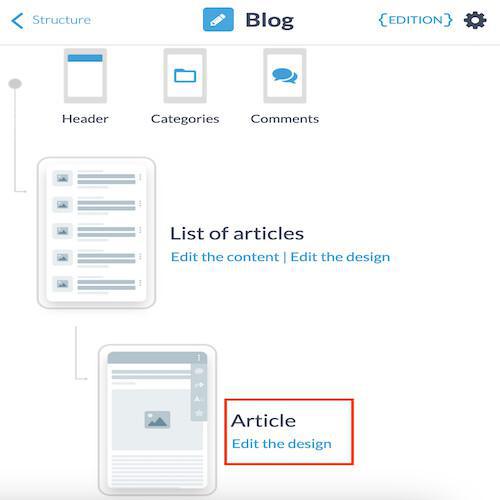
Scroll down to the bottom of the page, to the **HTML Code**field.
## 1. Delete the date
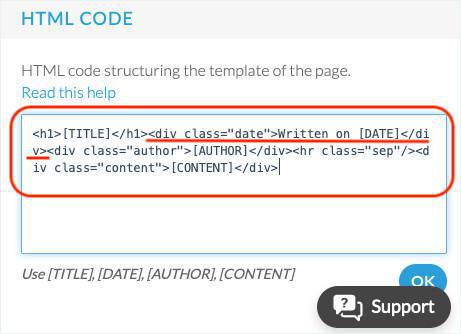
1. Delete exactly the portion of the code **Written on [DATE]
**in the HTML Code field
2. Click **OK**.
## 2. Delete the author
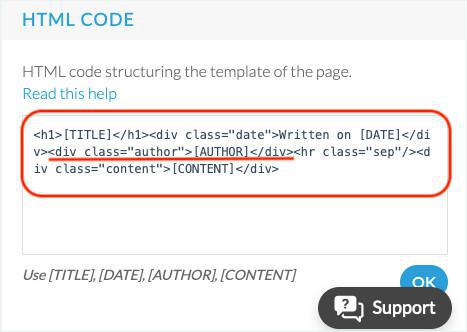
1. Delete exactly the portion of code **[AUTHOR]
** in the HTML Code field
2. Click **OK**.