Create your event app without coding
The easiest way to create an app without coding

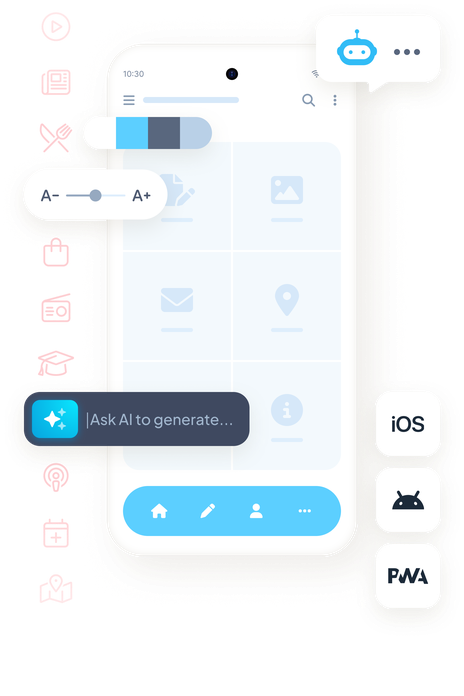
Visual app builder
Design your app with a drag-and-drop interface and professional templates.
Real-time preview
See changes instantly on your device through our companion preview app.
One-click publishing
Deploy to App Store and Google Play with ease. We handle the technical side.
What happens in this video
The GoodBarber back office opens on My App, the entry point where we see a live preview of the Words & Waves app. The main menu lists Dashboard, Content, Monetization, Notification, Statistics, My App and Publish. The pointer is moving to Content.
Content opens in the main menu. Add, Content list, Comments and Trash Can are where the articles and the other items of the app are created, reviewed and removed.
Add opens inside Content. For this app, GoodBarber offers two kinds of item: An article and A sound. The pointer is moving to An article.
The article editor, for a new story in Stories. The title is being typed: What the tide leaves behind. The content area is empty. The side panel already shows where the article will appear, who writes it, and the writing date.
On the text block, assisted writing opens from the sparkle button. Inside the CMS it offers Complete, AI Assistant, Sum up, Translate and Change tone. The pointer is heading to AI Assistant.
AI Assistant is open in the article editor. A prompt is being typed for the piece: Write a short piece on what the tide leaves behind. The article already carries its title, a photograph of a surfer, the body text and the author Clara Whitmore. The status is Draft.
The same article in the content editor, now Published. The title is What the tide leaves behind, the author is Clara Whitmore, and the body opens with "When the tide slips away, it leaves a quiet world behind", under a photograph that is also the article thumbnail.
Back on My App. The phone shows that article, written by Clara Whitmore on 10/06/2026. Edit, above the phone, is closed.
Edit opens on the preview. From here GoodBarber offers three ways into the app: General header of the app, Design of the section's articles, and Content of this article. The pointer rests on General header of the app.
The pointer moves to Design of the section's articles. The article highlights in the phone, so we see which part of Words & Waves that action will change.
The design of the Stories articles. ToolBar Up is the selected layout, so the article toolbar, with close, comment, share, text size and bookmark, sits at the top of the phone. ToolBar Slide and ToolBar Down Classic sit beside it. The page background is white, and the title is Playfair Display.
The layout changes from ToolBar Up to ToolBar Slide. The phone preview updates from the same configuration: a Words and waves header appears, the title comes first, and the photograph moves under the text.
Back on My App, with the article still in the phone. The pointer moves down the main menu to the Extensions Store.
The Extensions Store, in the same back office. The page reads "Get the most out of your app with our Extension Store" and "More than 190 extensions for your project." Categories in view: Content, Memberships & Login, Monetization, Notifications, Essentials and Productivity. Popular extensions include Memberships, Chatbot and AI Extension Builder.
The store scrolls to the collection Build audience loyalty. Content creators lists 80 extensions. Newspapers lists 65.
Preview mode. The banner reads "You are now in preview mode." We see the web version of Words & Waves, then the same app inside an iPhone 16 Pro. The tooltip reads "Test your app on iOS." The pointer moves along the device icons.
The preview settles on that web version, at desktop size. Stories shows What the ocean knows about us, Where Sydney begins to whisper, The city after dark and The art of slowing down, by Clara Whitmore. Under Reflections, the audio pieces What remains unsaid and Why we slow down.
Back on My App, with the phone on the Words & Waves home. Publish opens. One configuration, three outputs: the web version, labeled PWA in the menu, plus Android App and iOS App. The pointer moves to iOS App.
How to create your event app in 4 steps
Add content
Schedule, speakers, venues: add them and edit them right up to the last minute.Customize design
Pick a professional theme and tweak every detail to match your brand.Activate features
Add push notifications, user authentication, and mobile payments.Preview & publish
Test on your device and submit to App Store & Google Play.
Everything your event app needs
Schedule
An agenda by day and time slot, which each attendee turns into a personal schedule with favorites.
Speakers and exhibitors
A directory with a profile for every speaker, exhibitor, or attendee.
Maps and directions
Every venue on a map with directions, even when the event spans several sites.
Push notifications
Announce a room change, the start of a session, or ticket sales opening for the next edition.
Ticketing
A button opens your current ticketing page, whether Eventbrite or your own. Sales stay with your ticketing provider, with no app store commission.
Networking and live video
A chat so attendees can meet up, and live video for those following remotely.
Trusted by thousands of app creators


 Excellent service and product for building apps; I have never been this satisfied with a solution.
- After 7+ years, the quality and innovation still stand out, with a highly attentive team helping us publish apps quickly.
- The best app platform in my experience: feature-rich, reliable for 6 years, with responsive support and great value for money.
- After 10 years of use, I am still impressed: beautiful templates, user-friendly interface, endless options, and great service.
- A very complete and easy-to-use no-code platform, with fast learning and many extensions to build advanced apps.
- A smooth and rewarding experience, supported by a team that guides you every step of the way and encourages future projects.
- Excellent communication and the best solution among those I have used over the past 10 years.
- A reliable product I have used for 7 years, perfect to get started and never needed to switch.
- A solid product with regular updates; support is human, responsive, and always helpful with iOS and Android changes.
