You can connect your social network to your app. To do so, you can add a Facebook section to your app.
The Facebook section works as described below depending on the platforms included in your offer:
PWA: it will open your Facebook page's Url under a new browser tab
Android Native version: It will open a web view of your Facebook page's Url
iOS Native version: It will open a component of Safari mobile with a web view of your Facebook page's Url
The Facebook section works as described below depending on the platforms included in your offer:
PWA: it will open your Facebook page's Url under a new browser tab
Android Native version: It will open a web view of your Facebook page's Url
iOS Native version: It will open a component of Safari mobile with a web view of your Facebook page's Url
1. Add and set a Facebook page
1. In the left swipe menu go to My App > Structure
2. Click the green button "Add a section" from the right column
3. Add a Facebook section by choosing "Facebook" in the content items.
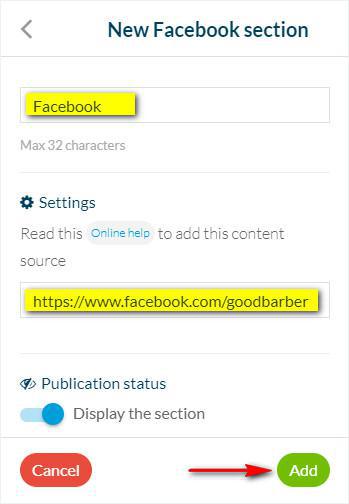
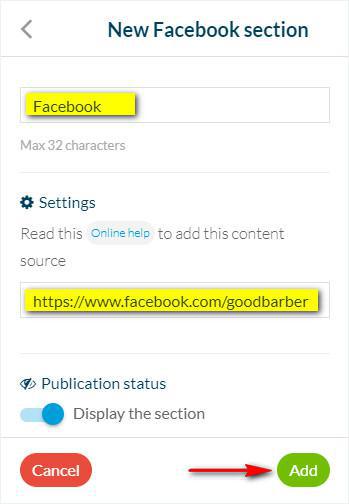
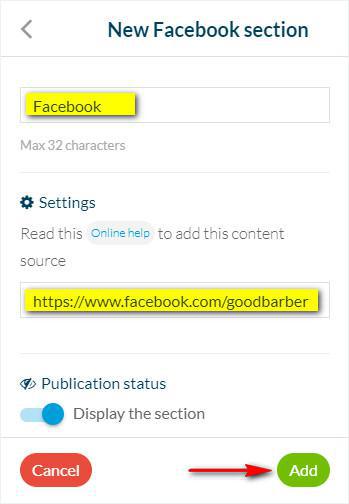
4. Give it a title
5. Fill in your Facebook URL
6. Click "Add"
2. Click the green button "Add a section" from the right column
3. Add a Facebook section by choosing "Facebook" in the content items.
4. Give it a title
5. Fill in your Facebook URL
6. Click "Add"
2. Create a link to your Facebook account
You can also add a link to your Facebook account in your Navigation menu header, footer , or in the Header of your app if you think it is better for your app users.