What this online help covers:
How to activate the sitemap of your Progressive Web App (PWA), verify your PWA in Google Search Console and submit your sitemap to Google. It also explains the difference between the general sitemap and the news sitemap.
Prerequisites:
Your Progressive Web App (PWA) is published.
You have a Google account to access Google Search Console.
Expected result:
Your PWA is verified in Google Search Console and your sitemap is submitted, so Google can discover and index your pages more easily.
How to activate the sitemap of your Progressive Web App (PWA), verify your PWA in Google Search Console and submit your sitemap to Google. It also explains the difference between the general sitemap and the news sitemap.
Prerequisites:
Your Progressive Web App (PWA) is published.
You have a Google account to access Google Search Console.
Expected result:
Your PWA is verified in Google Search Console and your sitemap is submitted, so Google can discover and index your pages more easily.
1. Activate a Sitemap
Technically, sites in XML format are where Google's indexation robots' attention is drawn to. The Sitemap system indicates which pages of your website should be indexed, and when their last update was. Basically, its purpose is to lessen the work of Google robots.
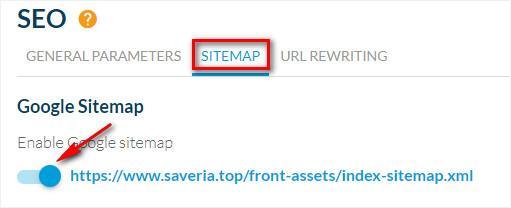
1. Go to the menu Sales channels > PWA > SEO , in the Sitemap tab.
2. By default, the sitemap is deactivated.
Activate the sitemap by clicking ON.
3. Click "Save".
1. Go to the menu Sales channels > PWA > SEO , in the Sitemap tab.
2. By default, the sitemap is deactivated.
Activate the sitemap by clicking ON.
3. Click "Save".
2. Declare a Sitemap to Google
1. Go to your account in the Google Search console :
https://search.google.com/search-console/welcome
2. Log into your account
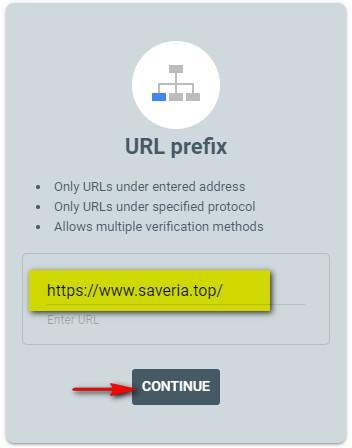
3. Enter the URL of your Progressive Web App (PWA) in the property type: "URL prefix"
4. Click "Continue"
https://search.google.com/search-console/welcome
2. Log into your account
3. Enter the URL of your Progressive Web App (PWA) in the property type: "URL prefix"
4. Click "Continue"
5. You have the following options: "Recommended verification method" or "Other verification methods".
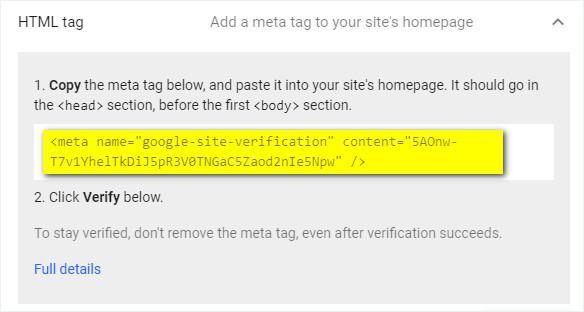
Select the "HTML Tag" verification method.
6. Copy the full "HTML tag" provided by Google.
Select the "HTML Tag" verification method.
6. Copy the full "HTML tag" provided by Google.
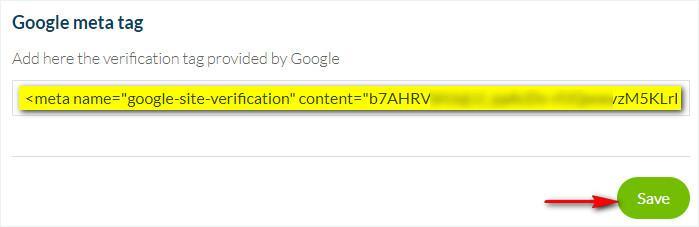
7. Once back in your back office, go to the menu Sales channels > PWA > SEO , in the Sitemap tab
8. Paste the Google tag in the Google Meta Tag field
9. Click Save.
8. Paste the Google tag in the Google Meta Tag field
9. Click Save.
10. Click the button "Rebuild my PWA " in the menu Sales Channel > PWA > Update, tab Progressive Web App Engine.
Wait for the update to be complete (this can take several minutes).
11. Return to the Google Search console, click the "Verify" button to validate your new property.
If Google gives the error "We couldn't find your verification meta tag." Try again later on, using the same verification method (HTML tag).
12. Once your PWA has been validated by Google, click "Go to property"
Wait for the update to be complete (this can take several minutes).
11. Return to the Google Search console, click the "Verify" button to validate your new property.
If Google gives the error "We couldn't find your verification meta tag." Try again later on, using the same verification method (HTML tag).
12. Once your PWA has been validated by Google, click "Go to property"
13. Click on the left menu Index > Sitemaps (still in the Google console).
14. Get the end of the sitemap URL (index-sitemap.xml) in the menu Sales channels > PWA > SEO, in the Sitemap tab, from your back office.
15. Paste this in the field "Enter sitemap URL"
16. Click "Submit".
14. Get the end of the sitemap URL (index-sitemap.xml) in the menu Sales channels > PWA > SEO, in the Sitemap tab, from your back office.
15. Paste this in the field "Enter sitemap URL"
16. Click "Submit".

3. Difference between the general sitemap and the news sitemap
Two sitemap feeds are generated for your PWA. You can find them in the menu Sales channels > PWA > SEO :: Sitemap tab .
General sitemap
General sitemap
- Lists the last 100 items of your app: newly published items and recently modified items.
- Updated every 24 hours.
- Lists only the last 100 items from your CMS Article sections published within the last 2 days.
- Updated every hour.