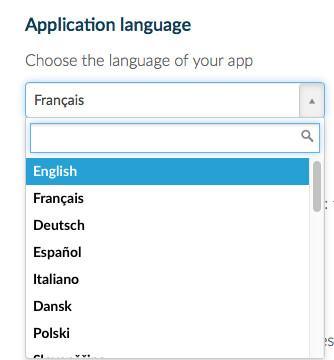
1. Choose the application language
The language of the application for generic texts is, by default, the language of the portal in which you created your app/backend.
Only generic text will change with the language. All customizable texts cannot be changed automatically. You will need to change it manually yourself.
- Go to the menu "Settings" at the bottom left of your back office
- Select "App Settings >App information "
- Choose the language in the dropdown menu
- You can choose between several languages (French, English, Spanish, Italian, Norwegian, German, Japanese, Danish, Dutch, Turkish, Slovenian, Portuguese, Traditional Chinese, Simplified Chinese, Arabic, Russian, Polish, and Croatian).
- It does not matter which language the user's mobile phone is set to. It is the language selected in the Settings > App information menu that will be used on your app in order to maintain consistency with the language of your content.
Only generic text will change with the language. All customizable texts cannot be changed automatically. You will need to change it manually yourself.
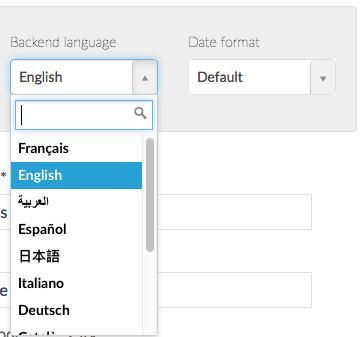
2. Choose the backend language
The backend language (or management interface) is not linked to the app's language, every member of your team can have a different language.
- Open at the bottom of your screen, the left swipe menu of your back office
- Click on your name
- Click on My Account
- Choose the language in the dropdown menu
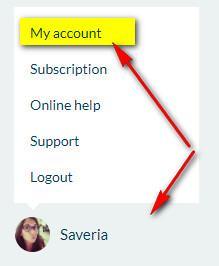
Every member can click on his or her profile to modify his or her backend language. There are 12 languages for the backend (French, English, Spanish, German, Portuguese-Portugal, Portuguese-Brazil, Dutch, Catalan, Turkish, Japanese, Italian, Arabic, Finnish, Swedish, Norwegian and Danish).
Like for the app language, customizable texts cannot be translated (for example the section's names).
Like for the app language, customizable texts cannot be translated (for example the section's names).