1. Activate the add on Squarespace
1. Go to the menu Extensions Store > All Extensions
2. Click the extension "Squarespace" or search for it in the search bar
3. Click on the green "Install" button.
A section will be automatically created and you will be redirected to the sections tab.
2. Click the extension "Squarespace" or search for it in the search bar
3. Click on the green "Install" button.
A section will be automatically created and you will be redirected to the sections tab.

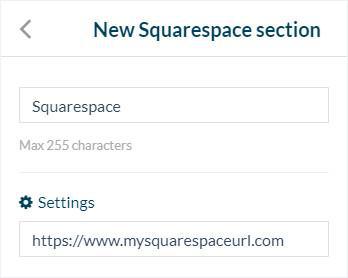
2. Set Squarespace section
1. Enter a title for your section.
2. In the field settings, fill the url of your Squarespace website.
3. Click "Add".
2. In the field settings, fill the url of your Squarespace website.
3. Click "Add".