GBTC: Publish your app with easeDiscover GoodBarber Takes Care and simplify the app publication process for both the App Store and Google Play. Let us handle the technical details for you.Learn more about GBTC
If you read carefully tuesday's update, you saw that we enabled Disqus comments on GoodBarber.
Many of you had requested this feature, so we set aside our developments on GoodBarber 3 for a few hours, in order to bring this feature to GoodBarber 2. It's now ready to be used. Let me explain how to turn on Disqus comments into your app.
Disqus: the Web's Community of Communities
Just a few words about Disqus before diving into the settings stuff. For those who don't know, it's an online service to manage comments and discussions in your website or your app.
Created in 2007, Disqus is now used by more than 3 millions websites. Used at first to manage comments, the service has evolved to become also an advertising platform.
One main advantage, for the end user, is to use his Disqus account on any website using this technology, and engage in the discussion very easily.
Let's see how you can use it in your GoodBarber app.
Get your shortname
First, if you want to use Disqus with GoodBarber, it means that you're already using this service on your website.
Your goal now is to enable your users to make comments with Disqus on your website and on your app, and to have those comments synchronized on the two mediums.
The first thing to do is to log into your Disqus account, and go to the admin panel. if you have installed Disqus on several website, choose the one that is linked to your GoodBarber app.
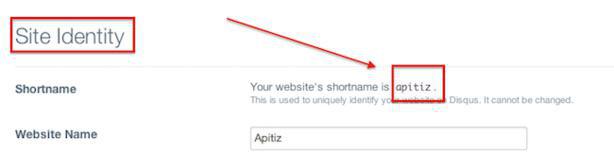
Find your shortname for this website and copy it. You'll use it later.
Activate disqus comments in your app
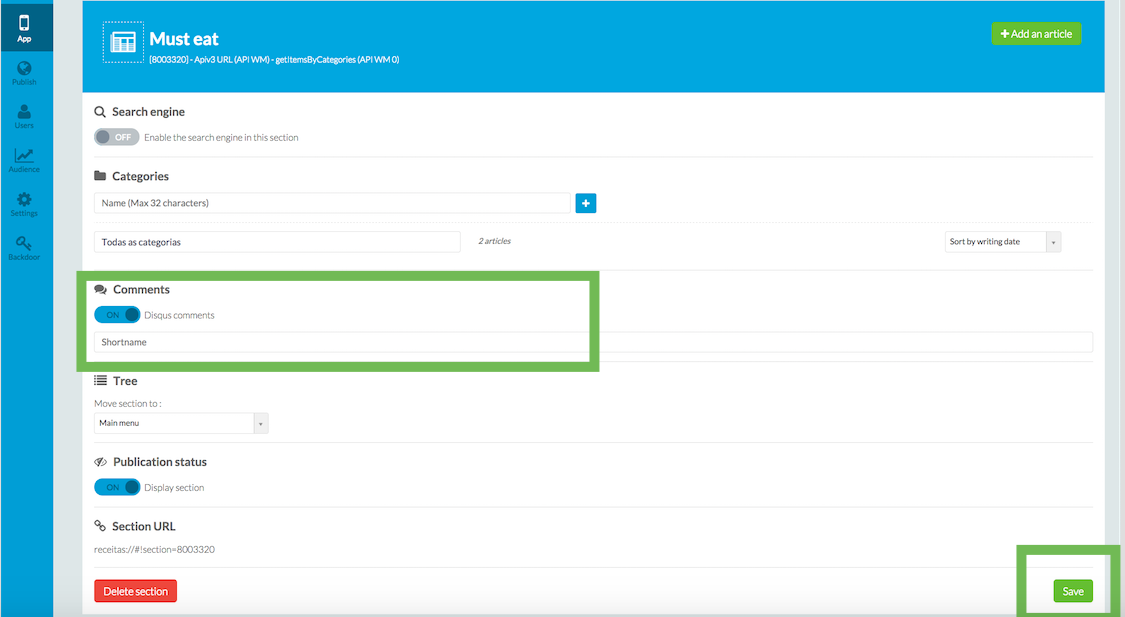
Now, go to your GoodBarber backend and select the article section on which you want to activate Disqus (it is in the Content > Sections menu)
Under the advanced setting of the section, activate Disqus comments and paste your shortname.
Save your section and then go the to Publication > Update menu to publish the changes into your app.
That's it. Disqus is activated on your app.
Ready for a showcase?
We are selecting apps to demo the integration of Disqus. If you have Disqus activated on your app and you want to be featured in the [Showcase]rubrique:10 section of this blog, just post a comment below with a link to your app.
The short version. Meta catalog, map and Meta catalog, listings are two extensions of GoodBarber, the no-code app builder, that read an agency's "Home listings" catalog, the XML feed it gives Meta for its real estate ads. Meta catalog, map fills a Map section: each property with a known position becomes a pin with its own page, sorted by distance when the app knows where the user is. Meta catalog, listings fills an Article section with the same properties, newest first. You connect them with the link to your catalog feed. Both are free for Content apps.Agencies build this catalog to reach buyers and tenants where they spend their time. Meta's apps were used by 3.60 billion people a day on average in June 2026, up 3% in a year, according to Meta's second quarter 2026 results published on July 29, 2026. Here is how the two extensions play out for an agency in Hamburg.
The short version. Givebutter Events and Givebutter Campaigns are two extensions of GoodBarber, the no-code app builder, that read a nonprofit's campaigns on Givebutter. Givebutter Events fills a Calendar section with upcoming events, at their time in the event's time zone, with their location unless you share it with attendees only. Givebutter Campaigns fills an Article section with active forms and fundraising pages, with their cover image and description. You connect them with a Givebutter API key. Both are free for Content apps: each section counts as one of the extensions included in your plan.A lot of giving already goes through Givebutter. On Giving Tuesday 2025, supporters gave $20 million on the platform, up from $16.4 million in 2024, from more than 93,000 donors across 16,000 active campaigns, according to Givebutter's recap published on December 8, 2025. Here is how the two extensions play out for an animal rescue.
 eCommerce
 Memberships
 Chatbot
 Online Courses
 Bookings
 Travel guide
 Events
 Content Creators
 Pickup & Delivery
 Newspaper
 Radio
Radio Schools
 Faith
Faith Organizations
 Restaurant
 Grocery
 Custom apps
 Employee Communication

 NO CODE APP BUILDER
 TECHNOLOGY
 WHY GOODBARBER?
 Design
 PRODUCT RESOURCES
 TOPICS
 MOBILE APPS RESELLERS
 DISCOVER