GBTC: Publish your app with easeDiscover GoodBarber Takes Care and simplify the app publication process for both the App Store and Google Play. Let us handle the technical details for you.Learn more about GBTC
It can be very useful for your users, by allowing them to search a specific term within the whole content of your blog.
How can I activate the search engine in my app?
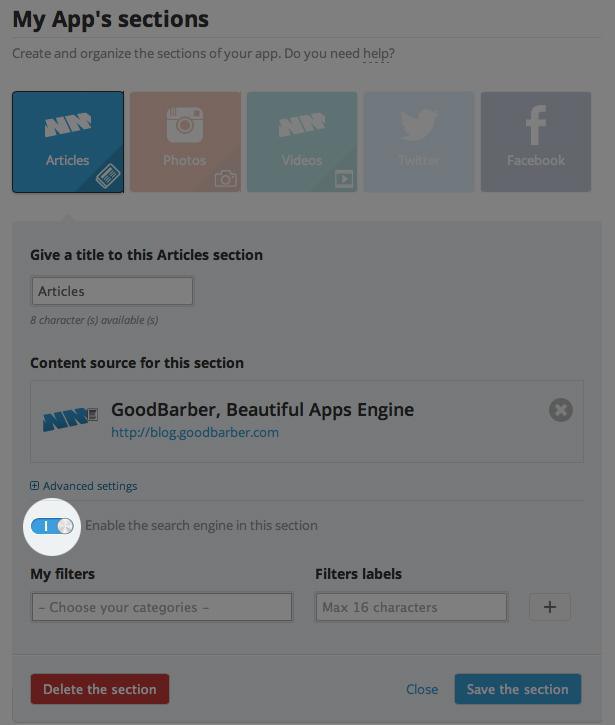
To activate the search engine, you need to have a WordPress or WMaker section plugged into your app.
In your GoodBarber backend, go in the Content > Sections menu, and Edit your Article section. Click on Advanced Settings, Enable the search engine option, and save your modifications.
NB: If you don't see the search engine option, click on the Save the section button to flush the backend cache.
How can I customize the design of my search engine?
Once your section has a search engine enabled, you can go to the Design > Global menu to customize the design of the search bar for all your sections. You can also edit the design of the search bar for a specific section of your app.
If your app has been built with an update of the Beautiful Apps Engine previous to #753, you'll need to publish an update on the Store to activate the Search Engine. Otherwise, just go to the Publication > Update menu, and click on Publish modifications.
 eCommerce
 Memberships
 Chatbot
 Online Courses
 Bookings
 Travel guide
 Events
 Content Creators
 Pickup & Delivery
 Newspaper
 Radio
Radio Schools
 Faith
Faith Organizations
 Restaurant
 Grocery
 Custom apps
 Employee Communication

 NO CODE APP BUILDER
 TECHNOLOGY
 WHY GOODBARBER?
 Design
 PRODUCT RESOURCES
 TOPICS
 MOBILE APPS RESELLERS
 DISCOVER