GBTC: Publish your app with easeDiscover GoodBarber Takes Care and simplify the app publication process for both the App Store and Google Play. Let us handle the technical details for you.Learn more about GBTC
Today Méryl introduces you: Jeff, our web developer. He's going to give you some information about ad networks.
What's an ad network?
An ad network is a company that links advertisers who want to display their ads, to publishers who are ok to display ads next to their contents. Publishers don't need to look for ads, the ad network does it for them. Therefore the publishers can just focus on the traffic for their app.
How can you integrate an ad in your app?
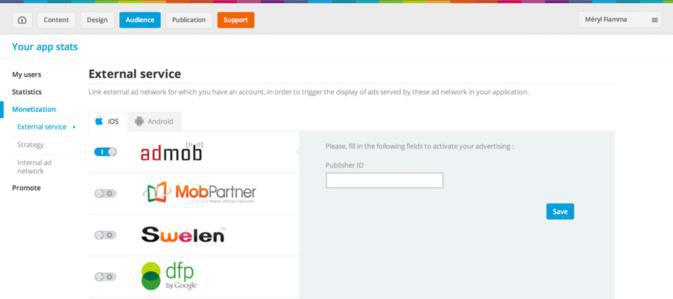
Users just have to put their publisher ID in the Backoffice: section audience > monetization > External service. And just leave the rest to Goodbarber! We fetch the required informations and display ads for you.
How can users know how much they will earn?
In GoodBarber, we allow you to change your ad networks as you wish. So its up to you if you want to test them all and see what network makes you earn more money than another one.
Is there a difference between ad networks?
Each ad network is specialized in a certain audience type. That's why GoodBarber offers so many choices.
There are 2 big categories of ad networks: - the first one is the Premium type used essentially for websites with a big audience - and the second one is the "general public" type used by a wide range of small publishers
In the Monetization section I can find a strategy tab, can you explain to me what is it?
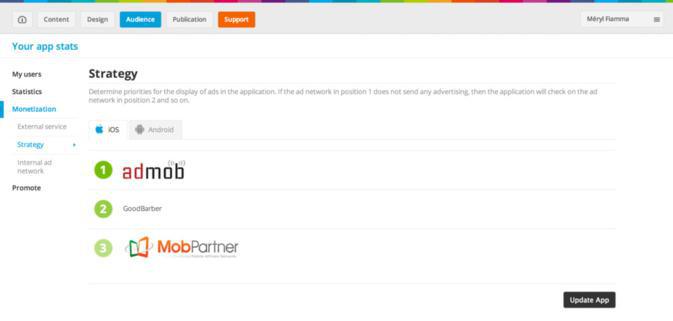
We allow our customers to make a strategy that is to say a list, a kind of priority order to optimize the ad displaying on their app. Users can list ad networks they integrated in their app at first. If the first ad network of the list doesn't provide an ad, then GoodBarber will immediately call the second one and so on until an ad is displayed on the app.
Something you want to ad?
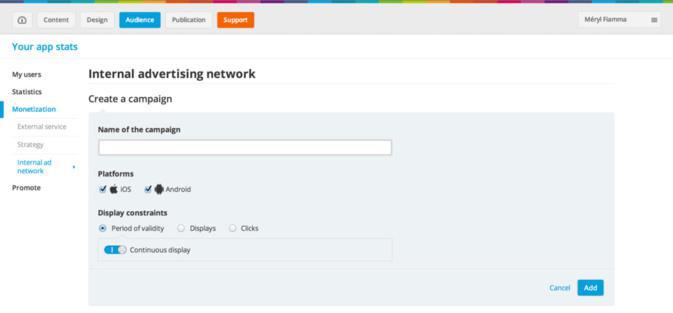
Yes, with GoodBarber you can upload your own banner and splash screen with our internal tool. And that is for users who don't have an account in an ad network. So GoodBarber can display your ads for you.
On iPhone Duo, an app switches displays every time the phone opens or closes: the outer display, narrow and tall, then the inner display, as wide as a small tablet. Apple asks apps to treat that switch as a simple change of size, like a window being resized, and draws a rule from it: when the device opens or closes, people find what they left.A GoodBarber app follows that rule to the letter. When iPhone Duo opens or closes, it keeps its screens and lays them out again at their new size: the same screen, the same place, what's playing, what was typed into a form. The gesture changes the shape of the screen, never what you were doing.
 eCommerce
 Memberships
 Chatbot
 Online Courses
 Bookings
 Travel guide
 Events
 Content Creators
 Pickup & Delivery
 Newspaper
 Radio
 Schools
 Faith
 Organizations
 Restaurant
 Grocery
 Custom apps
 Employee Communication

 NO CODE APP BUILDER
 TECHNOLOGY
 WHY GOODBARBER?
 Design
 PRODUCT RESOURCES
 TOPICS
 MOBILE APPS RESELLERS
 DISCOVER