GBTC: Publish your app with easeDiscover GoodBarber Takes Care and simplify the app publication process for both the App Store and Google Play. Let us handle the technical details for you.Learn more about GBTC
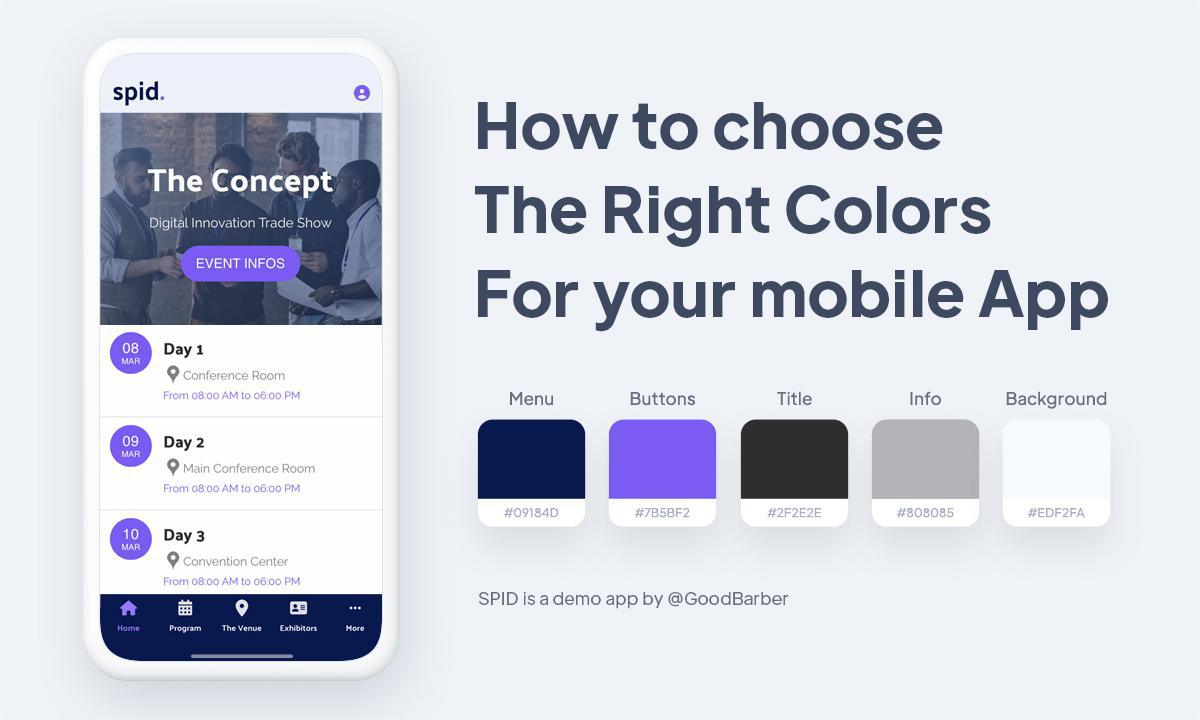
Colors set the tone of an app. They make a brand recognizable, create a mood and guide the eye to what matters. Let's dive into how to choose the right colors for your mobile app, and which tools can help.
Why colors matter
This choice is never random. Companies are well aware of the importance of color when it comes to influencing consumer behavior.
Each color carries its own associations. For example, red evokes strong emotions like love, passion, and anger. In a marketing context, red is often used for special offers or discounts. People now associate this meaning, so it’s a good idea to use red if you want to draw attention to an offer you are making. Blue and green are relaxing and soothing colors. They convey feelings of trust and commitment. Black and grey are elegant colors. Black is also used to give a modern and trendy feel. Yellow is a catchy and cheerful color, but it should only be used in small amounts to highlight, otherwise it is perceived as irritating.
Color is a very useful tool to create a brand identity and trigger specific emotions in users.
How to choose the colors of your app
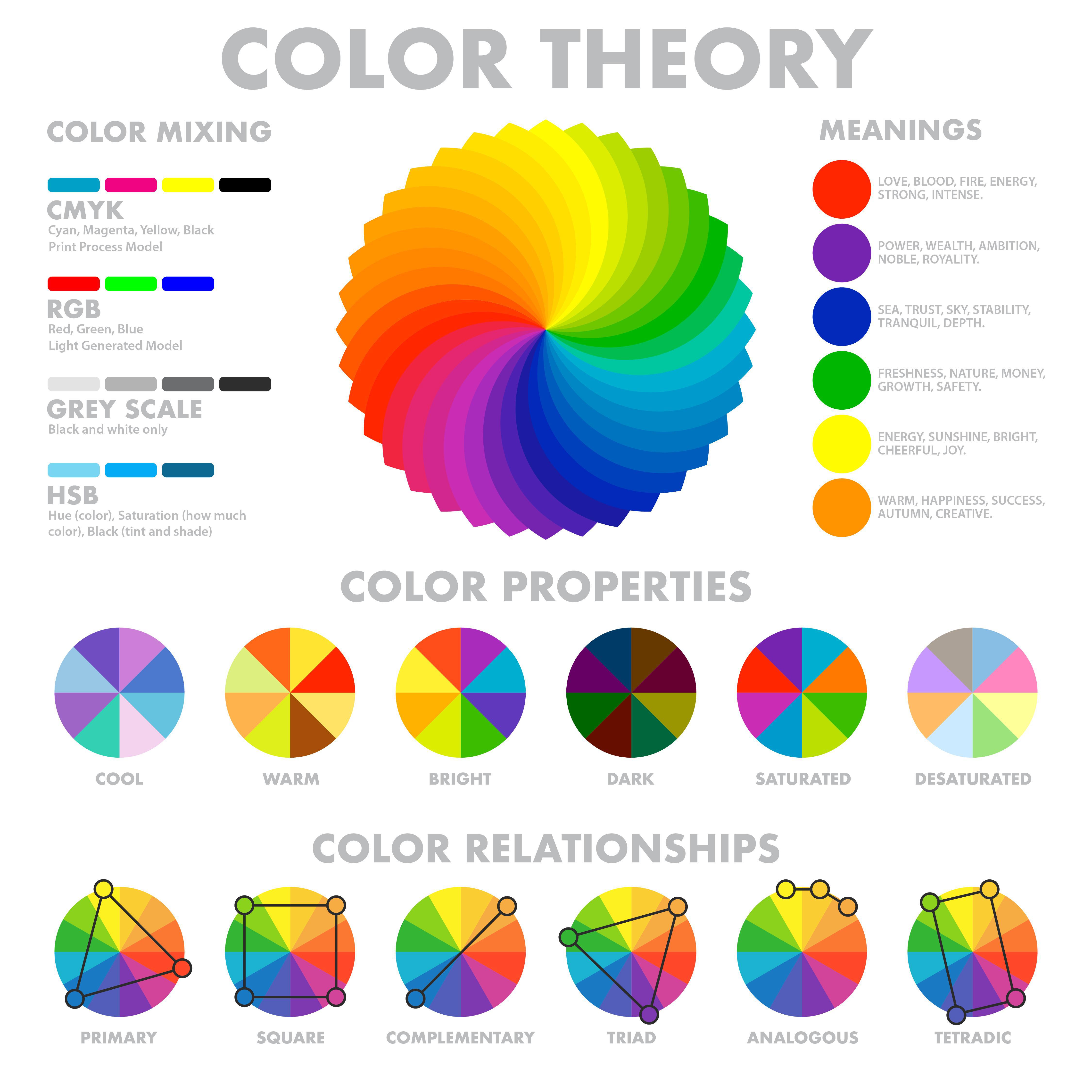
Color Wheel infographic
First, you need to know your brand and what you want it to be associated with. What is the mood or feeling you want to express?How do you want people to feel about using your app? Do you want your brand and app to feel accessible, calm, bold, sophisticated, polished, quirky, or elegant?
Once you've defined this, look at which color evokes this emotion. Colors can be divided into two main categories: warm and cool. Warm colors tend to be associated with energy, while cool colors are linked with calmness and security.
For example,
Red is often associated with bold or intense experiences
Yellow is cheerful, joyful, optimistic
Blue is one of the most prominent colors in nature. Associated with water and air, it’s tied to calmness and tranquility. It's also often used to symbolize stability and trust.
Green symbolizes abundance, growth, and health, and has become popularly associated with peace, and environmental consciousness.
Orange represents cheerfulness, confidence, and fun.
Purple represents power, wealth, and royalty.
White evokes light, purity, or cleanliness. It’s associated with simplicity and modernity in design.
Black is associated with power, elegance, and sophistication.
Your next step is to create your color scheme. A lot of successful brands have only one or two brand colors, so don’t be afraid to keep it simple and stick with that core brand color.
A color scheme is simply the way colors are combined together.
- You can choose one base color and thendifferent tones of that one color. You can use a color wheel to help you choose different hues of that same color, varying the saturation and tone of the base color to pick out lighter and darker hues. This is called the Monochromatic color scheme. It gives a more uniform look and feel to your app. - Next is the Triadic color scheme. There, you'll use three colors, equally spaced on the color wheel. This too will create a harmonious look, but without the ombré effect of the monochromatic scheme. - A complementary color scheme is composed by using two colors opposite each other on the color wheel. It is the most contrasting of all color schemes, and the one that attracts the most attention. For example, red and green, blue and orange. - Analogous colors are a group of three colors next to each other on a color wheel, such as violet, red-violet, and red. When these colors are grouped we call it an analogous color scheme. The color in the center of this group of three is sometimes called the mother color since the other two colors contain that center color. Analogous color schemes create a visually pleasing and calming display. Whatever scheme you choose, check that your text stays readable on its background. The Web Content Accessibility Guidelines (WCAG) call for a contrast ratio of at least 4.5:1 for normal text and 3:1 for large text.
Misconceptions to avoid
Consumers' differences: Colors don't have the same meaning everywhere. For examplein the Western world, white symbolizes purity and peace, and it is generally worn at weddings. But in China, white is traditionally the color of mourning, worn at funerals. Keep this in mind when planning your color scheme, since your app will reach users all around the world.
The sector in which your business operates. Every sector has its own color codes. The most important thing is to consider the best color for you in your specific context rather than think about the general impact of color.
5 free tools to help you find your colors
You're now ready to pick your mobile app colors. These free tools will help you put everything you learned in this article to good use, so that you can pick the best color scheme and palette for your app.
Adobe Color, Adobe's online tool built around the color wheel. Choose a base color and a harmony (monochromatic, complementary, analogous, triadic…), and the tool builds the palette for you. It can also extract a palette from an image, measure the contrast between two colors, and simulate how your palette looks to people with color blindness.
My Color.Space is a great free resource to generate color palettes and color gradients. You start with a color of your choice. Enter the HEX code and ColorSpace generates several palettes matching your color. If you don't know the HEX code, there are plenty of free tools online that will give you the code from a photo you upload.
Coolorsgenerates palettes in one click and also lets you browse ready-made ones. Its Image Picker builds a palette from the photo of your choice. The essentials are free; a paid Pro version exists.
Color Viewfinderis a convenient app when you need to quickly create color palettes. This free iOS app (with in-app purchases) automatically generates a color palette based on a photo on your device and requires little editing and changing. Color results can be added or removed from the generated palette, and the final selection of colors displays next to the original photo and their HEX color codes.
WebAIM's Contrast Checkermakes sure your text stays readable. Enter your text color and your background color, and it calculates their contrast and tells you whether the pair meets accessibility guidelines (WCAG). A good habit before you finalize your palette.
You're now ready to pick your color scheme for your mobile app. You have all the tips and tools you need to get started. If this still seems a little too much, don't worry. In your GoodBarber back office, the Colors page (My App › App style › Colors) offers a catalog of color themes created by our designers. Find the one that best fits your brand, select it and it will automatically apply to all the sections of your app! Prefer a custom palette? On the same page, the Magic palette, an AI trained by GoodBarber for app colors, builds one in one click, with contrast and readability in mind. Regenerate it until you find the right one, then save it. To see what role each color of your theme plays, and how to change it across the whole app at once, read how to change the colors of your app.
The short version. Meta catalog, map and Meta catalog, listings are two extensions of GoodBarber, the no-code app builder, that read an agency's "Home listings" catalog, the XML feed it gives Meta for its real estate ads. Meta catalog, map fills a Map section: each property with a known position becomes a pin with its own page, sorted by distance when the app knows where the user is. Meta catalog, listings fills an Article section with the same properties, newest first. You connect them with the link to your catalog feed. Both are free for Content apps.Agencies build this catalog to reach buyers and tenants where they spend their time. Meta's apps were used by 3.60 billion people a day on average in June 2026, up 3% in a year, according to Meta's second quarter 2026 results published on July 29, 2026. Here is how the two extensions play out for an agency in Hamburg.
The short version. Givebutter Events and Givebutter Campaigns are two extensions of GoodBarber, the no-code app builder, that read a nonprofit's campaigns on Givebutter. Givebutter Events fills a Calendar section with upcoming events, at their time in the event's time zone, with their location unless you share it with attendees only. Givebutter Campaigns fills an Article section with active forms and fundraising pages, with their cover image and description. You connect them with a Givebutter API key. Both are free for Content apps: each section counts as one of the extensions included in your plan.A lot of giving already goes through Givebutter. On Giving Tuesday 2025, supporters gave $20 million on the platform, up from $16.4 million in 2024, from more than 93,000 donors across 16,000 active campaigns, according to Givebutter's recap published on December 8, 2025. Here is how the two extensions play out for an animal rescue.
 eCommerce
 Memberships
 Chatbot
 Online Courses
 Bookings
 Travel guide
 Events
 Content Creators
 Pickup & Delivery
 Newspaper
 Radio
Radio Schools
 Faith
Faith Organizations
 Restaurant
 Grocery
 Custom apps
 Employee Communication

 NO CODE APP BUILDER
 TECHNOLOGY
 WHY GOODBARBER?
 Design
 PRODUCT RESOURCES
 TOPICS
 MOBILE APPS RESELLERS
 DISCOVER