 eCommerce
 Memberships
 Chatbot
 Online Courses
 Bookings
 Travel guide
 Events
 Content Creators
 Pickup & Delivery
 Newspaper
 Radio
Radio Schools
 Faith
Faith Organizations
 Restaurant
 Grocery
 Custom apps
 Employee Communication

 NO CODE APP BUILDER
 TECHNOLOGY
 WHY GOODBARBER?
 Design
 PRODUCT RESOURCES
 TOPICS
 MOBILE APPS RESELLERS
 DISCOVER
How to use Twitter to increase your traffic

Last week, we attended the webinar « #TweetSmarter: Boost your website traffic with Twitter », the learnings of which we thought we’d share with you so that you can make the most of Twitter when promoting your Beautiful App .
So, there you go!
4 golden rules

It’s nice to be creative but whatever campaign you are coming up with, you want it to be in keeping with your company’s or product’s mission and spirit. Never lose sight of it.
#2 Create a value proposition
If you are going to spend time, or even more so, money, on tweets you might as well make them count. Try and imagine what you’re brining to the conversation that is new or at least inventive.
#3 Set an objective
In order to be to the point you have to set yourself a clear objective. Is it to drive people to purchase? Is it that you need more App installs?
#4 Get organized
Yes, reactivity is great when it comes to social networks , but when you are thinking « long term strategy » you have to come up with a plan.
Best practices
To get more in depth, what are the best practices that apply to Website cards and App install cards but than can be just as useful for your day to day tweets?

Try and stay away from stock images if you can. The point is, after all, to showcase your product. If you are promoting your App a screenshot is, of course, the safest best. On top of that, try and target your audience. Having both an iOS and Android screenshot at hand is a good idea. It has indeed been shown that App install cards paired with dedicated screenshots get 11,5% more clicks.
You need to explain what you do.
While trying to keep tweet copy short and to the point you need to come up with an efficient sentence that puts what you do in a nutshell. If the concept works for Website cards and App install cards it is also relevant for regular tweets. Try and always remind your audience what it is that makes you stand out.
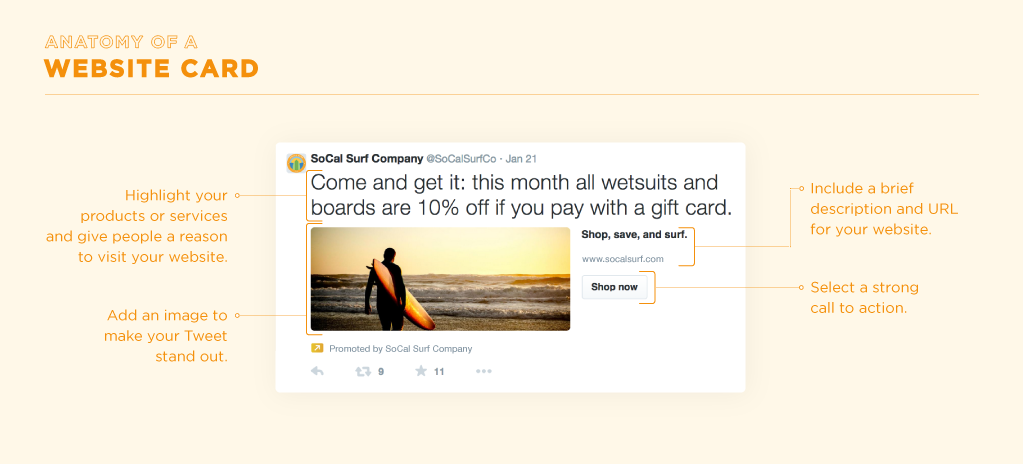
One more way to draw attention to what you offer is to localise.
For instance, try and show the many ways your app has been beneficial to local businesses, teams, shops around you. It helps make your product more real and helps potential users/clients identify with what you bring to the market.
Personalize you call to action.
That is, once again, specific to Website cards and App install cards that you can customize with various calls to action (read more, shop now, etc.). Also, for App install cards in particular they can be a great opportunity to re engage your users with calls to action such as: open, play, shop, connect, etc. But, of course, that works for your Twitter communication in general! Be specific by keeping in mind what you want your user to do when they click on your tweet.
Quality over quantity
Now, here’s some valuable advice to optimize the 140 characters you're given and to produce qualitative tweets.

#1 Convey a sense of urgency
You want to give people a good reason to take immediate action, for example, with a promotion that ends soon.
#2 Minimise distractions
Don’t over do it with hashtags because you don’t want to give users too many click options to chose from. Focus on the link you are promoting.
#3 Share reviews and ratings
If you’ve gotten some good press or impressive Appstore reviews, share them, they are a great way to gain the trust of your audience.
#4 Give users a roadmap
Users like to know what to expect, think of your tweet as a teaser.
#5 Ask a question
It helps users feel part of a conversation and drives engagement. Website cards that include a question get 25% more clicks.
Try and always include different options, for testing, especially for Twitter campaigns, the more to test with, the better, that is a minimum of 4 tweets per campaign. And of course, it’s up to you to track what’s working and make it thrive. No need to stress that this piece of advice is just as relevant for your overall Twitter communication.
You are now ready to get the conversation going about your Beautiful App, whether you want to give Twitter Ads a try or simply make the most of your tweets on a daily basis. See you soon @GoodBarber!
The webinar was held by @LornaBrady


