GBTC: Publish your app with easeDiscover GoodBarber Takes Care and simplify the app publication process for both the App Store and Google Play. Let us handle the technical details for you.Learn more about GBTC
Hi everyone, we hope you had a great weekend! Let's start this week with one of the new features coming with the release of GoodBarber Salvador : Live+
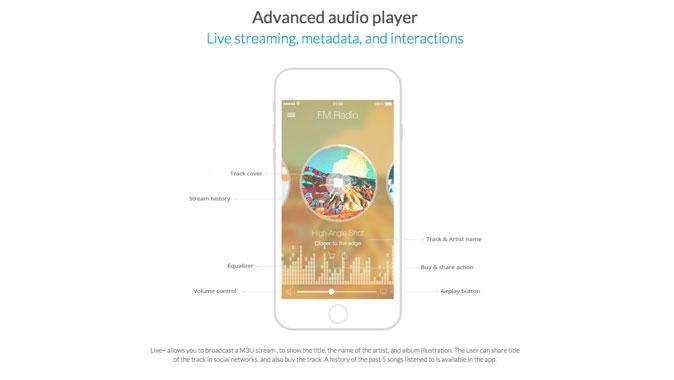
Live+ is a new section inspired by our community. More and more radio stations use GoodBarber to create an app. With this new section, they can display the meta information when they stream their music. Among the informations displayed while you listen to music, you can find the artist name, the track cover, and some other useful details. Users have a direct link to buy a track or share what they are listening to.
How can I use Live+?
If you want to install Live+, go to your backend >> Add-ons >> Live services >> Select Live+
This section is available as a paid option. You now have 2 possibilities: you can try the add-on for free for or, purchase it for 88$/year.
Once it's installed, you can name your section and add a feed URL.
Like all of the sections in your beautiful app, you can design / personalize your Live+ section from your backend.
Clear, simple, beautiful... Streaming has never been easier than with GoodBarber ;)
GoodBarber apps can now show a real estate agency's Kyero listings on a map or as a list, kept up to date from the feed its software already publishes.
Siri Actions will answer three questions about your app's events: what's on today, what's coming up, and what's on this weekend. The events come from the ones already on your app's home page, so there is nothing to set up.
 eCommerce
 Memberships
 Chatbot
 Online Courses
 Bookings
 Travel guide
 Events
 Content Creators
 Pickup & Delivery
 Newspaper
 Radio
Radio Schools
 Faith
Faith Organizations
 Restaurant
 Grocery
 Custom apps
 Employee Communication

 NO CODE APP BUILDER
 TECHNOLOGY
 WHY GOODBARBER?
 Design
 PRODUCT RESOURCES
 TOPICS
 MOBILE APPS RESELLERS
 DISCOVER