GBTC: Publish your app with easeDiscover GoodBarber Takes Care and simplify the app publication process for both the App Store and Google Play. Let us handle the technical details for you.Learn more about GBTC
The Menu is used for secondary navigation within your app. Seven different concepts are available—each with its own advanced configuration options. Thanks to this amount of diversity, one of the strengths of GoodBarber 4.0, the Menu completes the Home, finely distributing traffic within the app.
Independence
Building the menu can be achieved independently of the number of sections in the app. The menu lets you direct traffic, while sections are used to structure the content organization.
Thanks to this separation, you have complete control over the creation of the navigation of your app. Main points of entry are available from the home widgets, and secondary entries are managed through the Menu, also known as the Navigation mode.
Advanced configuration
The product team and our engineers have done away with many of the limits of menu customization. Regardless of the chosen Navigation mode, configuration options are many and ingenious. Shedding the rigidity associated with the previous setup has introduced infinite possibilities.
In a Navigation mode you can manage 4 elements:
Links (1) and shortcuts (2) point towards destinations. The destination can be within the app or outside of it. The links are considered main points of entry of the menu. Shortcuts are meant to be more discreet points of entry, they are generally positioned at the top and bottom of the menu, and can also be aligned on the same line for optimal display.
Titles (3) and separators (4) are design elements. They can be used to prioritize information within the menu. Their availability varies according to the chosen Navigation mode.
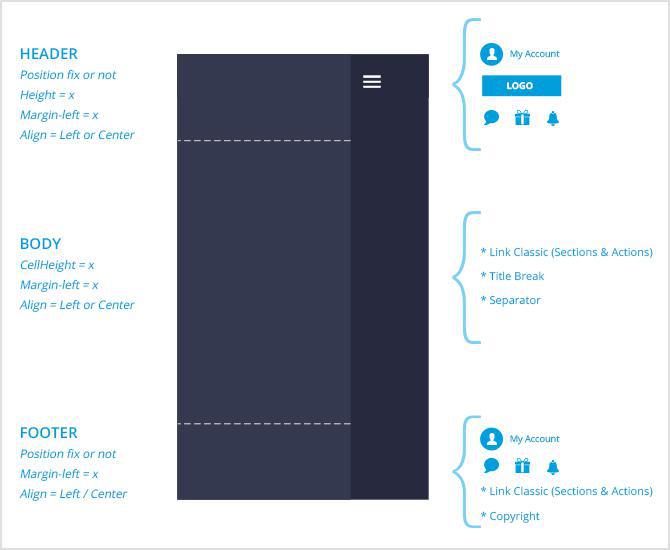
To allow even more flexibility in terms of design customization, navigation modes are divided into several areas.
The header is the top area of the menu. It can include the user profile, logo, shortcuts and separators.
The body is the central and main area. You can arrange this space with links, titles and separators.
The footer is the bottom area. Links, shortcuts, user profile, copyright information can be placed there.
Vertical and horizontal alignment of the information contained within these areas is customizable. These settings, among others, which you will quickly discover upon setting up your project, allow for a more refined design.
Menu types
You have the choice between 7 different navigation modes.
Swipe: navigation is hidden by default and is available in a slider to the left. The Swipe is ideal for secondary navigations with many entries. On desktop, permanent display of the Swipe menu can be enabled.
TabBar: Five links are available. If the menu features more links, the rest is filed under "Others". The TabBar is displayed at the bottom of the screen on mobile. On desktop, it adapts into an horizontal menu, as part of the header of your web app. The TabBar is also displayed on content pages accessible from your navigation mode.
Slate: navigation is hidden but available either from the left or center of the page, based on the setup. Entries are text only and displayed in list format. It is possible to force the Slate display upon opening the app.
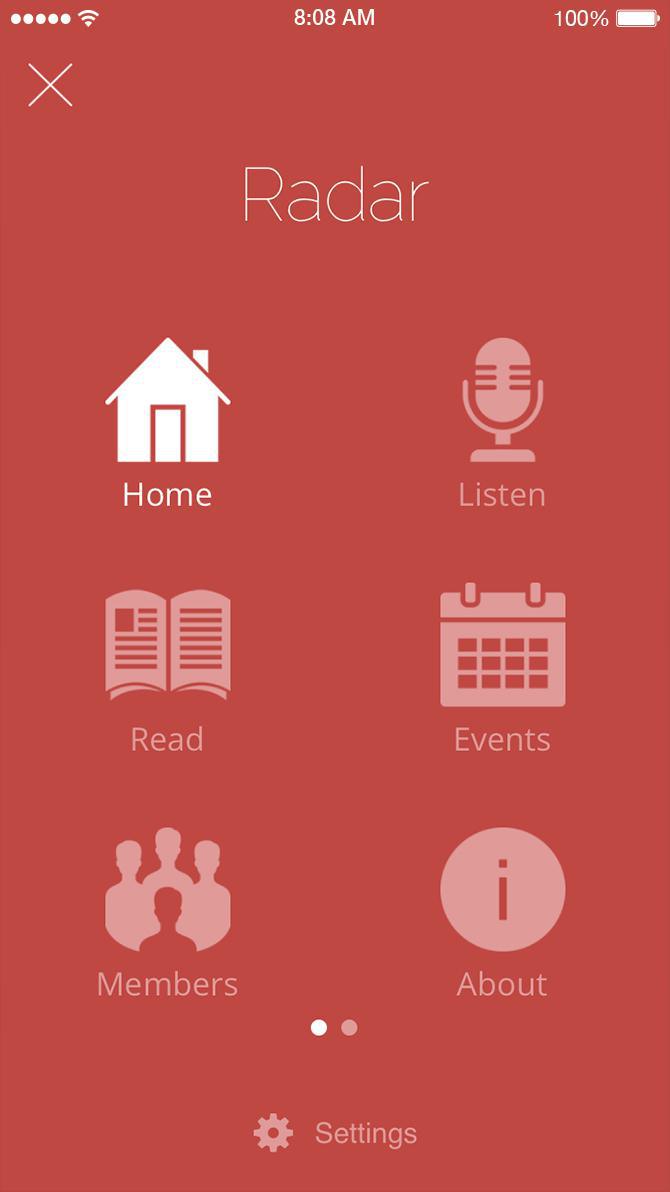
Grid: the menu is hidden and is displayed at the centre of the screen upon request. The display. The display operates in grid mode. The number of positions in the grid can be configured. It is also possible to force the Grid display upon opening the app.
Little Swipe: this menu is ideal to introduce a discrete secondary navigation, in icons format, with a vertical organization. It is hidden by default and opens from the left of the screen, taking up very little space. On desktop, it is possible to force the Little Swipe permanent display.
From scratch: it’s up to you to build this menu as you please. It doesn’t come with a template. You start with a blank page and use HTML code to design your menu. To display links towards sections, use the internal urls of the app. Storage space is available to host your menu’s graphical elements.
No menu: some projects might not require secondary navigation at all. “No menu” is a way to disable the Navigation mode for your app. Up to you to define the section to be displayed upon opening the app. It can be the Home or any other section.
Infinite design
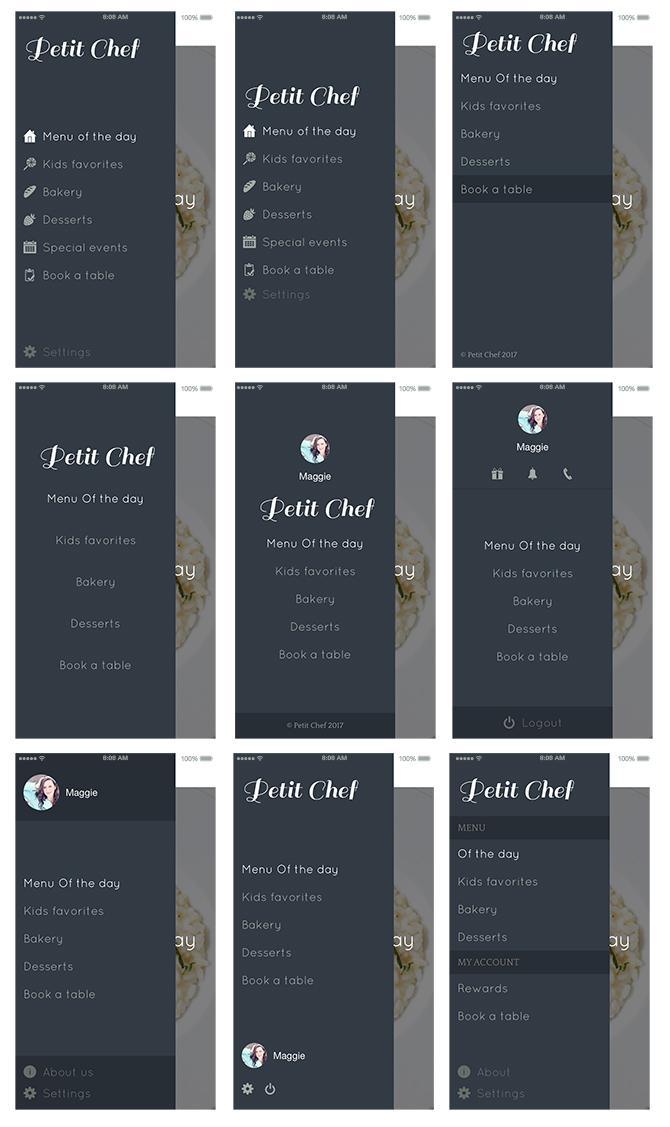
Customization options, for just one navigation mode, are countless. For instance, you will find below several possible declinations with the Swipe menu.
And now, it’s your time to get creative and start designing your very own menu!
Bonus
We've also got you covered with a video tutorial, from our YouTube channel . Use it to discover in a few quick and easy steps how to replicate some of menu designs our team came up with!
On iPhone Duo, an app switches displays every time the phone opens or closes: the outer display, narrow and tall, then the inner display, as wide as a small tablet. Apple asks apps to treat that switch as a simple change of size, like a window being resized, and draws a rule from it: when the device opens or closes, people find what they left.A GoodBarber app follows that rule to the letter. When iPhone Duo opens or closes, it keeps its screens and lays them out again at their new size: the same screen, the same place, what's playing, what was typed into a form. The gesture changes the shape of the screen, never what you were doing.
 eCommerce
 Memberships
 Chatbot
 Online Courses
 Bookings
 Travel guide
 Events
 Content Creators
 Pickup & Delivery
 Newspaper
 Radio
 Schools
 Faith
 Organizations
 Restaurant
 Grocery
 Custom apps
 Employee Communication


 NO CODE APP BUILDER
 TECHNOLOGY
 WHY GOODBARBER?
 Design
 PRODUCT RESOURCES
 TOPICS

 MOBILE APPS RESELLERS
 DISCOVER