 eCommerce
 Memberships
 Chatbot
 Online Courses
 Bookings
 Travel guide
 Events
 Content Creators
 Pickup & Delivery
 Newspaper
 Radio
Radio Schools
 Faith
Faith Organizations
 Restaurant
 Grocery
 Custom apps
 Employee Communication

 NO CODE APP BUILDER
 TECHNOLOGY
 WHY GOODBARBER?
 Design
 PRODUCT RESOURCES
 TOPICS
 MOBILE APPS RESELLERS
 DISCOVER
New dashboard for your back office

We really take it to heart to constantly improve the back office as it is such a central instrument.
We not only want to offer the best app building platform, but also give you the tools to manage your app and your audience.
The new dashboard offers you an overview of your app. In a glimpse you can access all the major informations regarding your app. Responding to your subscription and enabled add-ons, it was created to only display relevant informations.
You will access this new dashboard as soon as :
- If you have a PWA subscription
● “My app” block on your checklist is completed
● PWA is published
- If you have an Android native subscription
● “My app” block on your checklist is completed
● Your app is published on Google Play
- If you have an iOS Premium subscription
● “My app” block on your checklist is completed
● Your app is published on Google Play
● Your app is published on the App Store
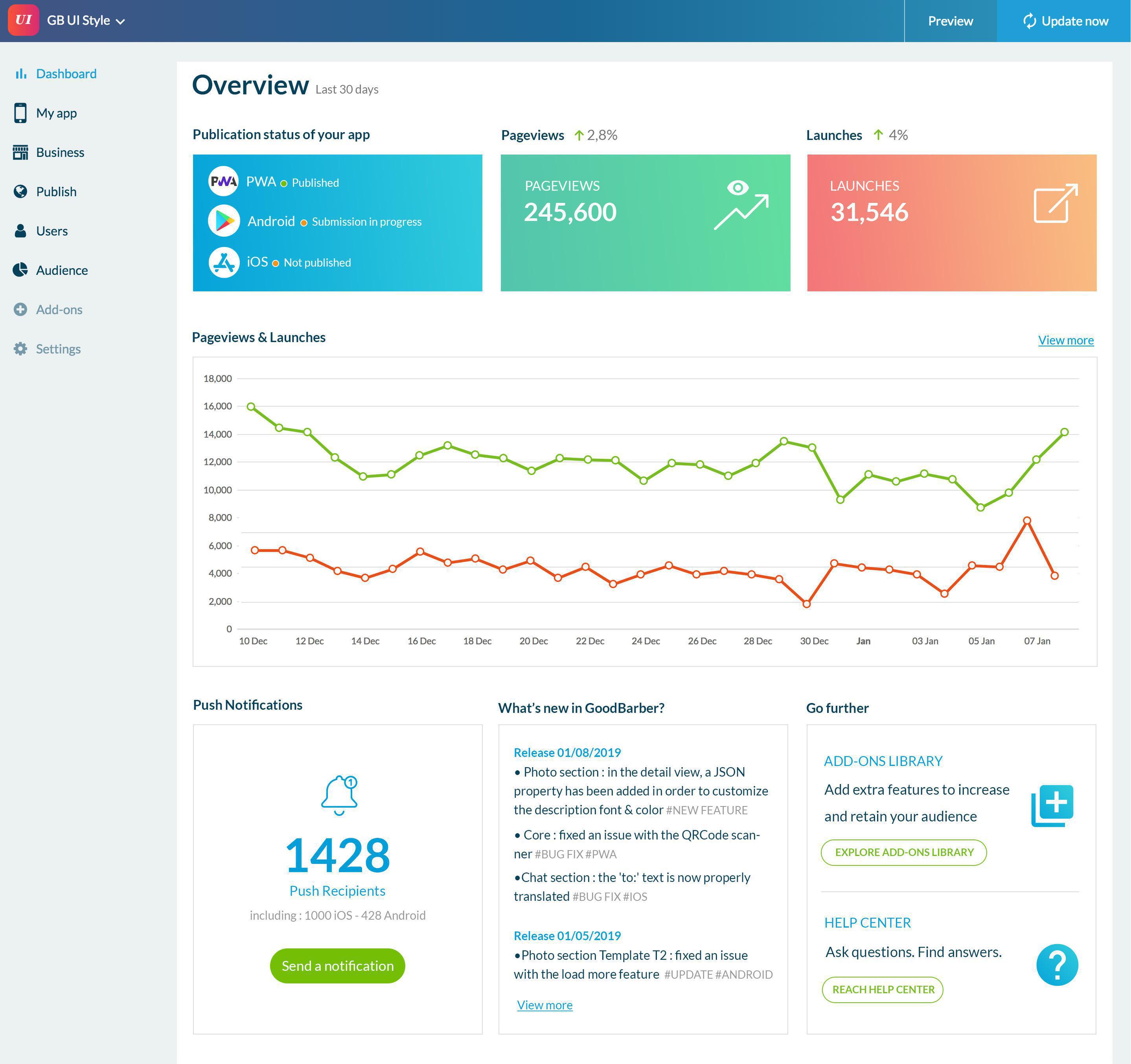
Publication status of the app
The first element on the dashboard is about the publication status of your app. The information on the status will depend on the platform:
For native platform:
- Not published
- In process
- Publishing error
- Ad Hoc version ready
- Submission in progress
- Submitted
For PWA:
- Not published
- PWA generation
- Updating
- Published
Statistics
The following blocks will keep you informed on your app statistics. The first two blocks clearly display the number of pageviews and launches within the last 30 days. At glance you can have a clear overview of your app success.
Just below, the same data will be detailed in a graph with daily values, letting you follow your app progress. From the dashboard, a shortcut gives you direct access to the traffic overview page.
Push notifications management
This block is entirely dedicated to push notifications. If you enabled push notifications in your back office, you will be informed of the total of recipients and an action button allows you to directly send notifications.
If push notifications have not yet been enabled, an action button will send you straight to activation page where you will be invited to set your push notifications certificates.
GoodBarber news
Are you interested in what the Goodbarber team is developing? This block is for you: a flow of all the updates, improvements of bug fixes our developers are working on. You’ll never miss any info.
NB: For Reseller or White Label clients, this will be replaced by a “What’s new” block where you will be able to display your own news flow.
Shortcuts
The third block on this bottom line contains two very useful shortcuts:
- towards the Add-ons Library, where you can find an array of advanced features to increase and retain your audience
- towards the Help Center, where you can find the answers to all your questions with our Online Help or by asking directly our Support Team.
Users data
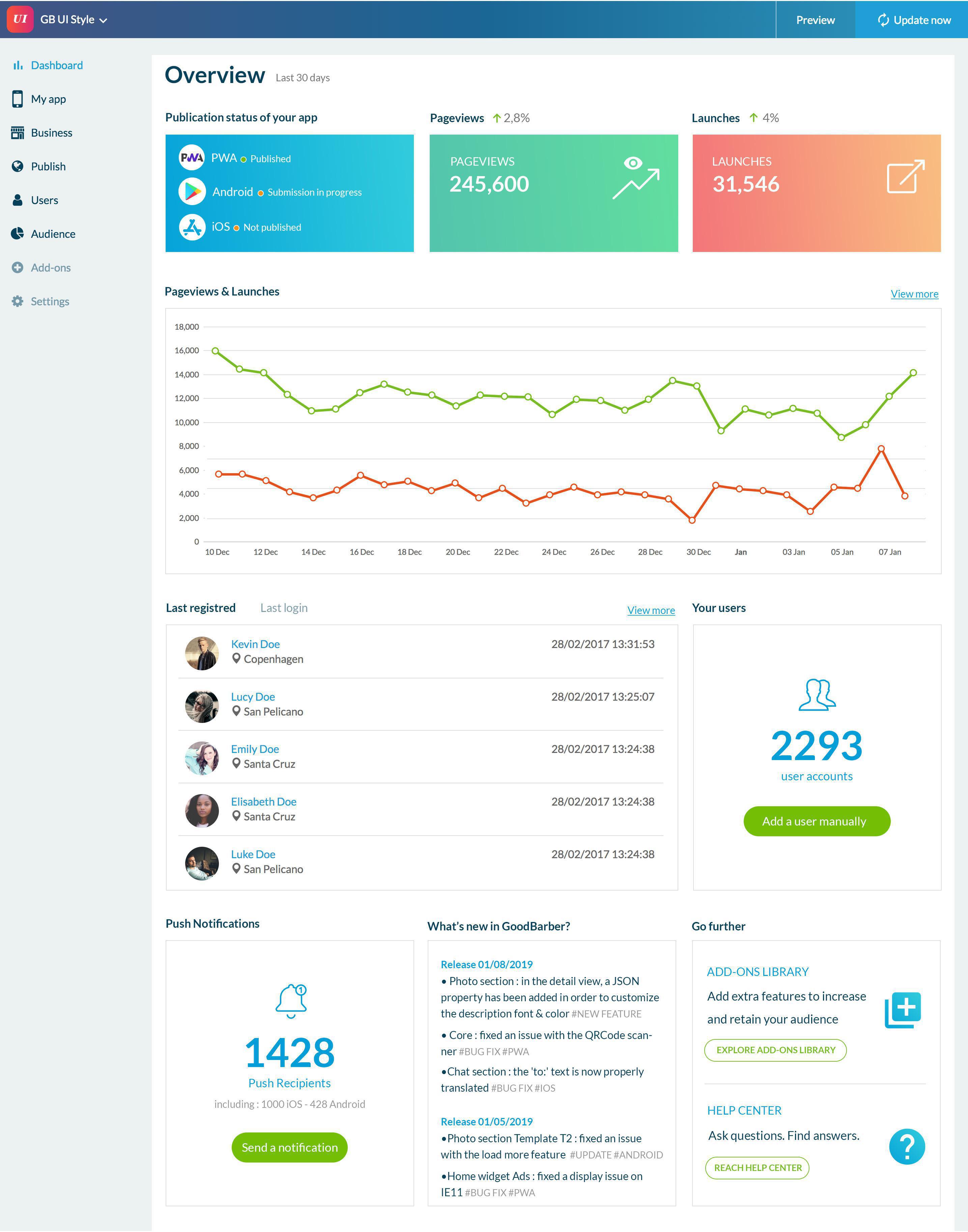
If you enabled the Authentication add-on, two new blocks will appear on your dashboard.
The first one is a snapshot of your Users List, allowing you to consult the list of the last registered users or the last loggins. You’ll also find a shortcut to the complete Users List.
The second block gives you the total of users who created an account in your app and the option to add a user manually.


