GBTC: Publish your app with easeDiscover GoodBarber Takes Care and simplify the app publication process for both the App Store and Google Play. Let us handle the technical details for you.Learn more about GBTC
You've been hearing about PWA's and their undeniable advantages for some time now. But do you really know how this new technology works and what it is that makes it so different from a classic website or native app? The goal of this article is to explain one important element that plays a huge role in making PWA's so unique : Service Workers.
How does a PWA work?
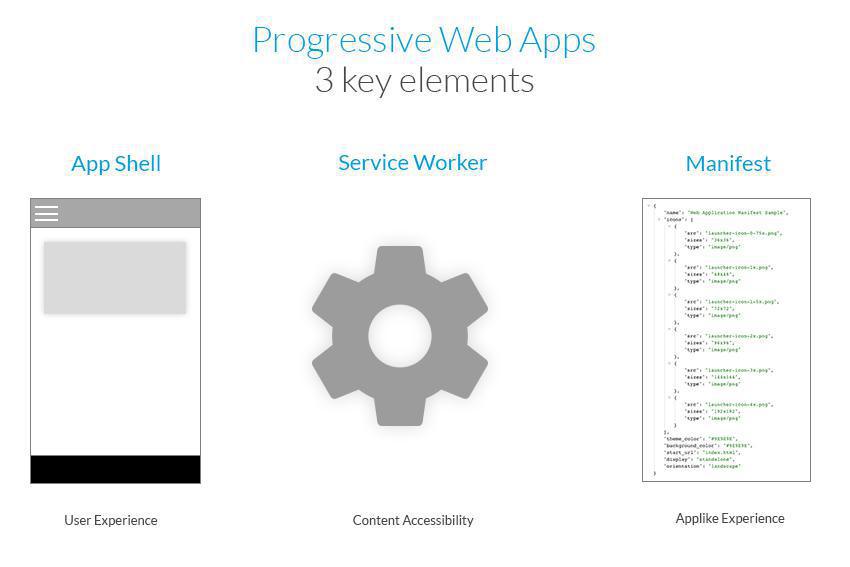
PWA's are the perfect compromise between a website and a native app. The way they work is actually based on several, innovative, pre-existing concepts, that when combined, allow for remarkable performance :
The App Shell
This is sort of your application's shell, inside of which your data is transmitted. It is made up of HTML, CSS, and JavaScript, necessary for the user interface to work. The usage of an App Shell architecture allows for these very light-weight settings to be quickly loaded upon the first visit, which considerably reduces the time required the first time the PWA is displayed.
Service Worker
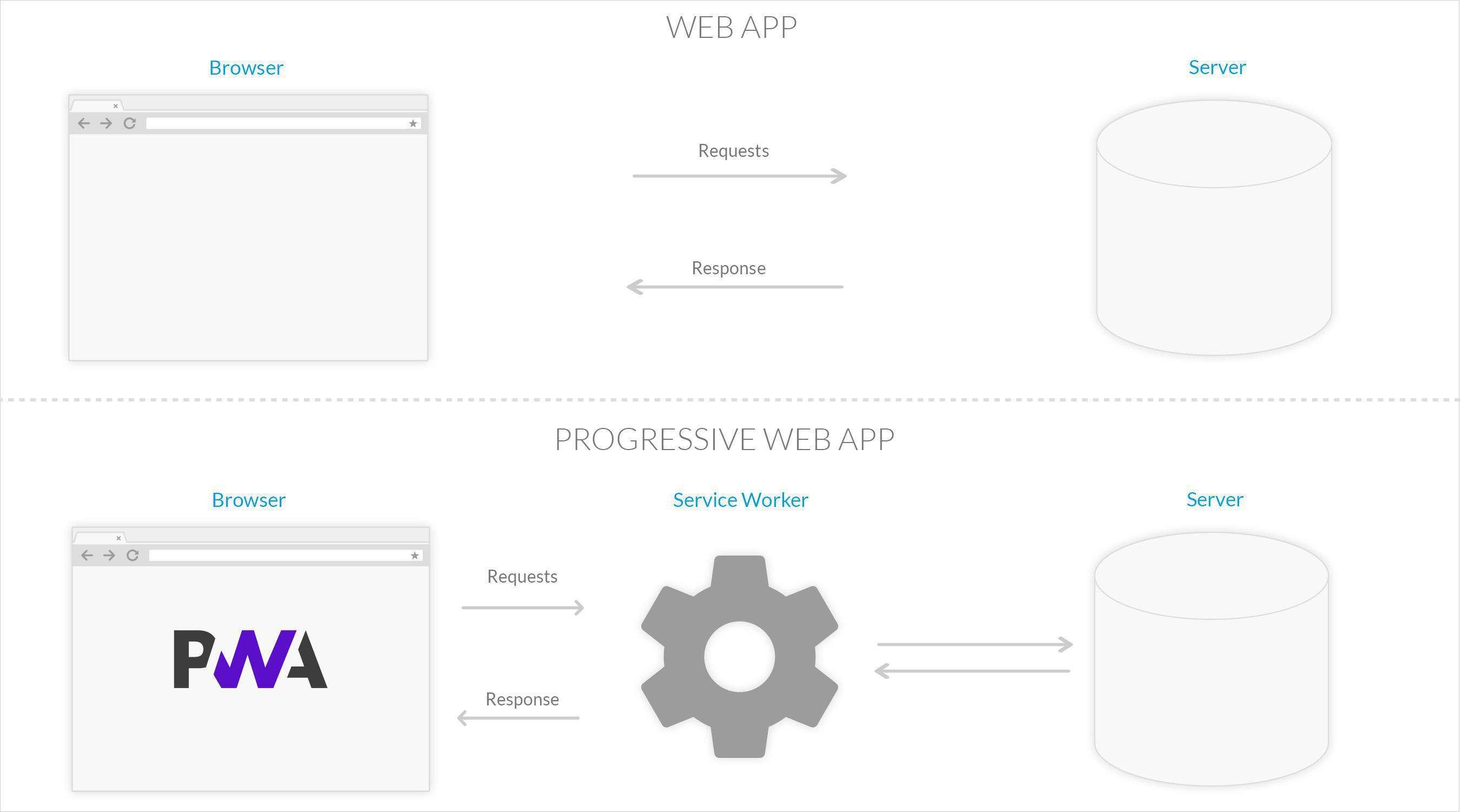
This is the technical basis of a number of features that distinguish PWA's from classic websites. It is positioned between the app and the browser (or the network when it's available) and can strongly modify the app's behavior through a number of possibilities it offers and that we will get into more deeply later on in this article.
JSON manifest
A manifest is a file that contains metadata related to other files it describes. It is a descriptive file that allows for the application to have a more native rendering with a full-screen display, indentifiable icons, the ability to change the screen's orientation, and most importantly, the option for the app to be installed on users' home screens.
What is a service worker?
1) Definition and how it works
From a technical standpoint, a service worker is a script a browser runs in the background. It is capable of executing actions in response to events such as network requests, or information transmitted by the operating system (connectivity changes for example). It allows developers to build advanced features, such as push notification or cache management. Once the service worker is installed in the browser, it independently performs the tasks it's been assigned, even if the user is not browsing the site. The way a service worker functions is similar to a proxy server; it serves as an intermediary between the browser and the Internet in order to improve user experience, particularly by caching a web page's data.
In short, a service worker is essentially a simple JavaScript file that runs in the background and that is triggered by certain events. It intercepts requests made by the server and is able to send a response, either by transmitting the resource received by the server or by providing a local version of the resource if it has already been requested. In the case of GoodBarber's Progressive Web Apps for example, it will allow for the way the browser displays fonts to be optimized, as it downloads and caches them upon the user's first visit. In future visits, the font will be locally served, which means it will be immediately displayed, ensuring an overall faster display of the application.
2) Limits There are 2 pre-requisites for a service worker to be installed in a browser :
The first is the usage of https protocol to serve web pages. Service workers can perform very powerful operations from the user's browser. Using https protocol guarantees that there is no risk that the service worker installed on the browser has been tampered with. If the page is served in http, the service worker won't be installed.
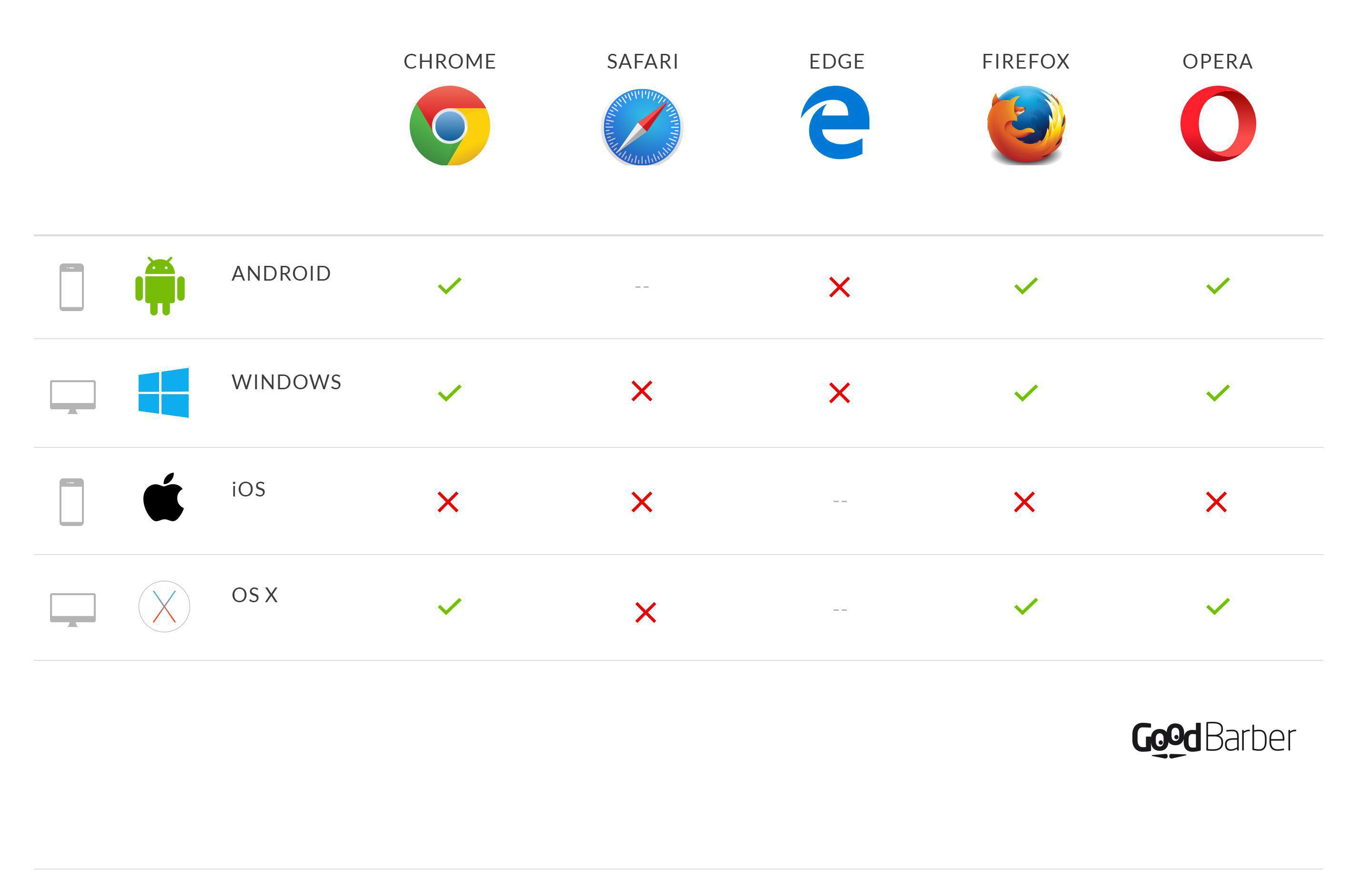
The second is the usage of a browser that supports service workers. Currently, service workers are supported by the following browsers : Google Chrome, Mozilla Firefox, Opera, and Microsoft Edge, depending on the operating system of the machine they're installed on.
What does a service worker bring to a PWA, exactly?
Service workers play an important role in what makes PWA's close to native apps in terms of functionality. Here are a few examples:
1) Background synchronisation
Once service workers are installed, web sites are able to execute JavaScript code without having to be in the foreground–even without any web page having to be opened in the browser. This feature is just like background updates in native apps, only applied to the web. This feature is useful for regular, website data updates and allows for updated data to be displayed directly upon the user's arrival. It also contributes to performance improvement by loading static resources just as well as it does complete pages in advance.
2) Offline accessibility
Beforeservice workers appeared, web app offline functionality was managed by the Appcache interface, which allowed application files to be stored in a cache and to be used in the case of a lost connection. Offline accessibility was therefore already possible through Appcache, but service workers largely simplified the implementation of this functionality. Appcache does have certain inconveniences; its lack of flexibility in particular.
Service workers were originally created like an improved version of Appcache, in order to allow web developers to provide their apps with optimal offline functionality. In terms of functionality, service workers actually intercept network requests, then carry out the appropriate actions based on whether or not the network is available and if the updated resources are available on the server.
Here is an example of a caching strategy that developers can implement via service workers : Cache then Network .
This feature allows the user not only to browse content without an internet connection, but also to enjoy an improved user experience since even with an Internet connection, certain files won't need to be loaded from the web server as they will already be locally stored.
3) Sending push notifications
The ability to use push notifications via web apps is a true revolution which bridges the gap between native and web apps even more.
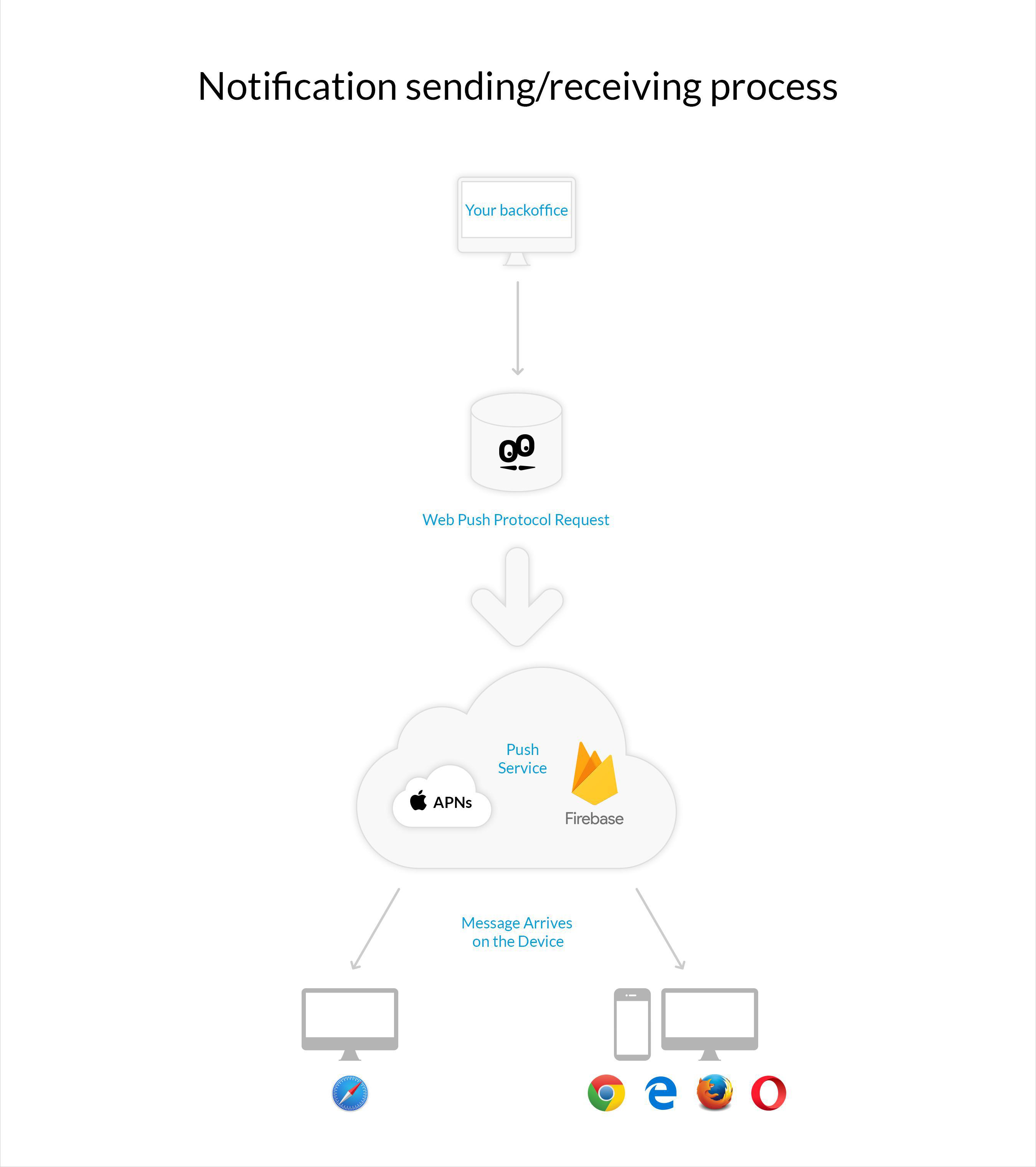
This functionality is made possible by service workers' ability to work in the background. Two technologies contribute to this possibility : the Push API and the Notification API, which are different yet complementary. The Push API notifies the service worker of a notification's presence. The Notification API triggers the display of the notification in the browser. These two API's must therefore be used inside the service worker.
In GoodBarber's case, the management and display of push notifications via the service workers are supported by a specific service called FireBase.
In other words, the push service will notify the service worker, with the Push API, that a notification has been received. The notification API is then used to display this notification to the user.
Push notifications aren't supported by Safari on mobile yet, but they do work on Safari desktop, not because of service workers but because of Apple's push notification service (APNs) which is a service created by Apple, allowing an external service provider to send messages to any Apple device using OS X. Note that notifications for websites do not appear on devices using iOS (mobile).
To sum it up, you can see the importance of service workers in the functionality of Progressive Web Apps, as a number of functionalities rely on their usage, leaving developers with a lot of freedom in building their apps. Recent news is leaving us hopeful and giving us reason to believe that service workers have a long life ahead of them, since Apple seems to be moving towards making Safari compatible with them, thus allowing its users to take full advantage of all that Progressive Web Apps have to offer.
As you can see, service workers and Progressive Web Apps are about to revolutionize the way we see the web, for both developers and users who are little by little discovering the potential of web apps, which turn out to be closer to native apps than you would think.
MB WAY, Scalapay and seQura join Stripe Extended: mobile payment for Portugal and pay-in-installments options, ready to enable in your GoodBarber eCommerce app.
It all starts with the design. A new typeface, Plus Jakarta Sans, a blue for the interface, a green kept for publishing and confirming, softer corners, gentle shadows and redrawn icons. The whole thing reads calmly, and every color has a job: blue guides, green confirms.In My App, your app's preview takes the center of the screen and the settings sit together in a panel on the right. You edit on one side, you see the result on the other, and your app stays in front of you the whole time.
The short version. Ticketmaster is an extension of GoodBarber, the no-code app builder, that fills a Calendar section with the upcoming events a venue sells on Ticketmaster. Each event arrives with its image, its description, its date and time, and a button to buy tickets on Ticketmaster; canceled events are not shown. You connect it with a free key from Ticketmaster's developer portal and your venue's ID. It is free for Content apps: each section counts as one of the extensions included in your plan.Plenty of venues already sell there. Ticketmaster sold 346 million fee-bearing tickets in 2025, according to Live Nation's full-year results, published on February 19, 2026. Here is how the extension plays out for a concert hall that sells all its shows on Ticketmaster.
 eCommerce
 Memberships
 Chatbot
 Online Courses
 Bookings
 Travel guide
 Events
 Content Creators
 Pickup & Delivery
 Newspaper
 Radio
Radio Schools
 Faith
Faith Organizations
 Restaurant
 Grocery
 Custom apps
 Employee Communication

 NO CODE APP BUILDER
 TECHNOLOGY
 WHY GOODBARBER?
 Design
 PRODUCT RESOURCES
 TOPICS
 MOBILE APPS RESELLERS
 DISCOVER