 eCommerce
 Memberships
 RAG Chatbot
 Online Courses
 Bookings
 Travel guide
 Events
 Content Creators
 Pickup & Delivery
 Newspaper
 Radio
Radio Schools
 Faith
Faith Organizations
 Restaurant
 Grocery
 Custom apps
 Employee Communication

 NO CODE APP BUILDER
 TECHNOLOGY
 WHY GOODBARBER?
 Design
 PRODUCT RESOURCES
 TOPICS
 MOBILE APPS RESELLERS
 DISCOVER
Shopping App: A new add-on to increase conversion, the Quick Buy button
Written by Marie Pireddu on

Easy navigation and smooth ordering process are two of the main reasons shoppers will stay or leave a shopping app.
You can improve this shopping experience by creating smooth ordering directly from the Home page or from a collection. Instead of navigating to single product pages, your clients can shop directly from the products list
By allowing your clients to quickly select products, you can speed up their shopping flow on your app, which then will result in increasing your conversion rate. It might also encourage them to buy more.
For example, if you're a caterer or selling beauty product , your clients are most likely going to buy more than one product from you. If they are buying a facial cleanser, they will probably also buy a moisturizer or exfoliant.
Thank to our new add-on, you can now add this feature to your Shopping App.
You can improve this shopping experience by creating smooth ordering directly from the Home page or from a collection. Instead of navigating to single product pages, your clients can shop directly from the products list
By allowing your clients to quickly select products, you can speed up their shopping flow on your app, which then will result in increasing your conversion rate. It might also encourage them to buy more.
For example, if you're a caterer or selling beauty product , your clients are most likely going to buy more than one product from you. If they are buying a facial cleanser, they will probably also buy a moisturizer or exfoliant.
Thank to our new add-on, you can now add this feature to your Shopping App.
How does it work?
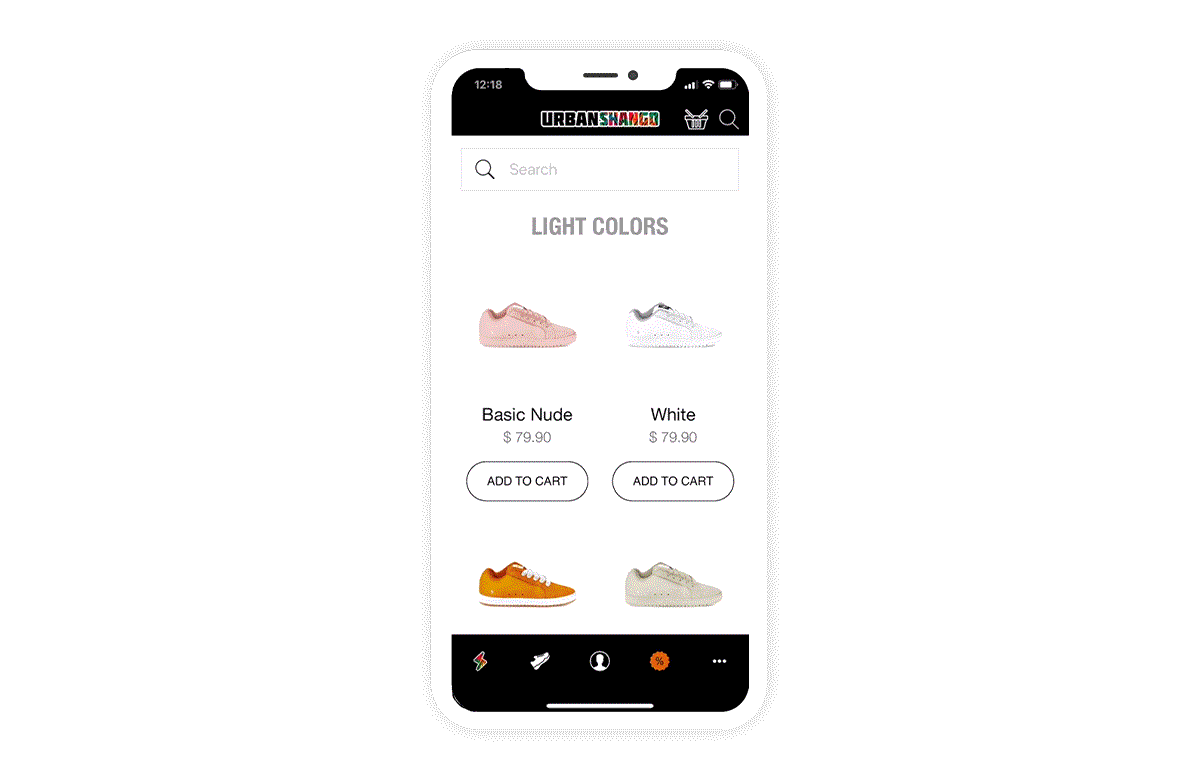
With this new add-on the Quick Buy button, your clients can easily add products to their cart from the Home page (product list widget) or while browsing a collection.
Shoppers never leave the page they’re browsing, allowing them to view more products and therefore helping you increase your cart average.
Shoppers never leave the page they’re browsing, allowing them to view more products and therefore helping you increase your cart average.