 eCommerce
 Memberships
 RAG Chatbot
 Online Courses
 Bookings
 Travel guide
 Events
 Content Creators
 Pickup & Delivery
 Newspaper
 Radio
Radio Schools
 Faith
Faith Organizations
 Restaurant
 Grocery
 Custom apps
 Employee Communication

 NO CODE APP BUILDER
 TECHNOLOGY
 WHY GOODBARBER?
 Design
 PRODUCT RESOURCES
 TOPICS
 MOBILE APPS RESELLERS
 DISCOVER
The GoodBarber App To Manage Your Account
Written by Ghjancarlu Simeoni on
The GoodBarber application for iPhone is available in the App Store since few hours.
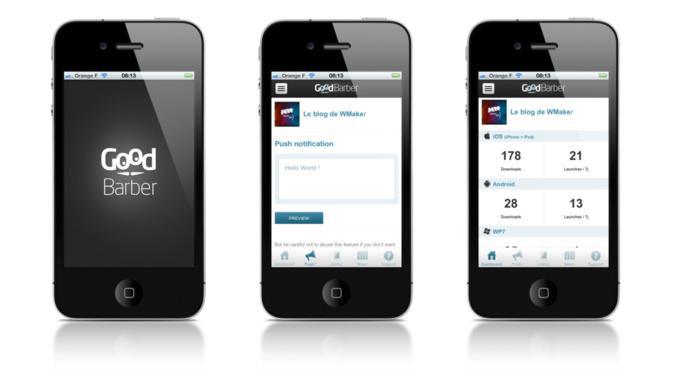
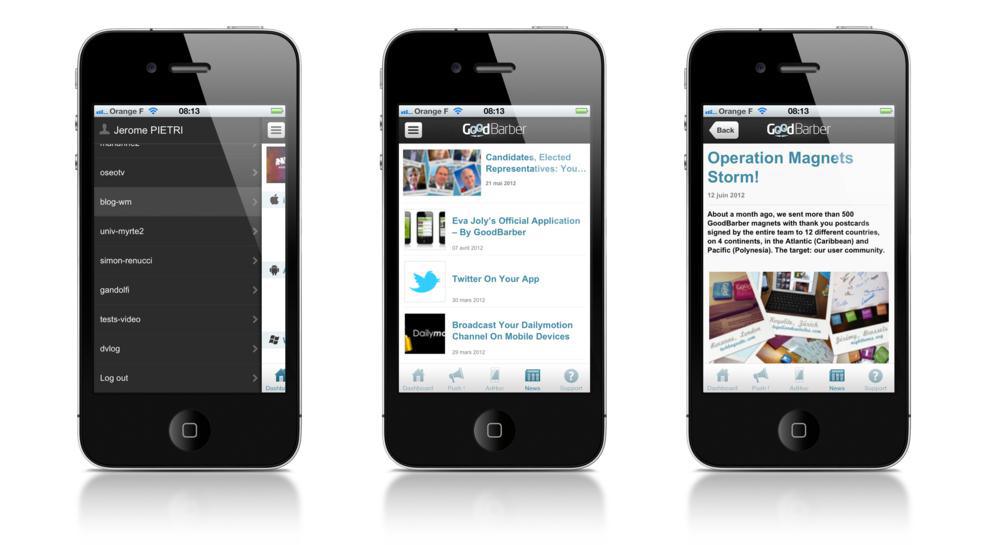
You can download it now!
The GoodBarber app enables you to manage daily your GoodBarber account. It is an essential add-on.
While you are building your app, it allows you:
- to directly access the test version of your iPhone app
- to receive push notifications keeping you informed of the implementation progress of your app
- to get help from the online customer support
Once your app is online, it allows you:
- to monitor download statistics
- to send push notifications to your followers, wherever you are
- to contact the online customer support
- to manage all the apps built using your GoodBarber ID (very useful if you are an agency, for instance)
GoodBarber is constantly evolving. The GoodBarber app also keeps you up-to-date with all the latest news!
Give us your feedback.
The GoodBarber app enables you to manage daily your GoodBarber account. It is an essential add-on.
While you are building your app, it allows you:
- to directly access the test version of your iPhone app
- to receive push notifications keeping you informed of the implementation progress of your app
- to get help from the online customer support
Once your app is online, it allows you:
- to monitor download statistics
- to send push notifications to your followers, wherever you are
- to contact the online customer support
- to manage all the apps built using your GoodBarber ID (very useful if you are an agency, for instance)
GoodBarber is constantly evolving. The GoodBarber app also keeps you up-to-date with all the latest news!
Give us your feedback.