 eCommerce
 Memberships
 RAG Chatbot
 Online Courses
 Bookings
 Travel guide
 Events
 Content Creators
 Pickup & Delivery
 Newspaper
 Radio
Radio Schools
 Faith
Faith Organizations
 Restaurant
 Grocery
 Custom apps
 Employee Communication

 NO CODE APP BUILDER
 TECHNOLOGY
 WHY GOODBARBER?
 Design
 PRODUCT RESOURCES
 TOPICS
 MOBILE APPS RESELLERS
 DISCOVER
Add a Rating Pop-Up to Your Beautiful App
Written by katrina bertacci on · Last update:
"Even the most intellectual mind has something to learn"- George Santayana

Hello Goodbarbers,
Big things are happening in GoodBarber these days.
Our fingers are flying on our keyboards to write new codes and develop new features!
Right after launching GoodBarber 3 , our completely new and restyled platform, we took some time to listen to all your requests and we created a road map to plan the development of all the new features you asked for, so we could implement them as soon as possible.
Last week we introduced you to our new Contact Us section. Today we're proud to present the new integrated pop-up that you can activate to encourage your users to rate the app.
Just as George Santayana said, we all have something to learn!
Big things are happening in GoodBarber these days.
Our fingers are flying on our keyboards to write new codes and develop new features!
Right after launching GoodBarber 3 , our completely new and restyled platform, we took some time to listen to all your requests and we created a road map to plan the development of all the new features you asked for, so we could implement them as soon as possible.
Last week we introduced you to our new Contact Us section. Today we're proud to present the new integrated pop-up that you can activate to encourage your users to rate the app.
Just as George Santayana said, we all have something to learn!
How does it work?
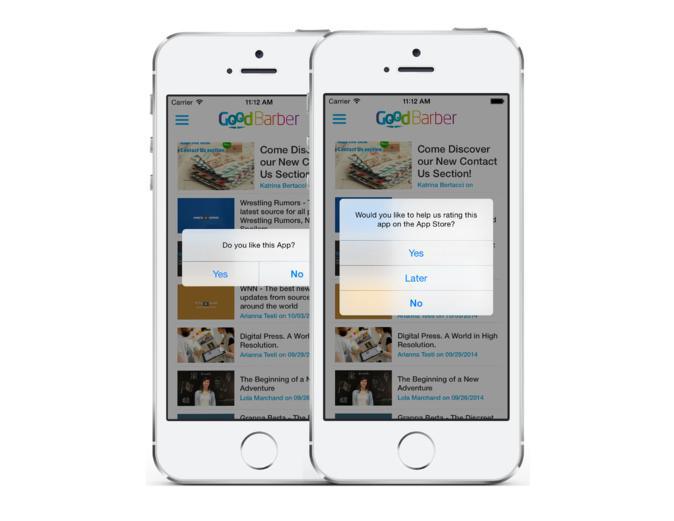
This new rating pop-up is designed to allow you to get as much feedback from your users as possible.
In the first screen it asks you're user if they're happy with the app.
If the answer is no, the user will be redirected to his mailbox where he can send you a mail with his thoughts.
Don't be afraid of criticism! It's extremely useful to discover what needs to changed in the app; also, this feedback gives you a chance to get in touch with the user and explain your reasons. Don't take the critiques personally, answer the message and decide how to go on with the development of your app.
If the user is instead satisfied (Hurray!!), a second pop-up will appear asking him to rate the app in the stores, he can then choose between 3 possible answers: Yes, No and Later.
If the users choose "Yes", they will be automatically directed to the store where they downloaded the app (App Store or Google Play), so he can rate it.
If someone chooses "Later", the pop-up will reappear after some time.
If someone chooses "No", well, nothing happens... At least that person is a happy client. :)
Warning: the rating pop-up is not supported in the HTML5 version.
In the first screen it asks you're user if they're happy with the app.
If the answer is no, the user will be redirected to his mailbox where he can send you a mail with his thoughts.
Don't be afraid of criticism! It's extremely useful to discover what needs to changed in the app; also, this feedback gives you a chance to get in touch with the user and explain your reasons. Don't take the critiques personally, answer the message and decide how to go on with the development of your app.
If the user is instead satisfied (Hurray!!), a second pop-up will appear asking him to rate the app in the stores, he can then choose between 3 possible answers: Yes, No and Later.
If the users choose "Yes", they will be automatically directed to the store where they downloaded the app (App Store or Google Play), so he can rate it.
If someone chooses "Later", the pop-up will reappear after some time.
If someone chooses "No", well, nothing happens... At least that person is a happy client. :)
Warning: the rating pop-up is not supported in the HTML5 version.
How do you activate this option?
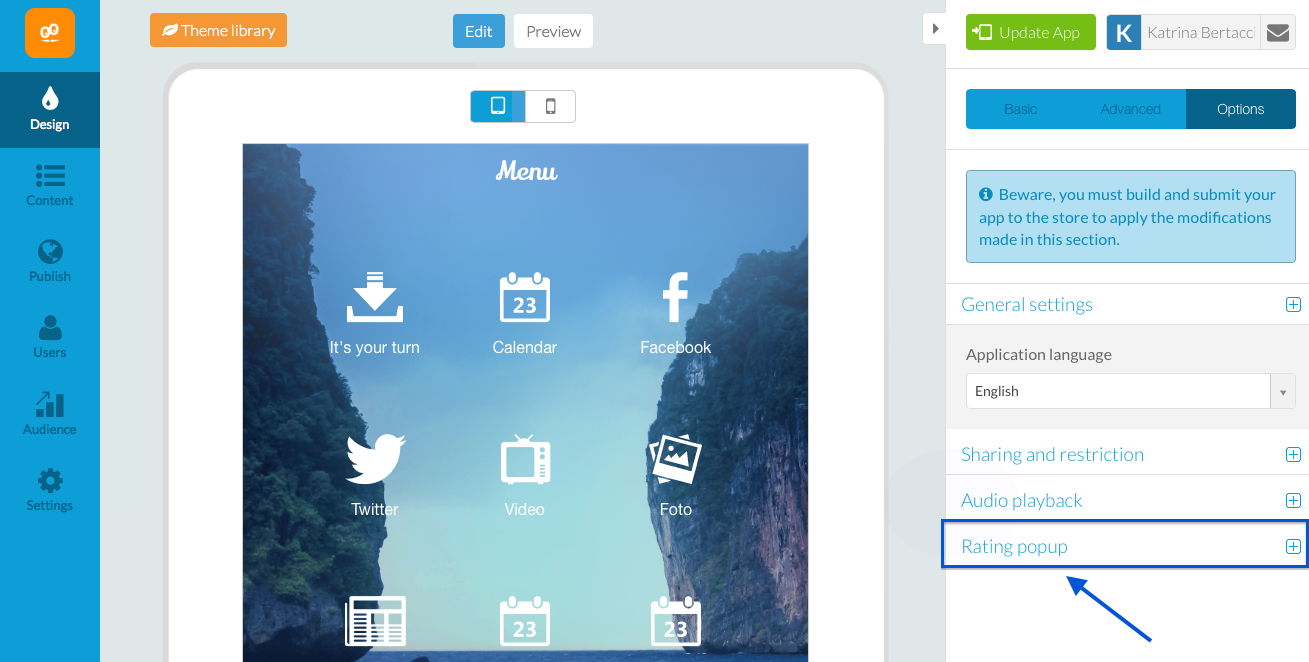
All you have to do is go to the Design menu in your backend and then click on the tab Options > Rating pop-up.
From here you can:
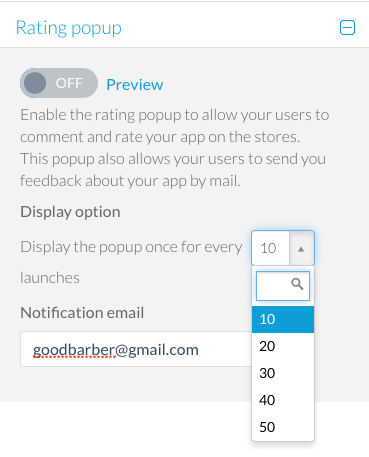
- Activate the pop-up
- Choose when you want it to appear, this is calculated considering the times the user opens the app (10 /20 / 30 / 40 /50)
- Add a contact mail address for the feedback
After you've done this, you just have to rebuild the app and update it in the stores!
- Choose when you want it to appear, this is calculated considering the times the user opens the app (10 /20 / 30 / 40 /50)
- Add a contact mail address for the feedback
After you've done this, you just have to rebuild the app and update it in the stores!
Once again, I'd like to know your opinion :)
If you have any questions or feedback about this option, just drop us a comment below.
See you next week.... with even more new features!!
If you have any questions or feedback about this option, just drop us a comment below.
See you next week.... with even more new features!!