GBTC: Publish your app with easeDiscover GoodBarber Takes Care and simplify the app publication process for both the App Store and Google Play. Let us handle the technical details for you.Learn more about GBTC
App monetization is often crucial to the success of a mobile app. Whether it's a paid app or an app that can be installed for free, you must have a monetization strategy that satisfies your users while ensuring profitability. There are several monetizing solutions to fit the different needs. For example, news apps are better suited to subscription services while travel apps will benefit from in-app advertising. I
Lucky for you, GoodBarber offer both in-app purchase and in-app advertising. For those of you using in-app advertising with external ad networks, we've just added a new feature that will for sure interest you: AdMob Mediation.
What is Admob Mediation
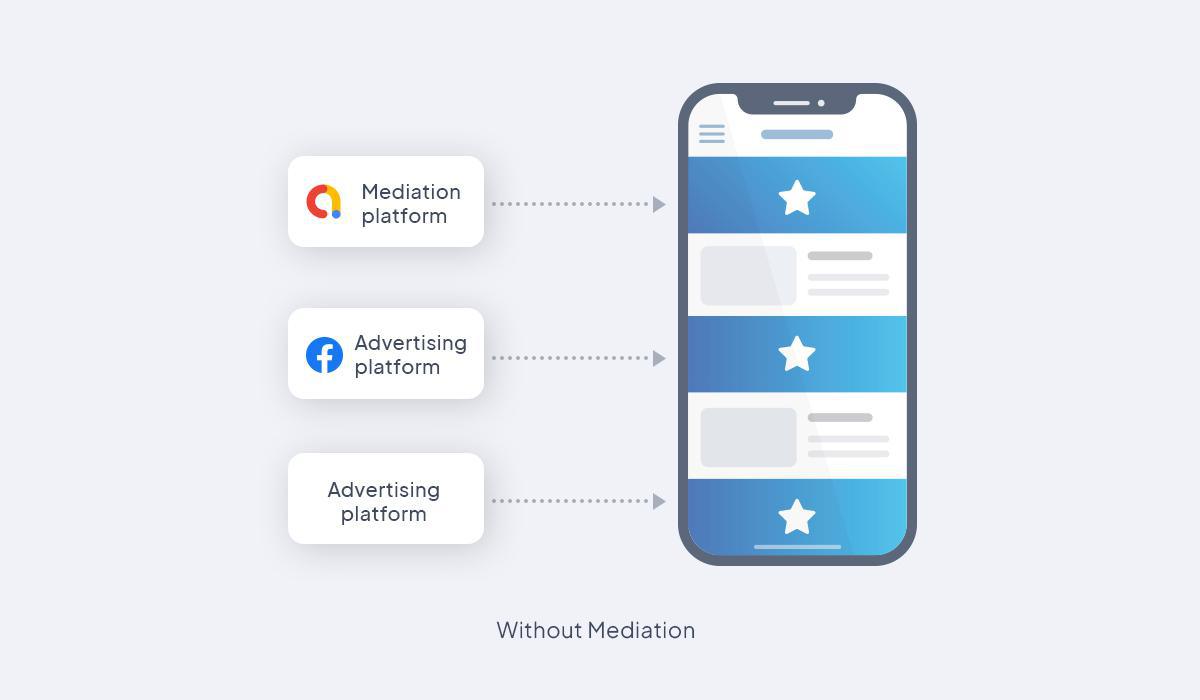
Before Mediation, you needed to set up different ad network in your app back office. Each ad network will then work to fill up an "ad container".
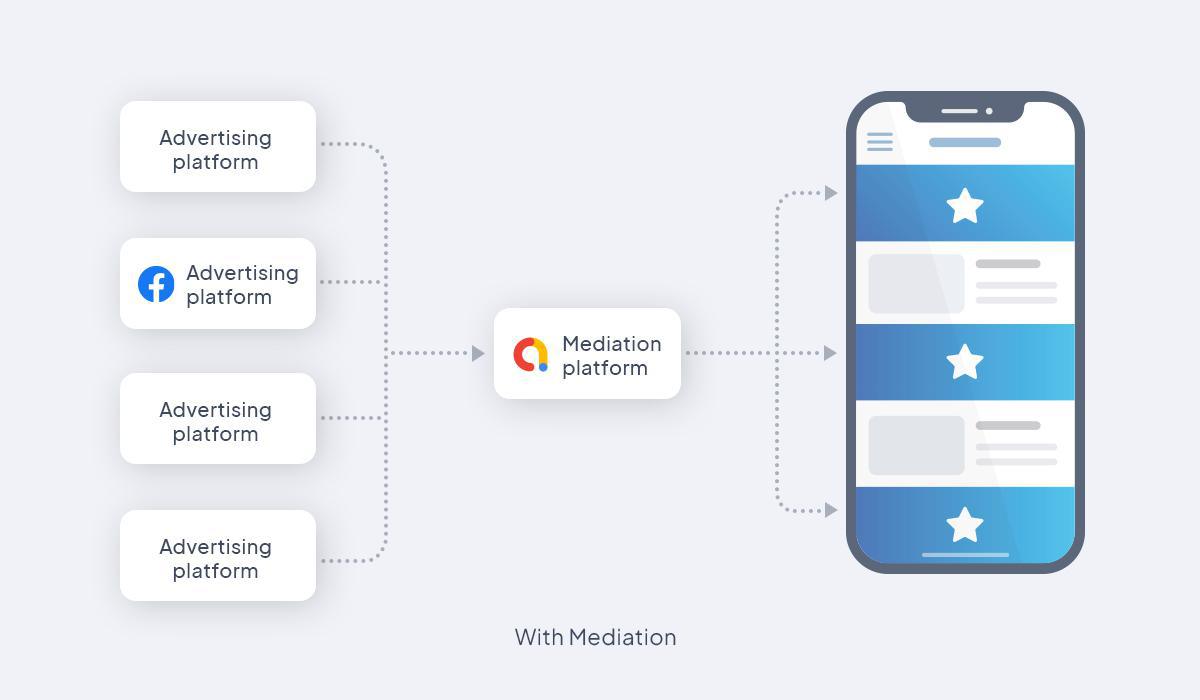
With Admob mediation, the process is much simpler. Indeed, Mediation is a feature of AdMob that helps you manage all of the ad sources you use to serve ads to your apps in one place. Using mediation, you can send incoming ad requests to multiple ad sources and help ensure you find the best available ad sources to fill the requests.
Let Admob Mediation manage your Facebook Ads in your GoodBarber app
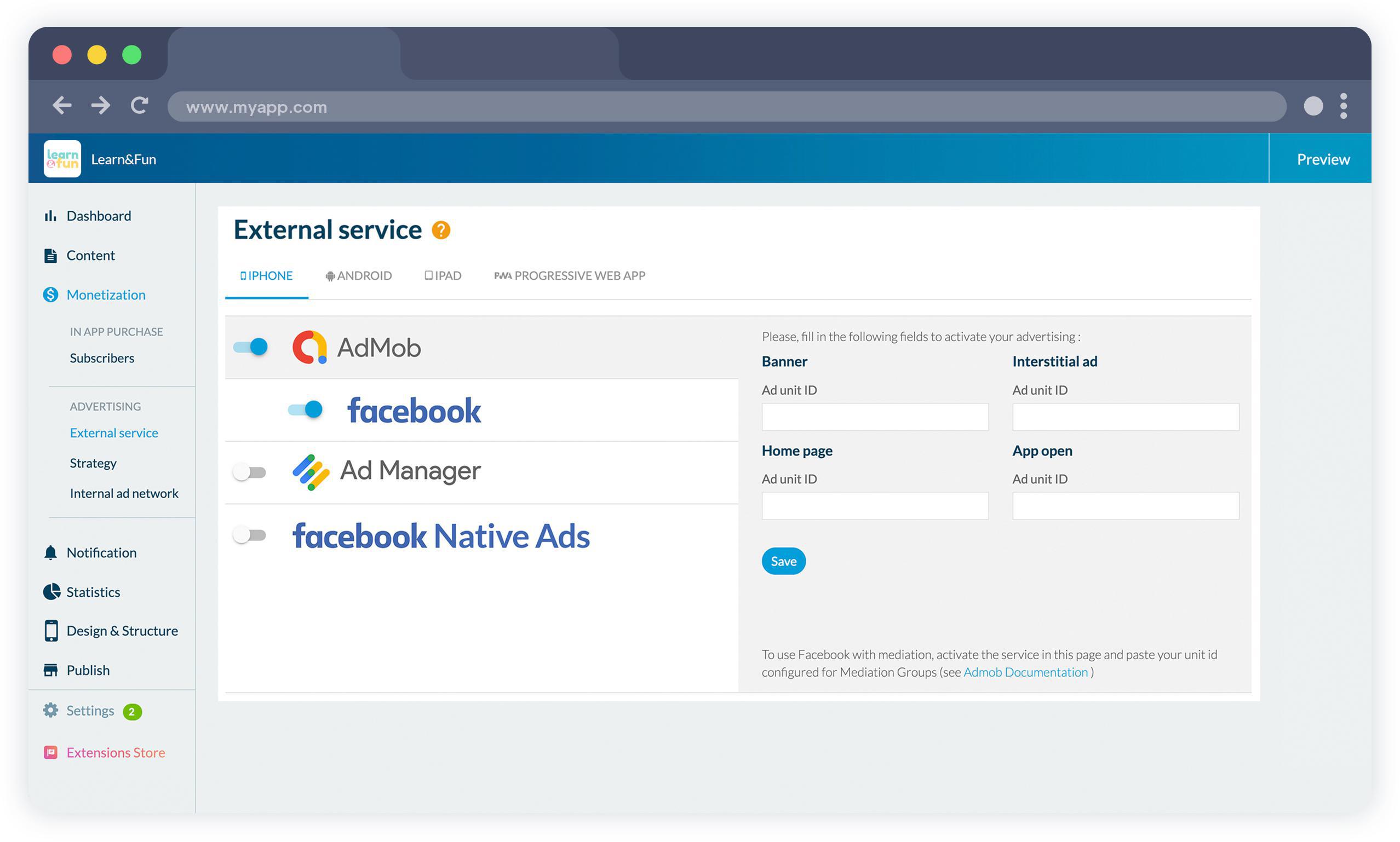
In your Back office, under the menu Monetisation > External service, you can see a new "Facebook" tab under Admob. This is where you activate the service. You'll need
First to link your Facebook Ad account to your Admob account.
Create an Admob unit id for a mediation group that is setup to request the Facebook Ad network. You can find the step-by-step process in this Admob documentation .
Then paste this unit id in the Admob page in your GoodBarber backoffice and ads coming from the Facebook Ad Network will be running.
What are the benefits from using Admob Mediation?
Everything in 1 one place: All your targeting settings are managed from one place. Admob will filter the ad sources and select which one to display. You will also find all the stats related to the different ads networks directly on the Admob platform.
Offer a better user experience: the relevance and quality of the ads displayed in your app are a big part of its success and profitability.That's why AdMob holds all advertiser demand to a high standard, to defend against malware, spoofing, bad content, and more. Features such as Ad Review Center lets you see what ads have actually been showing in your app and block specific ads you don't like, while Ad Content Rating ensures that only appropriate ads are served on the basis of your app's target audience. Maximize profits: With multiple sources for each ad container, you'll never have to worry about an empty container again. AdMob gives all ad networks fair access to ad inventory, ensuring the highest paying network always wins. Built-in features like Ad Network Optimization (ANO) and mediation groups will hep you build a strong revenue stream and optimize your strategy.
The short version. Meta catalog, map and Meta catalog, listings are two extensions of GoodBarber, the no-code app builder, that read an agency's "Home listings" catalog, the XML feed it gives Meta for its real estate ads. Meta catalog, map fills a Map section: each property with a known position becomes a pin with its own page, sorted by distance when the app knows where the user is. Meta catalog, listings fills an Article section with the same properties, newest first. You connect them with the link to your catalog feed. Both are free for Content apps.Agencies build this catalog to reach buyers and tenants where they spend their time. Meta's apps were used by 3.60 billion people a day on average in June 2026, up 3% in a year, according to Meta's second quarter 2026 results published on July 29, 2026. Here is how the two extensions play out for an agency in Hamburg.
The short version. Givebutter Events and Givebutter Campaigns are two extensions of GoodBarber, the no-code app builder, that read a nonprofit's campaigns on Givebutter. Givebutter Events fills a Calendar section with upcoming events, at their time in the event's time zone, with their location unless you share it with attendees only. Givebutter Campaigns fills an Article section with active forms and fundraising pages, with their cover image and description. You connect them with a Givebutter API key. Both are free for Content apps: each section counts as one of the extensions included in your plan.A lot of giving already goes through Givebutter. On Giving Tuesday 2025, supporters gave $20 million on the platform, up from $16.4 million in 2024, from more than 93,000 donors across 16,000 active campaigns, according to Givebutter's recap published on December 8, 2025. Here is how the two extensions play out for an animal rescue.
 eCommerce
 Memberships
 Chatbot
 Online Courses
 Bookings
 Travel guide
 Events
 Content Creators
 Pickup & Delivery
 Newspaper
 Radio
Radio Schools
 Faith
Faith Organizations
 Restaurant
 Grocery
 Custom apps
 Employee Communication

 NO CODE APP BUILDER
 TECHNOLOGY
 WHY GOODBARBER?
 Design
 PRODUCT RESOURCES
 TOPICS
 MOBILE APPS RESELLERS
 DISCOVER