GBTC: Publish your app with easeDiscover GoodBarber Takes Care and simplify the app publication process for both the App Store and Google Play. Let us handle the technical details for you.Learn more about GBTC
Once you’ve published your App on the stores and it is live, it’s time to start promoting it. There are many ways you can get the word out about your app, but today, we will focus especially on getting it reviewed. A very cost efficient manner to get publicity and, hopefully, praise. But, beware, just because it is free, doesn’t mean there aren’t a few ground rules to comply with. And really, we can’t stress enough how important it is to get a review request right. The first impression you give must be perfect, because it is likely your interlocutor will have a limited attention span. After all, you are not the only one approaching him. As a result, you are left with a very narrow window to draw his valuable attention, so make the most of it. Here’s how to best tackle PR , with the help of our Infographic!
Get your interlocutor right
Of course, what you should primarily focus your attention on is the blog / media and if possible, the person you will be addressing. Make sure you reach out to the right interlocutor or else, all your efforts will just be a waste of time.
No need to stress that you should also address that person properly: get their name and position within the company right. Quite logically, this advocates against mass emails. Even if the gist of your message will remain the same, we highly recommend customizing the email enough so that the message sounds personal.
In the end, remember that the more you show consideration for your interlocutor, the more chances your app will be treated with the same consideration in return!
Your App’s ID card
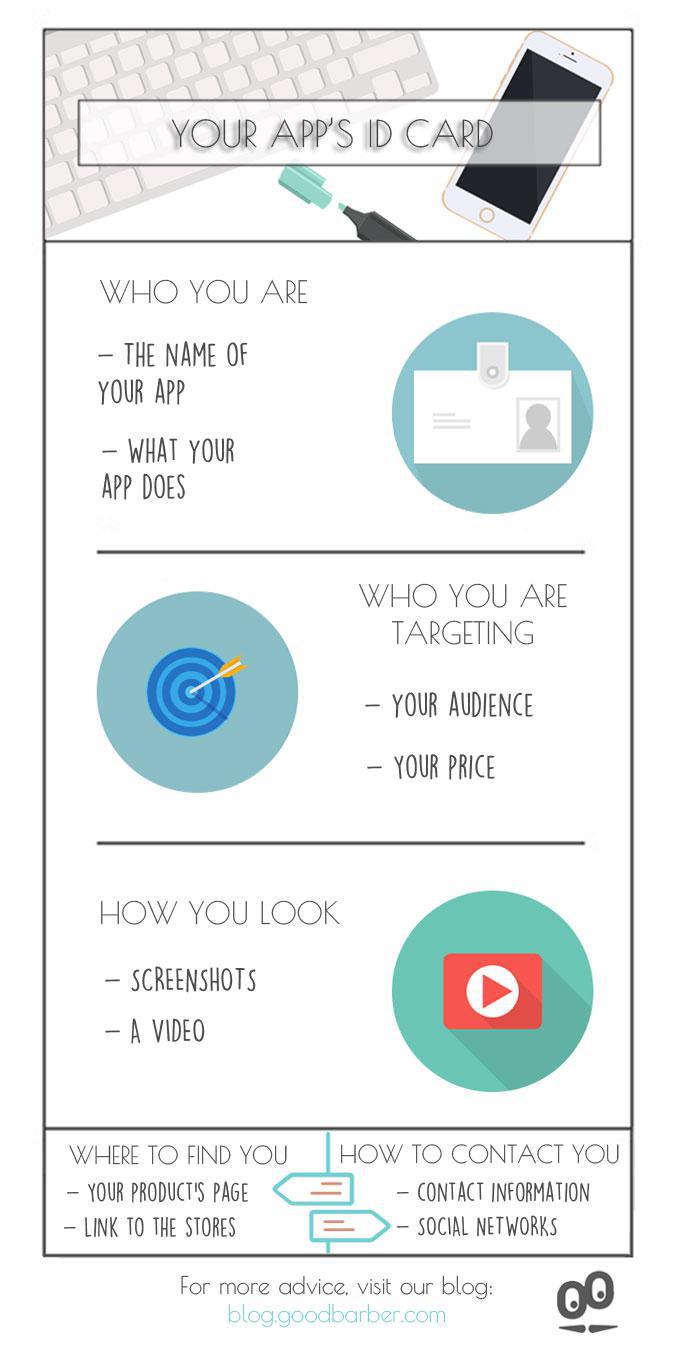
Now, let’s cover the basics, that is the necessary information you should share about your app. Sounds obvious? Well, maybe it is, but do make a checklist out of this and make sure you tick each and everyone of the points before sending out your e mail.
Be as thorough with this step as you would be if you were filling out a form to renew your ID card or get your password! It might seem trivial but you will be glad you don’t leave anything out, because once again, this is your app’s reputation and potential review at play here!
1 ) Who you are Start with the name of your app which should be the exact same name you use on the App Store . Then, proceed to describing what your app does. Try and be to the point, concise, and to focus on what sets it apart.
2 ) Who you are targeting Be specific about the audience you are targeting. This will allow your interlocutor to have a better idea of what your project revolves around. Don’t forget to mention the price if your app isn’t free. Your price range says a lot about your app.
3 ) Where to find you Now, you need to make it easy for the recipient to find you. Include a link to your landing page if you have one or to your website. And don’t forget the links to the App Store product page and/or Google Play.
4 ) How you look If you should definitely include screenshots, don’t over do it: one or two is enough. You are not submitting your App to the stores! What you might want to consider is sending a video. If you have the budget or talent to make one, this is a great way to capture your recipient’s attention. However, only send a video if it’s top quality. Otherwise you wouldn’t be making yourself a favor.
5 ) How to contact you Yes your recipient can simply hit the "reply" button and get back to you. But it’s best to include contact information anyway, add a phone number and social networks accounts so that there’s several options to choose from.
The short version. Zeffy Events and Zeffy Campaigns are two extensions of GoodBarber, the no-code app builder, that read a nonprofit's campaigns on Zeffy. Zeffy Events fills a Calendar section with upcoming events, one entry per date when an event runs on several dates, each with a button that opens its Zeffy ticketing page in the app. Zeffy Campaigns fills an Article section with donation forms, peer-to-peer fundraisers and memberships: memberships open in the app, donations open in the phone's browser. You connect them with your Zeffy API key. Both are free for Content apps: each section counts as one of the extensions included in your plan.Zeffy says more than 100,000 nonprofits have raised over $2 billion through its platform, in an article published on June 16, 2026. Here is how the two extensions play out for a youth theater company that sells its show and raises funds on Zeffy.
In GoodBarber, each color of your theme plays a role. On one of our apps, changing a single color repainted 95 settings at once, without opening a screen.
The short version. Planning Center is an extension of GoodBarber, the no-code app builder, that fills a Calendar section with the events a church publishes on Church Center over the next six months. Recurring events appear once per date, at their public times, in the church's time zone, with their image, location and description. When an event has a sign-up, a button opens the form in the app. You connect it by signing in with a Planning Center Calendar administrator account: there is no key to copy. It is free for Content apps: each section counts as one of the extensions included in your plan.Many churches already run their calendar in Planning Center: it counts 78,000 active churches and 4 million active users, according to its About page, consulted in October 2026. Here is how the extension plays out for a church with a weekly service and a youth retreat.
 eCommerce
 Memberships
 Chatbot
 Online Courses
 Bookings
 Travel guide
 Events
 Content Creators
 Pickup & Delivery
 Newspaper
 Radio
Radio Schools
 Faith
Faith Organizations
 Restaurant
 Grocery
 Custom apps
 Employee Communication

 NO CODE APP BUILDER
 TECHNOLOGY
 WHY GOODBARBER?
 Design
 PRODUCT RESOURCES
 TOPICS
 MOBILE APPS RESELLERS
 DISCOVER