GBTC: Publish your app with easeDiscover GoodBarber Takes Care and simplify the app publication process for both the App Store and Google Play. Let us handle the technical details for you.Learn more about GBTC
We have already talked about it in the past, now we will resume what has been said and delve further into the subject. As you all know, an app can help you to increase your customer base and your traffic. But before this can be possible is important that your new app is presented to the world! You must to expect a normal period of transition in which you will try to redirect the users of your mobile website to your app. At this point, it is usual to undertake marketing strategies to promote the app and make it known to the world.
How to have the best from your website
Your website is full of opportunities! It doesn't attracts only your faithful readers, but also new traffic through SEO techniques, guest posts, social networks and advertise.
When someone discovers your mobile website it becomes an ideal candidate to become a user of your app. But you need to make the transition as easy as possible! Your website or blog is the right starting point to promote your app, without immediately launching yourself into marketing campaigns that are challenging and require time to be implemented.
Among the advantages of using this feature is the automatic change of the pricing and store from country to country. For example, if your application is only available on the english store, Italian users will not see the banner. In addition, if the application is already installed, the banner will automatically propose to user to open the application and not to download it.
Widget and "Available on..." buttons
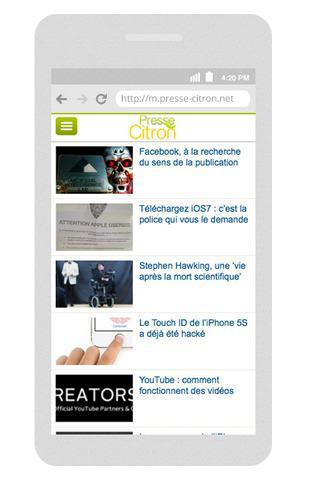
The widgets and the "Available on ..." buttons are excellent tools to promote your app. They are not invasive even if they are always present and visible on each page of your site.
GoodBarber give you the chance to customize your widget, directly from your GoodBarber backend, on the main menu > Audience > Promote > Widget.
Instead if you go to the main menu > Audience > Promote > Buttons menu, you will find a piece of code that permits to show two buttons linking to your app in the stores.
Link to your app
If you have to create your own links to your app, you should always use the single link provided by GoodBarber, so when a user will clicks on this link, depending on if he's using an iPhone or an Android device, he will be redirected to the correct store.
Your universal download url looks like: http://[MYAPP].goodbarber.app/apps/download/
Now that we have resumed the old advices, we will offer you other two simple ways to promote your app.
Write a presentation post for your app
When your app is finally published in the stores, you should provide, especially to your faithful users, all the explanations and instructions for use it.
Also the prospective users must understand immediately all the features, as to facilitate a future use.
So, write a presentation post, explaining the reason why you decided to create your app, what your app offers more than your mobile website and the benefits it brings to users. Do not forget to provide the universal link for the download.
Get inspiration from the post we wrote for the launch of our app MyGoodBarber.
It could be a good idea to add a visual preview of the app.
Every week GoodBarber creates a video presentation of one of the best apps created with its platform.
If you're lucky, you can use this video for free as the showcase of your app.
The web version of your native app
Having a web version of your native app, not give you only the opportunity to be present on all the devices, but allows you to redirect easily the readers of your mobile website to your app and retain them.
GoodBarber, after Salvador, in addition to the iOS and Android versions, offers you also an HTML5 version with the same functionality of your native app.
You can connect it to a domain and use it as the mobile website of your website.
These simple tricks will be the foundation of your marketing strategy.
Now you just need to start promoting your app! Good Luck! :)
The short version. Meta catalog, map and Meta catalog, listings are two extensions of GoodBarber, the no-code app builder, that read an agency's "Home listings" catalog, the XML feed it gives Meta for its real estate ads. Meta catalog, map fills a Map section: each property with a known position becomes a pin with its own page, sorted by distance when the app knows where the user is. Meta catalog, listings fills an Article section with the same properties, newest first. You connect them with the link to your catalog feed. Both are free for Content apps.Agencies build this catalog to reach buyers and tenants where they spend their time. Meta's apps were used by 3.60 billion people a day on average in June 2026, up 3% in a year, according to Meta's second quarter 2026 results published on July 29, 2026. Here is how the two extensions play out for an agency in Hamburg.
The short version. Givebutter Events and Givebutter Campaigns are two extensions of GoodBarber, the no-code app builder, that read a nonprofit's campaigns on Givebutter. Givebutter Events fills a Calendar section with upcoming events, at their time in the event's time zone, with their location unless you share it with attendees only. Givebutter Campaigns fills an Article section with active forms and fundraising pages, with their cover image and description. You connect them with a Givebutter API key. Both are free for Content apps: each section counts as one of the extensions included in your plan.A lot of giving already goes through Givebutter. On Giving Tuesday 2025, supporters gave $20 million on the platform, up from $16.4 million in 2024, from more than 93,000 donors across 16,000 active campaigns, according to Givebutter's recap published on December 8, 2025. Here is how the two extensions play out for an animal rescue.
 eCommerce
 Memberships
 Chatbot
 Online Courses
 Bookings
 Travel guide
 Events
 Content Creators
 Pickup & Delivery
 Newspaper
 Radio
 Schools
 Faith
 Organizations
 Restaurant
 Grocery
 Custom apps
 Employee Communication


 NO CODE APP BUILDER
 TECHNOLOGY
 WHY GOODBARBER?
 Design
 PRODUCT RESOURCES
 TOPICS

 MOBILE APPS RESELLERS
 DISCOVER