 eCommerce
 Memberships
 Chatbot
 Online Courses
 Bookings
 Travel guide
 Events
 Content Creators
 Pickup & Delivery
 Newspaper
 Radio
 Schools
 Faith
 Organizations
 Restaurant
 Grocery
 Custom apps
 Employee Communication


 NO CODE APP BUILDER
 TECHNOLOGY
 WHY GOODBARBER?
 Design
 PRODUCT RESOURCES
 TOPICS

 MOBILE APPS RESELLERS
 DISCOVER
How to manage access rights to the Back Office - App Reseller Business (part 4)
This is the last episode of our App Reseller Business tutorials series. In this 4th part, we will see how to give your clients access to the back office of their app.
Go to the back office of the application you want to use. Go to "Settings" and select the "Team" menu. Here you can see who has access to the back office of this app. Then go to "New team member".
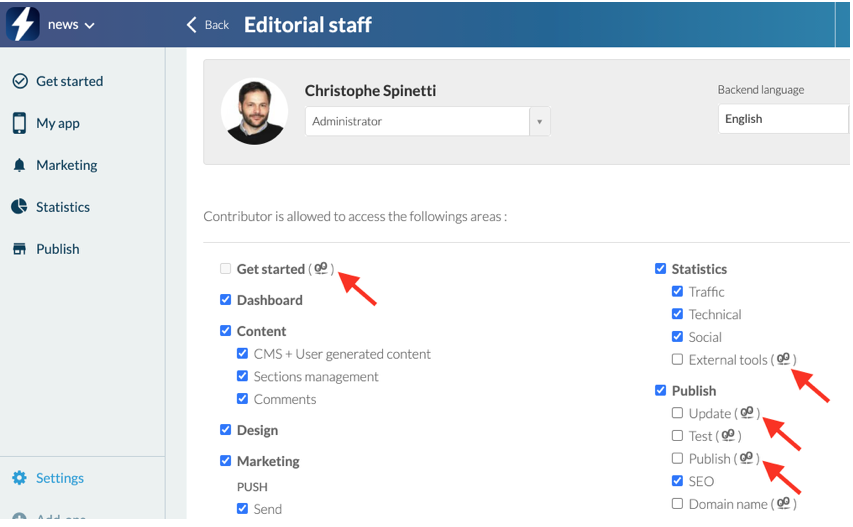
Now enter the e-mail address of your client and click on "Add". You can now configure the access rights, the language, and the role of your client. Be careful, when you see the little GoodBarber logo next to an access right, it means that the topic is not white-labeled and the client can see the GoodBarber name or logo. If you don't want to disclose that you are using GoodBarber to your clients, we advise you to uncheck all these boxes.
If you want to remove this access, just click on the "Trash" icon and click on "Continue".
Now you know how to add your clients to the back-office of their application!
App Reseller Business video series:
How to Startup and Set an App Reseller Account - App Reseller Business (part 1)
How to set the White Label option - App Reseller Business (part 2)
How to manage your customer apps - App Reseller Business (part 3)


