 eCommerce
 Memberships
 RAG Chatbot
 Online Courses
 Bookings
 Travel guide
 Events
 Content Creators
 Pickup & Delivery
 Newspaper
 Radio
Radio Schools
 Faith
Faith Organizations
 Restaurant
 Grocery
 Custom apps
 Employee Communication

 NO CODE APP BUILDER
 TECHNOLOGY
 WHY GOODBARBER?
 Design
 PRODUCT RESOURCES
 TOPICS
 MOBILE APPS RESELLERS
 DISCOVER
AI Content Publishing: Run Your App's Editorial Calendar with an Agent
Written by Pierre-Laurent Medori on · Last update:
Publishers, creators and associations didn't get into the work to live in a CMS. AI content publishing changes the deal: an agent runs your app's editorial calendar — publishing articles, scheduling them, posting events to the agenda, firing the push — while you do the actual work. Here it is on a live app, step by step, and where the line sits between what the agent does and what stays yours.
The content calendar that eats your week
Picture a two-person ocean-conservation nonprofit. One runs operations, one runs the field work. Between them they also run an app: a news feed, a list of causes, an events agenda, push notifications to a few thousand supporters.
Every week, the same routine. Write up the weekend's cleanup, format it, pick a category, decide what publishes now and what waits for the campaign date, add the next meetup to the agenda, schedule a push so people show up. None of it is hard. All of it is time — taken from the cause. No-code tools made each step easier; they never made the person optional. That is the part an agent changes.
How to automate your app's content calendar with an agent
Running your app like a newsroom means you stop operating the CMS by hand and start briefing an editor who does it for you. You describe the week in plain language; the agent carries it out across your app; you review.
This works because every GoodBarber app is agent-ready: it exposes its operations through a public Model Context Protocol server — 150 of them, 61 for the CMS alone — so an assistant you already use, like Claude, can manage your content by conversation instead of you clicking through a dashboard. So we tried it. Not on a mockup — on a live app.
A real editorial week: an MCP editorial workflow
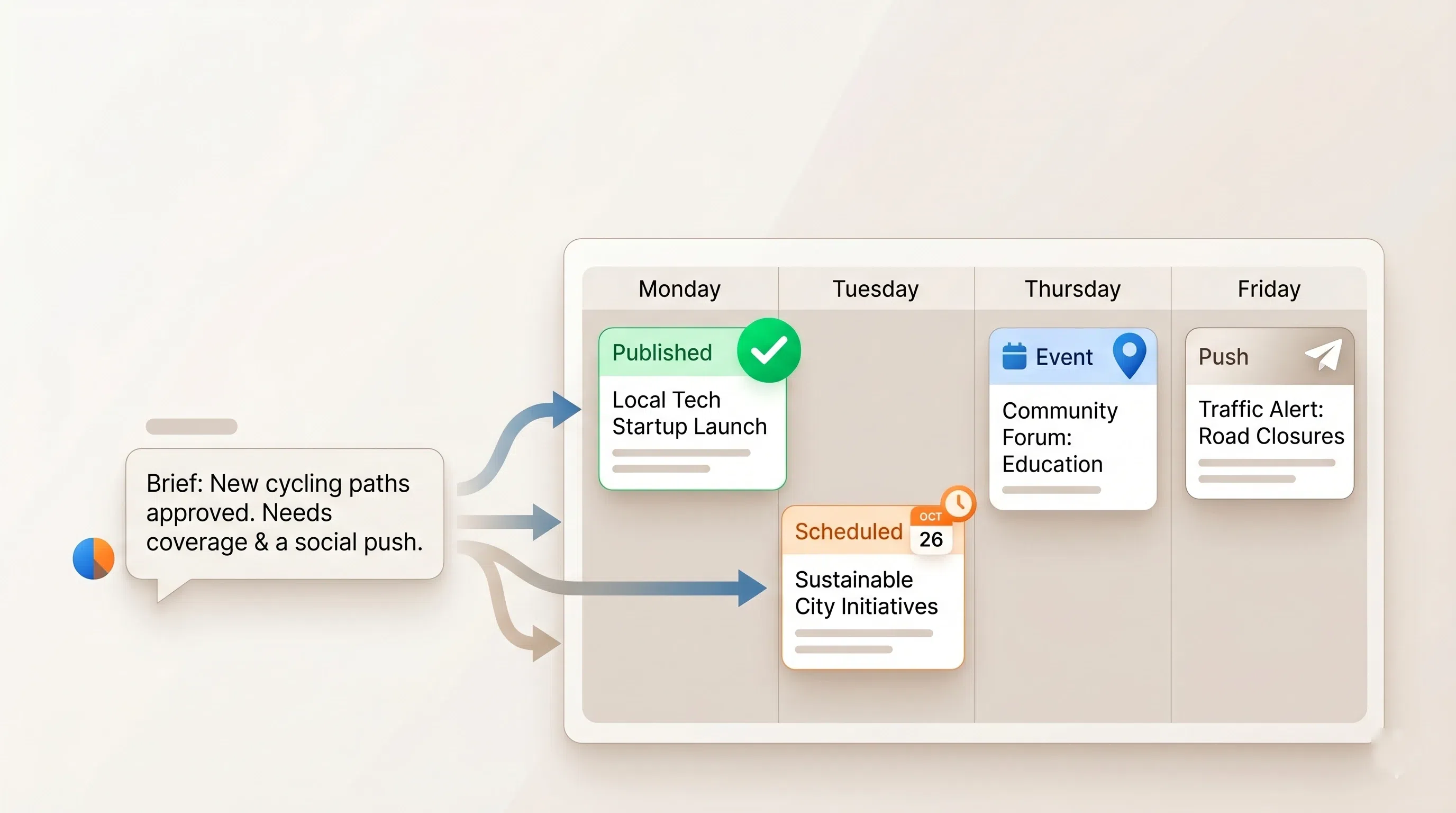
We connected Claude to a live demo app for an ocean-conservation nonprofit and gave it one brief:
"Publish this weekend's Calvi cleanup recap now. Prepare our Plastic Free July campaign piece and schedule it for July 1 at 8am. And put the June 21 volunteer cleanup on the agenda."
Here is what it did, in order.
It learned the newsroom first. Before writing a word, the agent listed the app's content sections — About us, Our causes — pulled up the events agenda, and read the existing articles. An agent about to publish on your behalf orients itself the way a new editor would.
It published the recap — live. The cleanup story went into Our causes, with a deck and SEO metadata, status published. Online immediately, at its own URL, in the feed supporters were already reading.
It scheduled the campaign. The Plastic Free July piece did not go live. The agent set it to scheduled with a publication date of July 1, 08:00. It now sits in the queue and publishes itself on the morning of the campaign — nobody has to remember a button at 8am.
It updated the agenda. The June 21 volunteer cleanup landed on the events calendar with its start time, three-hour window, and the Calvi venue — slotting in among the gala, the kitesurf race, and the rest of the season.
And the platform made it prove its work. Every write came back flagged for verification, so the agent re-read the scheduled queue and the live article before reporting back.
One more sentence closes the loop: "schedule the launch push for July 1 at 8am." The same MCP surface sends the notifications — a broadcast with a send-at time — so the campaign publishes and the supporters hear about it in the same motion.
Three sentences of brief. A week of content calendar, handled.
The agent publishes; you stay editor-in-chief
This is where the worry usually lands: if the agent does all that, what's left for me? The answer is the part that was always the real job.
The agent takes the mechanics — formatting, timing, the queue, the push. You keep the judgment — what's worth publishing, what the campaign says, which event matters. That division is enforced, not just promised: the platform flags every write for verification, and you can have the agent stage everything as a draft for you to approve before a single item goes live. Nothing publishes that you didn't green-light.
So it isn't "the agent runs the app instead of you." It's the agent doing the doing, while you keep the deciding. You stop being the one clicking publish; you stay the one who says what gets published. For a two-person nonprofit, that's the difference between a week in the tool and a week on the cause.
How to start
If you run a content app, you already have the newsroom. To hand it an editor: connect your AI assistant to your app's MCP endpoint — the address lives in your back-office — or start from the 44 ready-made Claude Skills that wrap these workflows. Then brief it the way you'd brief a colleague.
Want to see it on your own content first? Start a free Content App trial, connect an assistant, and give it a week to run.
Frequently asked questions
How do I automate my app's content calendar?
Connect an MCP-aware AI assistant (like Claude) to your GoodBarber app's MCP endpoint, then brief it in plain language: what to publish now, what to schedule, what to put on the agenda, and when to push. The agent calls the same CMS operations the back-office uses and carries out the week for you.
Can an AI agent schedule blog posts and push notifications?
Yes. Through the MCP server, an agent can create an article or event with a future publication date — it stays out of the feed until then and publishes itself — and queue a push notification with a send-at time, so a campaign and its alert go live together.
What is an MCP editorial workflow?
It's running your app's editorial work — publishing, scheduling, agenda, push — through the Model Context Protocol instead of by hand. You instruct an AI assistant; it calls the app's CMS operations directly; you review and approve. No copy-pasting between a draft and a dashboard.
Can AI publish to a mobile app's CMS without code?
Yes. GoodBarber exposes 61 CMS operations over MCP — create and update articles, build and reorder their content, manage events, handle photos and videos — all callable in natural language by an assistant, scoped to your app, with no code and no separate integration to build.