eCommerce
 Memberships
 Chatbot
 Online Courses
 Bookings
 Travel guide
 Events
 Content Creators
 Pickup & Delivery
 Newspaper
 Radio
 Schools
 Faith
 Organizations
 Restaurant
 Grocery
 Custom apps
 Employee Communication

 NO CODE APP BUILDER
 TECHNOLOGY
 WHY GOODBARBER?
 Design
 PRODUCT RESOURCES
 TOPICS
 MOBILE APPS RESELLERS
 DISCOVER
Create a mobile app with a built-in AI chatbot.
The Chatbot lets you offer a seamless conversational experience built on your content, ensuring clear and relevant answers every time.
 Conversational search
- AI powered by your content
- Accurate and relevant answers

The smartest way to integrate an AI chatbot in your app.
With GoodBarber Chatbot and RAG (Retrieval-Augmented Generation), one question is worth more than a search. AI draws on your selected app content, uploaded documents and podcast transcripts to instantly deliver clear, accurate, and context-aware information.
The feature can be added in one click, with no development required, instantly making your content accessible through conversation:
- → Ready to use, no coding required
- → Accurate answers based on your content
- → A unique experience that boosts engagement.
Perfect for media, learning, tourism, business communication, and beyond.
Explore ChatbotOffer smart access to your content

Multi-content
The Chatbot uses your app’s articles, events, map points and podcasts, alongside uploaded documents, to give smart content-based answers.
Each response can include a link to the source, taking users straight to the original page in your app.
Create app content in the GoodBarber back office (CMS), sync external feeds like RSS or WordPress, or upload your files.
Each response can include a link to the source, taking users straight to the original page in your app.
Create app content in the GoodBarber back office (CMS), sync external feeds like RSS or WordPress, or upload your files.

Relevant answers through RAG technology
Smart search through your content identifies the most relevant information to craft accurate answers.
The LLM generates responses in natural language, ensuring a smooth and easy-to-understand conversation.
The LLM generates responses in natural language, ensuring a smooth and easy-to-understand conversation.

An always up-to-date chatbot
Each new piece of content is automatically indexed, ensuring answers are always up to date and relevant.
Manual content selection gives you full control over what the chatbot can access.
Manual content selection gives you full control over what the chatbot can access.

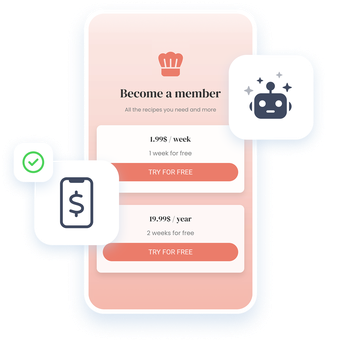
Compatible with the Memberships extension
Tailored answers, richer for your subscribers than for non-subscribers.
Access to the Chatbot can also be reserved for your subscribers as a premium benefit.
Access to the Chatbot can also be reserved for your subscribers as a premium benefit.

Build an app with built-in AI, no coding required
iOS, Android, and PWA apps ready to integrate the Chatbot in just a few clicks.
- Intuitive, 100% no-code interface — accessible to everyone
- Modern, customizable designs for a unique visual identity.
- Seamless Chatbot integration, no extra development needed
A versatile chatbot
Covers a broad range of use cases

Turn documents into answers
Add PDF, Word, text and Markdown files to your Chatbot. Make resources such as handbooks, policies and course materials easy to explore through questions.- Internal communication
- Training and onboarding
- Customer support
Choose whether users can open or download each original file.Create my app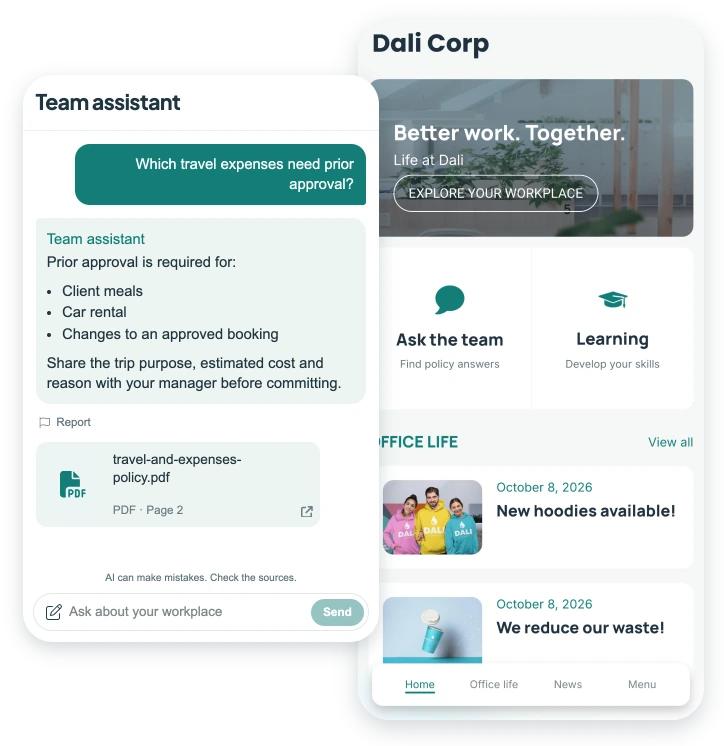

Find answers inside your podcasts
Turn your podcast archive into a source of answers. Enable automatic audio transcription so listeners can find the ideas, advice and stories inside your recordings, then return to the episode to hear more.- Radio apps
- Interviews and talk shows
- Learning and education
Source cards can link to the episode and show the relevant time range.Create my app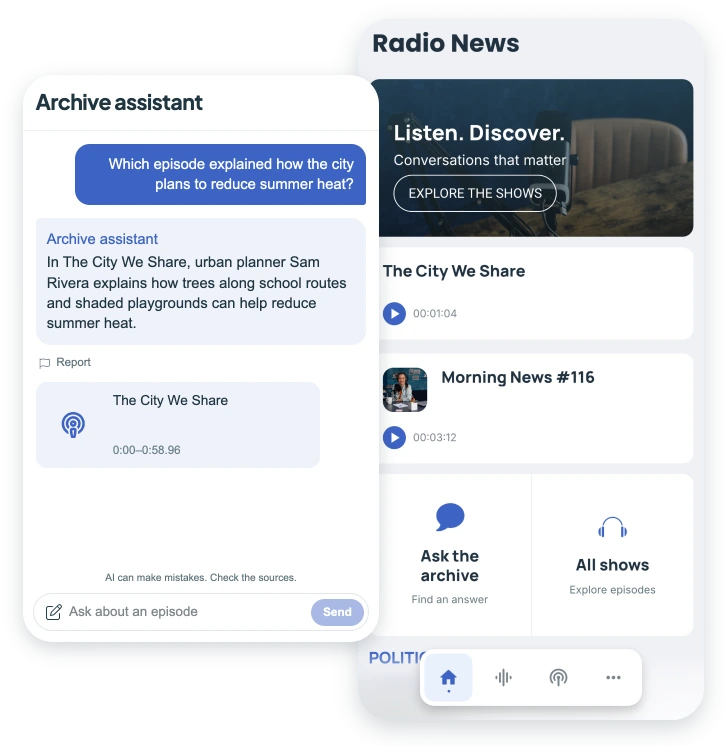

A smart guide
With the Chatbot, your content evolves into a smart, interactive guide built to meet your users’ specific needs. Tourism app
 Recipe book
 Astrology Guide
 Artistic portfolio
 Wellness app
Users can ask a question and instantly receive a clear, context-aware answer. Your content becomes more accessible, more engaging, and genuinely helpful in everyday life.Create my app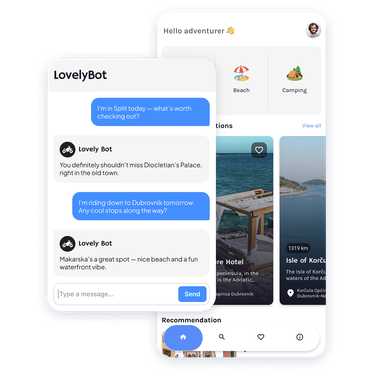

Accurate answers, enhanced by AI
The Chatbot changes the way your users interact with your app. No more menus or long lists: they ask a question and receive an answer based on your content. Cooking
 Training
 Tourism
 Internal communication
Access to information is becoming faster and more fluid.Create my app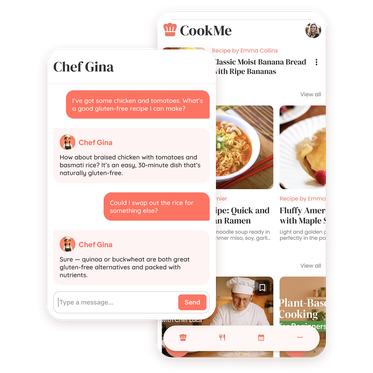

Turn your content into clear answers
With the Chatbot, your publications take on a new dimension. Whether it’s: An internal knowledge base
 A local newspaper
 An online magazine
 A niche media outlet
Each question from your users turns into a clear answer built from your content. This increases the usefulness and value of your app.Create my app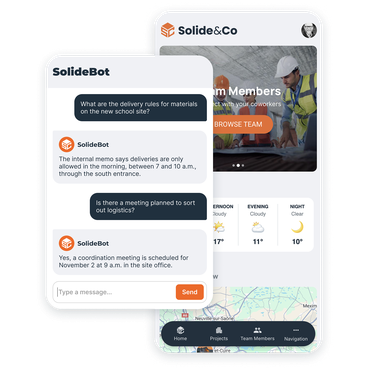


- What is the Chatbot extension?

- The Chatbot (formerly RAG Chatbot) is a feature that lets you integrate a conversational AI assistant into your app. It relies on your selected articles, events, map points, podcasts and uploaded documents to provide users with reliable and relevant answers to their questions.
- How does RAG (Retrieval-Augmented Generation) work?
- RAG technology combines information retrieval from your content with AI text generation. When a user asks a question, the chatbot identifies the most relevant parts of your publications and generates a clear, natural-language answer.
- Which types of content does the Chatbot support?
- The Chatbot supports articles, events, map points and podcasts from your GoodBarber CMS or connected external feeds. You can also upload PDF, Word, plain text and Markdown documents. Podcast descriptions are supported. Audio transcription is optional.
- Can I use documents without making them downloadable?
- Yes. Turn off Available to users for a file. Its contents can still inform answers, but its filename, download link and source card are withheld. This setting controls access to the original file. It does not prevent its contents from being used in answers.
- Can the Chatbot answer questions about podcast audio?
- Yes, when you enable automatic audio transcription. After indexing, answers can draw on the recording. Without transcription, the Chatbot uses episode descriptions. For premium GoodBarber CMS podcasts, transcripts remain protected. Non-subscribers can only receive answers from the description’s free preview.
- Can I choose which content will be accessible to the Chatbot?
- Yes. From your GoodBarber back office, you can choose which content to index. This gives you full control over what the chatbot can use to generate answers.
- Can I choose which AI model is used?
- Yes. You choose the AI model used for indexing and generating answers. Some models are faster and more cost-efficient, while others deliver higher-quality responses. This choice affects credit usage, allowing you to tailor the Chatbot to your priorities — optimizing costs or maximizing answer accuracy.
- Do I have to pay for the Chatbot extension?
- Yes. The Chatbot is offered as a paid extension to be added to your GoodBarber subscription. You can activate it with a single click and automatically benefit from a monthly credit allowance included. Everything is included in the price of the extension, with no hidden costs.
- How does the credit system work?
- The Chatbot uses a monthly credit allowance. Credits cover content indexing, answers and optional podcast audio transcription. Usage varies with the AI model, the content processed and the complexity of the conversation. Your allowance renews every month and is large enough to let users ask thousands of questions to the Chatbot.
- Can the Chatbot be limited to paying subscribers?
- Yes. The Chatbot is compatible with the Membership extension. You can make it available only to paying subscribers, or keep it open to everyone while offering more detailed answers to your premium members.
- Does the Chatbot work in multiple languages?
- Yes. Even if your app is available in a single language, users can ask the Chatbot questions in the language of their choice. The chatbot will reply in the user’s language, using your app’s content.
- Do I need technical skills to install the Chatbot?
- No. Add the Chatbot extension from your GoodBarber back office, choose your app content and podcast sources, or upload documents from the Files tab of your Chatbot configuration page. Once your sources are indexed, try a question your users might ask. No development skills are required.
- Is the Chatbot available on all platforms?
- Yes. The chatbot works seamlessly in your native iOS and Android apps, and in your Progressive Web App (PWA).
- What are some real-world use cases for the Chatbot?
- The Chatbot is suitable for many industries: eLearning and coaching, online media and publishing, tourism and practical guides, internal communication, associations, spirituality, and more. Each app uses its own content to answer its users’ questions.