GBTC: Publish your app with easeDiscover GoodBarber Takes Care and simplify the app publication process for both the App Store and Google Play. Let us handle the technical details for you.Learn more about GBTC
We couldn't stress enough the importance of personalizing one's app. That is why, on top of design and attention to detail, we want to provide you with as many tools as possible to customize your app.
That's also why we've decided to open a new door by granting you access to advanced customizing options for the texts of your application. Many of you issued that particular request, so that your app perfectly adapts to your concept. Your wish is our command! ;)
How does it work?
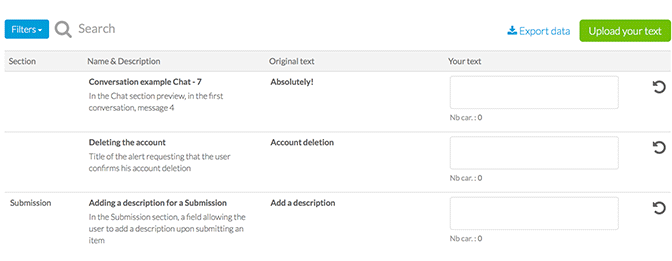
To customize the texts of your application simply go to Settings > App options > Texts. In that menu you will find a table with a large number of texts along with their description. To make the search more efficient, texts can be filtered by sections or keywords. Once you have identified one or several texts you want to customize, simply enter your own text in the field provided. To maintain a good design despite the modified text, a counter indicates the recommended number of characters.
Saving the best for last, you can export/import texts. This might sound trivial but it can actually prove quite useful if you wish to modify texts on a regular basis or if you possess several apps to which you want to apply the same modifications.
What is it for?
If you want to create an app in a language not available in the back office. If you want to change opt-in messages wording. If you want to introduce a nuance to a particular section. For example, with the Submission section, instead of requesting that users "Add a description" you can ask for "Add a GPS coordinate". For a Tourism app this can be a great way to help you organize user generated content.
All in all, customizing texts is an extra step towards creating a unique app. You can engage with your users in your own words! If you want to be formal or on the contrary really quirky, it’s your app completely :)
Five ways lead to a fitness app for your business, and each is priced its own way: a flat plan, an add-on to gym software, per client, per subscriber or quoted. The table below compares what each one costs and the job it is built for.
OpenAI released GPT-6 Sol and GPT-6 Luna on September 22, 2026, after GPT-6 Astra, the flagship of the family, earlier the same month. Luna is the smallest of the three. OpenAI describes it as its most efficient model for focused, high-volume tasks, and sells it at half the price of GPT-5.6 Luna, the model it replaces in OpenAI's own line-up.The next morning, we moved the AI Extension Builder to GPT-6 Luna, for every app, on the four moments where a model is at work: understanding your request, writing the code of the section, rewriting it when you ask for a change, and answering the questions you ask about what it built.
 eCommerce
 Memberships
 RAG Chatbot
 Online Courses
 Bookings
 Travel guide
 Events
 Content Creators
 Pickup & Delivery
 Newspaper
 Radio
Radio Schools
 Faith
Faith Organizations
 Restaurant
 Grocery
 Custom apps
 Employee Communication

 NO CODE APP BUILDER
 TECHNOLOGY
 WHY GOODBARBER?
 Design
 PRODUCT RESOURCES
 TOPICS
 MOBILE APPS RESELLERS
 DISCOVER