GBTC: Publish your app with easeDiscover GoodBarber Takes Care and simplify the app publication process for both the App Store and Google Play. Let us handle the technical details for you.Learn more about GBTC
In our last article we insisted on the growing influence mobile has on our every behavior, including desktop usage and expectations—an influence which has made room for a new concept, Progressive Web Apps. Today we will dig deeper into what makes up a PWA and how it operates.
As a concept, Progressive Web Apps are getting more and more attention. Taking after the best of the web on the one side and the best of native apps on the other, PWAs aim at reducing the gap between native apps and web apps.
Now, to this day, the success of native apps has derived from the fact that they are the best way to deliver outstanding user experience, on mobile, from a visual perspective as well as from the point of view of the features supported. However, the technology on which they run has its inherent limitations, when it comes to indexing for instance (SEO), with issues of discoverability, as well as the compulsory install step which can be a deterrent to some users. PWAs intend to overcome these obstacles, while still taking after apps in many ways.
To get a better understanding of the specifics of Progressive Web Apps, one must start by looking at the principles driving the concept, namely how a Progressive Web App should be 1) Reliable, 2) Fast, 3) Engaging. Therefore, a PWA is first and foremost about delivering a user experience. It’s with that user centric intent in mind that developers are turning to a set of web technologies, tools and best practices which in turn establish a new standards for the web, across devices.
To give you an introduction to the specifics of PWAs from a technological point of view, we discussed them with Jean-Mathieu, Angular developer at GoodBarber :
Reliable
One defining characteristic of a Progressive Web App is its capacity to function offline. On the user’s end, the idea is to avoid the display of the dreaded error message in the event of a flaky internet connection or no network connection at all.
To deliver content to the user offline, a PWA first relies on the app shell, which basically calls up the page’s structure, even if the content isn’t responding—its elements include the header, the layout of the page as well as a clear illustration that the page is loading, so that the user’s informed something is happening. A progress compared to the error message the user usually comes across with websites or web apps nowadays.
In order to challenge the look and feel of native apps, the design of a Progressive Web App is adaptive. Responsive is a must for any PWA, regardless of the technology running it. For the user, this ensures a seamless transition from one device to the next, all screen sizes alike, which definitely falls under the reliability dimension.
Fast
In addition, a Progressive Web App also relies on a service worker, whose purpose includes content caching, as soon as the app is launched for the first time. This way, beyond the first visit, content can be made available offline, articles list and details alike.
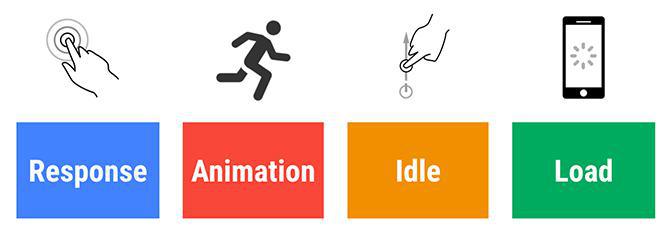
This behavior is in accordance with the requirements of the RAIL model introduced by Google: Response / Animation / Idle / Load—in other words, a Progressive Web App must respond to the user’s request, display an animation to keep him waiting, use this "idle" moment to cache as much content as possible and finally load under a second! With such promises it’s easy to see how the Progressive Web Apps phenomenon is winning over so many players of the web, across industries.
Engaging
If the installation of a native app can be considered as somewhat of a pitfall (in the sense that it requires extra engagement on the part of the user), Progressive Web Apps turn the app install into a bonus. On mobile and tablet the user is indeed prompted to install the app on the home screen of the device. This "install" is enabled throughthe app manifest, which feeds information to the browser, such as the icon (with the accurate size for each device), the splash screen (or the color to be displayed on the launch screen), the portrait / landscape display or both, and whether the app is to operate on its own, autonomously from the browser.
Progressive Web Apps also challenge native apps in the field of push notifications. If push notifications are enabled at the development stage, push notifications’ management is just another background task for the service worker. As of now, when it comes to PWAs, push notifications are supported by Chrome, Firefox, Opera, and Safari on desktop, but not on mobile. A reticence which could be interpreted as a sign that Progressive Web Apps are solid competition to native apps? Time will tell…
Last but not least, because Progressive Web Apps rely on the best of the web, they also fall under the growing consensus for a safer web navigation, with the requirement to be served over HTTPs. By the way, with HTTPs soon to become a requirement for iOS apps, on the App Store, even if this additional requirement for PWAs can be considered extra work for developers, it’s not what’s going to keep PWAs at bay from native apps.
Now, if one were to isolate one key element to outline the Progressive Web Apps revolution, it would probably be the service worker—as Jean-Mathieu puts it, it’s the service worker and its background tasks which manage push notifications, offline, cache and more, i.e. most of the features which differentiate Progressive Web Apps. All this without forgetting the manifest (pun intended) kinship with mobile, with a native “look and feel” for the user.
If you want more information about the specifics of Progressive Web Apps, Google has a checklist, available here .
Five ways lead to a fitness app for your business, and each is priced its own way: a flat plan, an add-on to gym software, per client, per subscriber or quoted. The table below compares what each one costs and the job it is built for.
OpenAI released GPT-6 Sol and GPT-6 Luna on September 22, 2026, after GPT-6 Astra, the flagship of the family, earlier the same month. Luna is the smallest of the three. OpenAI describes it as its most efficient model for focused, high-volume tasks, and sells it at half the price of GPT-5.6 Luna, the model it replaces in OpenAI's own line-up.The next morning, we moved the AI Extension Builder to GPT-6 Luna, for every app, on the four moments where a model is at work: understanding your request, writing the code of the section, rewriting it when you ask for a change, and answering the questions you ask about what it built.
 eCommerce
 Memberships
 RAG Chatbot
 Online Courses
 Bookings
 Travel guide
 Events
 Content Creators
 Pickup & Delivery
 Newspaper
 Radio
Radio Schools
 Faith
Faith Organizations
 Restaurant
 Grocery
 Custom apps
 Employee Communication

 NO CODE APP BUILDER
 TECHNOLOGY
 WHY GOODBARBER?
 Design
 PRODUCT RESOURCES
 TOPICS
 MOBILE APPS RESELLERS
 DISCOVER