 eCommerce
 Memberships
 RAG Chatbot
 Online Courses
 Bookings
 Travel guide
 Events
 Content Creators
 Pickup & Delivery
 Newspaper
 Radio
Radio Schools
 Faith
Faith Organizations
 Restaurant
 Grocery
 Custom apps
 Employee Communication

 NO CODE APP BUILDER
 TECHNOLOGY
 WHY GOODBARBER?
 Design
 PRODUCT RESOURCES
 TOPICS
 MOBILE APPS RESELLERS
 DISCOVER
World Cup 2026: add a match schedule and results section to your app, no code required
Written by Mathieu Poli on · Last update:
The 2026 World Cup has kicked off, and the matches are about to grab everyone's attention — a chance to keep your audience close and bring in a new one, right inside your app. Here's how to add a a match schedule and results section to it — each match's score, the next match up front, kickoff time in the visitor's local zone — starting from a single prompt, with GoodBarber's AI Extension Builder.
The problem: the World Cup is happening everywhere but your app

From June 11 to July 19, 2026, 48 teams and dozens of matches will set the rhythm for six weeks of worldwide attention. Meanwhile, your community is following the scores on five other apps. None of them carries your name.
A fixtures and results section is exactly the kind of page that, until recently, called for a developer. Today, you describe it and it builds itself. Here's how.
What you'll get
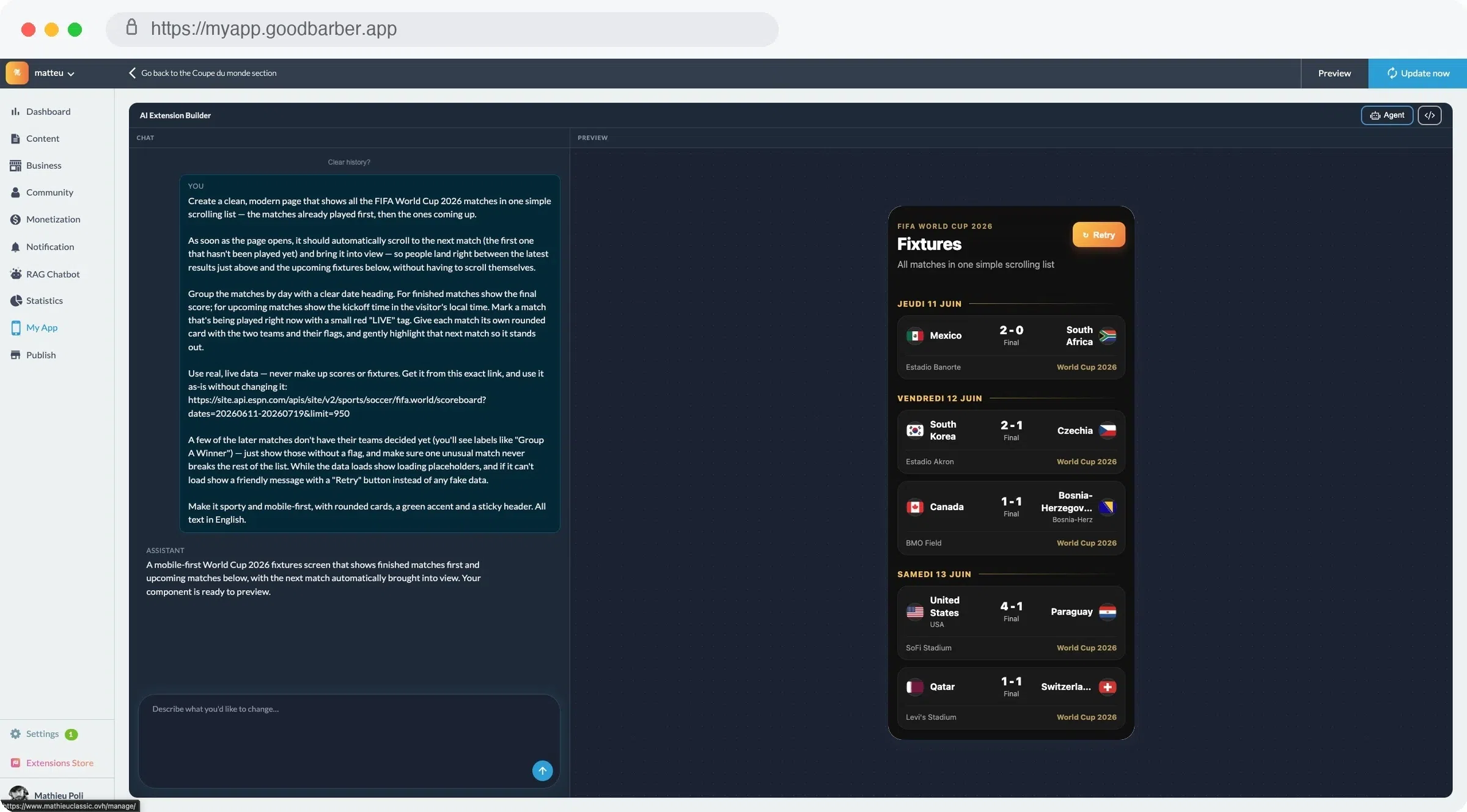
A single scrolling page:
- Matches already played first, upcoming matches next. On open, the page lands straight on the next match: the latest result just above, what's coming just below.
- Grouped by day, with a clear date heading.
- Final score for finished matches, kickoff time in the visitor's local time zone for upcoming ones.
- A rounded card per match, with both teams and their flags, and a subtle highlight on the next match.
- A sporty, mobile-first design.
And above all: real data, never invented. Placeholders while it loads; a clear message with a “Retry” button if it fails — no fake scores.
Two ways to get there.
Method 1 — The express route: one click in the examples library
Best when you want a result fast.
- In your GoodBarber back office, add a section and choose “Create with AI” (the AI Extension Builder).
- Open the examples library.
- Pick the example “World Cup 2026 — Fixtures & Results.”
- The assistant generates the code and shows the result live, in the context of your app.
No setup, no API to wire up, not a line of code. The example already ships with the right prompt — the one we break down just below. Keep it as-is, or tweak it to match your app's colors.
This is the “one click” scenario: the section exists in under a minute. But understanding how the example is written is what lets you create more of them afterward — for your national championship, your local league, or just your own club's matches.
Method 2 — The custom route: anatomy of the prompt
Here's the exact prompt behind the example. It fits in a few lines, and every line earns its place.
Our example is written in English, and it asks for an English interface (All text in English). Nothing forces you to: write your prompt in your own language and ask for text in that language if your audience speaks it.
What makes this prompt reliable comes down to five simple habits. Those are what to remember — far more than this specific case.
1. Describe the result, not the code. You never tell the assistant how to do it. You tell it what the user should see: a scrolling list, played matches first, the page opening on the next match. You describe an experience; the assistant writes the code.
2. Point to a real data source — and respect it. The prompt gives a live data link and one non-negotiable instruction: Use real, live data — never make up scores, use it as-is. That's the anti-hallucination guardrail. On every open, the page reads the real source; it never invents a score. (For a different event, this is the line you change: your championship, your league, your club.)
3. Anticipate the edge cases. In 2026, many knockout-stage matches don't have teams assigned yet — you'll see labels like “Group A Winner” go by. The prompt planned for it: show those matches without a flag, and above all make sure one unusual match never breaks the rest of the list. A single broken data point shouldn't take down the whole page.
4. Handle empty states and errors. While loading: placeholders. On failure: a clear message and a “Retry” button. Never fake data to paper over a gap. That's what separates a real section from a demo that crashes in a meeting.
5. Frame the style in one sentence. Mobile-first, rounded cards. The assistant needs a short, sharp art direction — not a spec sheet.
These five habits aren't just for football. Reuse them for an events calendar, a product list, an internal scoreboard: it's the same prompt grammar.
Why it really works in GoodBarber
Plenty of tools generate code with AI. The difference is where that code lands.
Here, the assistant isn't writing into the void. The generated section plugs straight into your app: hosting is included, it adopts your app's Smart Design system, and it's embedded in your app — on iOS, Android and as a PWA — then distributed to the stores like everything else. The result isn't a snippet to copy-paste: it's a living section inside a real app.
And that's just a start: a section built this way can also tap into the platform's capabilities — geolocation, content, push notifications, and more. Our example does without them — it reads its score source directly — but you can build pages that go much further in integrating with your app.
It's also what explains GoodBarber's long-standing promise — professional apps without writing a line of code, since 2011, today with one download every 4 seconds across 152 countries. The AI Extension Builder extends that logic: when a feature is missing from the catalog of 190+ extensions, you no longer depend on a developer — you describe it, and it gets added to your app.
Get started
The 2026 World Cup runs for six weeks. The attention window, though, is open right now.
Open the AI Extension Builder in your back office (or start a free trial), pick the “World Cup 2026” example from the library, and publish your fixtures and results section before the next kickoff. Then reuse the prompt's five habits for the next feature your app is missing.
In short (FAQ)
Are the results up to date?
Every time the page opens, the section reads a live data source. The scores and times shown are the ones that source returns — never invented data.
Do I need to know how to code?
No. You describe the section in plain language; the assistant generates the code and shows it live. You can then refine the prompt, or edit the code directly if you want.
Can I adapt it to another event or to my championship?
Yes. The prompt structure is reusable: swap the data source and the style to cover another competition, a local league, or just your own club's matches.