 eCommerce
 Memberships
 Chatbot
 Online Courses
 Bookings
 Travel guide
 Events
 Content Creators
 Pickup & Delivery
 Newspaper
 Radio
Radio Schools
 Faith
Faith Organizations
 Restaurant
 Grocery
 Custom apps
 Employee Communication

 NO CODE APP BUILDER
 TECHNOLOGY
 WHY GOODBARBER?
 Design
 PRODUCT RESOURCES
 TOPICS
 MOBILE APPS RESELLERS
 DISCOVER
The ultimate dashboard for your mobile apps
The best tool on the market to create and manage high-performing mobile apps, without compromise.
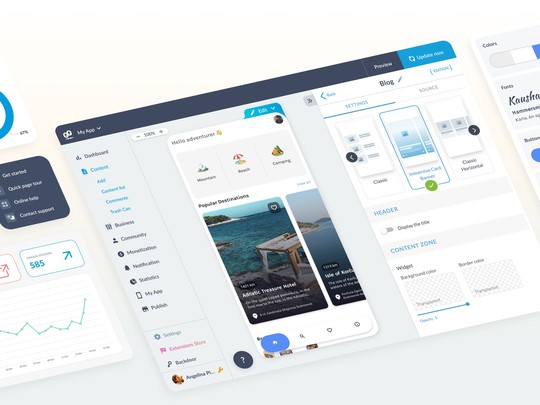
An intuitive interface for everyone
GoodBarber offers an ultra-ergonomic interface that guides you step by step. Easy to get to grips with, whether you're novice or expert, it simplifies your daily routine while offering advanced customization options for experienced users.
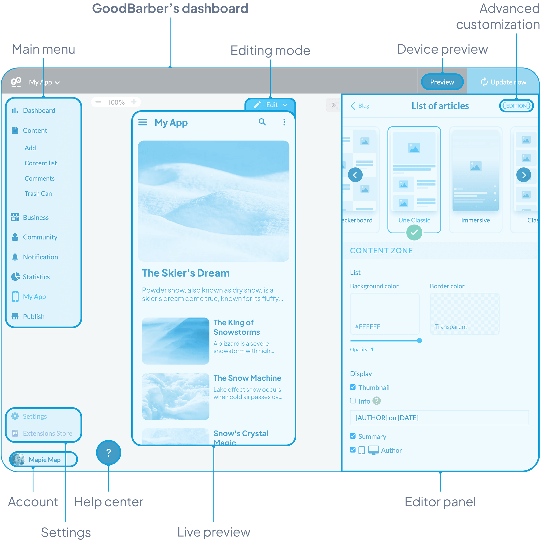

Design and customization
Easily modify the style and visual structure of your app to reflect your brand.

Choice of features
Integrate useful sections and features for your app from our extensions store.

Content management
Whether you're creating a Content or eCommerce app, manage your products, articles and pages effortlessly.
Real-time preview
Modify your app and immediately visualize the result on all media: smartphone, tablet, laptop, desktop. This key feature allows you to guarantee perfect rendering consistency, with no guesswork.
What happens in this video
My App opens on the Header of Words & Waves, where you set the top of the app and see it on the phone at once. Header height is Small. In the panel: the logo, the color #18181A and the font Playfair Display. The pointer moves to Preview and clicks it. The phone shows the stories, with What the ocean knows about us by Clara Whitmore.
Preview opens. This is where you check the app you are building, on the screen sizes GoodBarber provides, before you publish. The banner says "You are now in preview mode." The device is an iPhone 16 Pro. On the phone: the Words & Waves home, the story What the ocean knows about us, and the sound What remains unsaid under Reflections.
The phone preview holds. What the ocean knows about us stays on screen, by Clara Whitmore, dated Sunday, January 25. The banner still reads "You are now in preview mode."
The same build widens to a tablet size. What the ocean knows about us, Where Sydney begins to whisper and The city after dark sit side by side, and Reflections stays underneath.
The preview moves to desktop size: the web version of the same app. The stories line up in a row, Reflections lists What remains unsaid and Why we slow down, and the section navigation sits on the left.
Back on My App, in the Header you were editing. The Header panel is open, Small is still selected, Playfair Display is still the logo font, and the phone shows the same stories.
An interface that adapts to you
Your dashboard is dynamic and scalable. Thanks to the Extension Store, easily add functionalities to your app according to your needs. The dashboard adapts to your choices, displaying only the tools and options you need, making app management fluid and optimized.

All in one: from design to monetization
Manage all aspects of your app from a single, ergonomic dashboard:
 Customization: Easily modify your app's design.
- Content management: Add and organize your products and articles.
- Engagement: Send push notifications to your users.
- Performance tracking : View statistics at a glance.
GoodBarber's versatility makes it one of the most complete solutions on the market.

Multilingual and collaborative
GoodBarber facilitates collaborative working with access management by role (owner, administrator, user) and tailored permissions for each. Each member of your team can configure their interface in the language that suits them.
Multilingual interface
Available in 16 native languages for seamless management, whatever the user.

Customized access and permissions
Define precisely which sections and functions are accessible to each employee.
A powerful integrated CMS
GoodBarber's back office content management system (CMS) centralizes all the essential features for professional management of your articles, galleries, videos and podcasts. Create, publish and manage efficiently, without technical complexity.
Content appsWhat happens in this video
The Content list of Words & Waves is where you keep every story of the app. A draft stays a draft until you publish it. What the tide leaves behind is a Draft by Clara Whitmore, dated 10/06/2026. Then About Words and Waves, On learning to stay, What the ocean knows about us, What remains unsaid, Before the weekend begins, Where Sydney begins to whisper and Why we slow down, most of them Published and Free.
The list moves down. what we carry into rest and Living with the heat come into view, with pages 1, 2 and 3 at the bottom.
The list settles. What the tide leaves behind is still the first story, and Living with the heat is the last row of this page.
A space dedicated to eCommerce applications
Boost your sales with a comprehensive range of eCommerce tools. Manage inventory, secure payments and promotions, while optimizing your conversions with detailed statistics.
eCommerce AppsWhat happens in this video
My products is the catalog of Nova Concept: what the shop sells, in one list. Blue Sunglasses, Chunky Sneakers, Patchwork Organic Denim and Polaroid Camera are Published. The pointer rests on Products, open on Add, All products and Collections, then moves to Sales channels.
Sales channels opens as the pointer arrives. GoodBarber publishes this same catalog as PWA, the web version, and as native apps: Android App and iOS App. The pointer settles on iOS App. The catalog does not change.
Statistics opens as the pointer arrives. This is where you read the shop: Activity for what it sells, Traffic for the visits, and External analytics for the tools you already use. The same products stay on screen.
Marketing opens as the pointer arrives. From here you bring people to the shop: Discount list, Send push, Push history, Share and QR Code.
The pointer comes back to Products. Marketing stays open, and the catalog has not moved.

Product management
Stock, promotions and variants centralized in one interface.

Integrated marketing
Push notifications, loyalty programs and personalized offers.

Advanced statistics
Performance analysis to maximize conversions.