 eCommerce
 Memberships
 Chatbot
 Online Courses
 Bookings
 Travel guide
 Events
 Content Creators
 Pickup & Delivery
 Newspaper
 Radio
Radio Schools
 Faith
Faith Organizations
 Restaurant
 Grocery
 Custom apps
 Employee Communication

 NO CODE APP BUILDER
 TECHNOLOGY
 WHY GOODBARBER?
 Design
 PRODUCT RESOURCES
 TOPICS
 MOBILE APPS RESELLERS
 DISCOVER
Connect ChatGPT and Codex to your GoodBarber app
GoodBarber speaks MCP, the open standard for AI assistants. Connect ChatGPT or OpenAI Codex to your app and manage products, content, members and push notifications in plain language.
GoodBarber is available in the shared ChatGPT and Codex plugin directory. Connect it to your app to manage products, content, members and push notifications from a conversation.
Find GoodBarber in the plugin directory
Open the GoodBarber listing in ChatGPT on the web or in the desktop app. The same plugin connects your app to ChatGPT and Codex.
Connect GoodBarber
Choose how to connect your app. Both methods work in ChatGPT on the web and in the desktop app.
A GoodBarber app
- An active GoodBarber app
- Admin access to the app you want to connect
A ChatGPT account
- A ChatGPT account you are logged into
- Permission to install plugins in your workspace
Method A: install the GoodBarber plugin
The recommended method. Find GoodBarber in the plugin directory, install it, and connect your app.
Find GoodBarber
Open Plugins in ChatGPT and search for GoodBarber, or open its listing directly.
Install the plugin
Open the GoodBarber listing and select Install plugin. This step is the same in ChatGPT on the web and in the desktop app.
Connect your GoodBarber app
When prompted, select Connect. Sign in to GoodBarber with an API key from your back office and approve access. Each key is tied to one app: that is the app the assistant will manage.
Start a conversation
Start a new chat in ChatGPT or Codex. Type @ and select GoodBarber, then ask, for example: “List the articles in my app.”
Method B: add the MCP server manually
Create your own GoodBarber connection from the Plugins page. These steps apply on the web and in the ChatGPT and Codex desktop app.
Add a custom MCP server
Open Plugins. Select Add, then choose Add custom MCP server from the menu.
Enter the connection details
Enter GoodBarber as the name. Under Connection, enter this server URL:
https://mcp.goodbarber.dev/mcp/sseChoose OAuth
Set Authentication to OAuth so ChatGPT can sign you in to GoodBarber securely.
Create the plugin and authorize access
Review the warning, select I understand and want to continue, then Create as a plugin. When prompted, sign in to GoodBarber with an API key from your back office and approve access to your app.
Use GoodBarber in a conversation
After authorizing the connection, start a new chat in ChatGPT or Codex. Type @ and select GoodBarber. You can then ask, for example: “List the articles in my app.”
What you can do with it
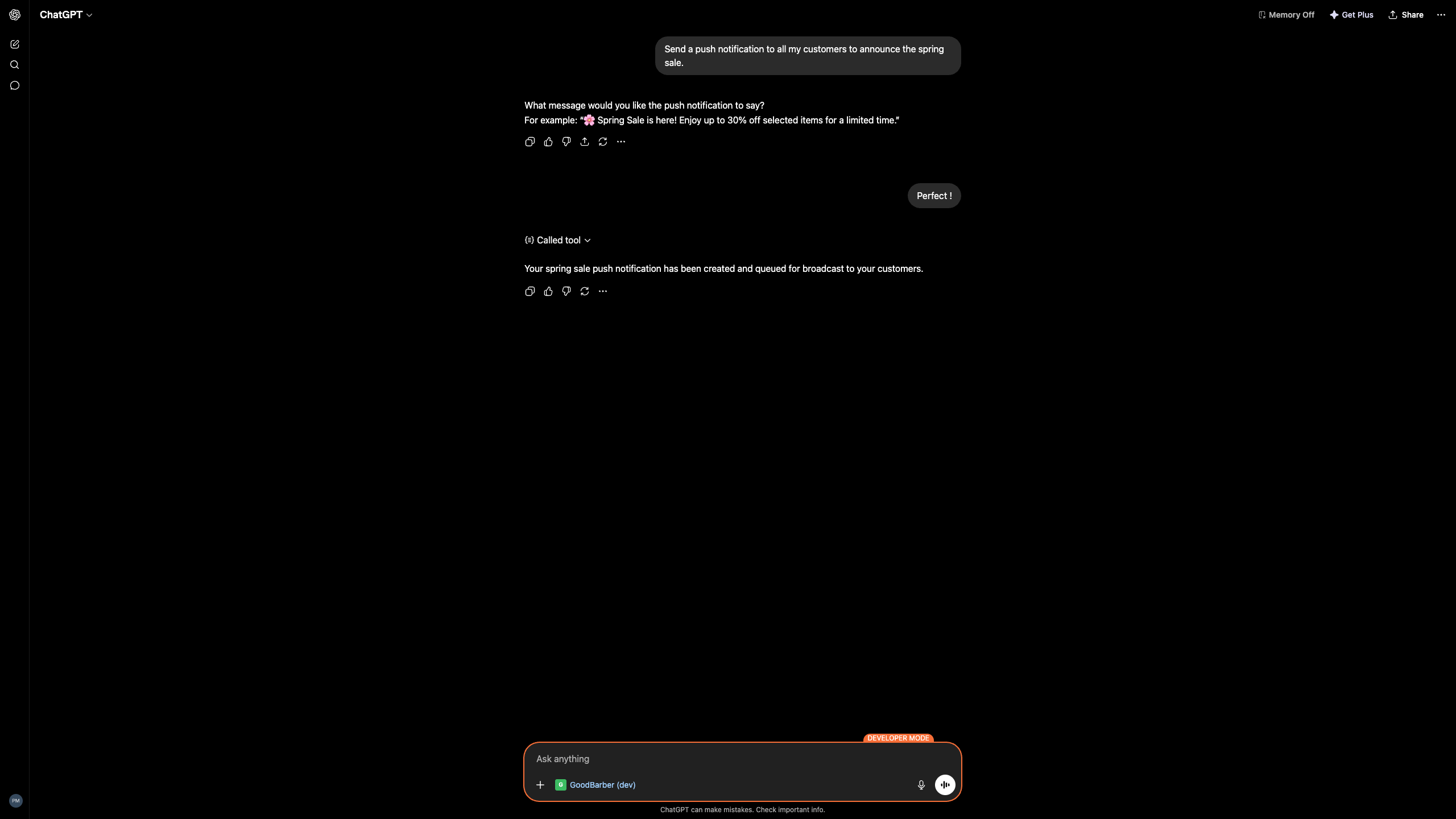
Plain language requests. GoodBarber does the work in your app. A few things our team ran while testing:
Content
Create a published article titled Spring Sale announcing 20% off the whole catalog until June 30.
Created and published the article, with the 20% off announcement.
Push notifications
Send a push to all my customers to announce the spring sale.
Created the push and queued it for broadcast, after you approved the wording.
Prefer a Custom GPT?
You can also connect GoodBarber through a Custom GPT with Actions. This separate connection method is useful when you want to share a prepared assistant with your team. We will link the GoodBarber GPT here once it is live in the GPT Store.
Good to know
A few honest limits before you start.
Manual connections use the server URL above
For a manual connection, use the GoodBarber MCP server URL and choose OAuth in the Plugins form.
Available actions depend on your plan
Which GoodBarber actions the assistant can run depends on your GoodBarber plan and your admin rights.
Workspace permissions apply
Your account, workspace permissions and security settings determine whether you can install plugins or add a custom MCP server. Contact your administrator if an option is unavailable.
You stay in control
Write actions require confirmation by default. You can manage tool permissions and revoke GoodBarber’s access at any time.
Your app stays yours
Connecting an assistant does not hand over the keys.
Secure sign in
You connect through OAuth: you sign in to GoodBarber and approve access. No password or token is shared with the assistant.
Scoped to your rights
The assistant can only do what your own GoodBarber account already allows.
Revoke anytime
Disconnect GoodBarber from Codex or ChatGPT whenever you want. Access ends immediately.
Privacy by design
GoodBarber keeps its privacy commitments for every connection. See our privacy policy.
Run your app from a conversation
Connect the GoodBarber plugin and manage products, content, members and push in ChatGPT or Codex.