 eCommerce
 Memberships
 Chatbot
 Online Courses
 Bookings
 Travel guide
 Events
 Content Creators
 Pickup & Delivery
 Newspaper
 Radio
 Schools
 Faith
 Organizations
 Restaurant
 Grocery
 Custom apps
 Employee Communication


 NO CODE APP BUILDER
 TECHNOLOGY
 WHY GOODBARBER?
 Design
 PRODUCT RESOURCES
 TOPICS

 MOBILE APPS RESELLERS
 DISCOVER
How to distribute iOS app out of the store with iOS Enterprise Program ?

However, if your goal isn't for it to be publicly available for everyone, but just for internal users, distributing it outside of the Store could be a good alternative.
You have two options :
Custom apps distribution.Custom appsmay be distributed using Apple Business Manager, School Manager, or redemption codes via the public App Store. You can find out more about custom apps in this article .
- In-House - The Apple Developer Enterprise Program allows you to create certificates and provisioning profiles in order to distribute your apps via an internal portal or URL.
This article covers alternatives to the Apple Developer Program for enterprises.
With this method, your binary (.ipa file) will be hosted on a server, and you'll give a URL to the users of your choice which gives them access in https.
Who is the Apple Developer Enterprise Program for?
The Apple Developer Enterprise Program allows you to distribute your app internally, outside of the App Store, and costs $299 per year.
No matter how you plan to distribute the iOS version of your app internally, you must first subscribe to this service, which is mandatory for creating the certificates.
How does it work from the administrator's point of view?
1) You will use an "In House" distribution certificate to sign your app.
2) You will give your app an app ID
3) You will link a push certificate to this app ID
4) You will associate "In house" and ad-hoc provisioning profiles with your app ID.
One your application is generated, you'll be able to manage its distribution yourself.
There are services available online to help you manage the distribution of an app created with an enterprise developer account, which allow you to create an internal store.
We have a good relationship with the founders of Appaloosa, one of the leading companies in this domain, and if you're interested in using their product, GoodBarber can offer you exclusive advantages. Contact the support team for more details.
It is possible to distribute your app yourself. It's a bit technical, but nothing impossible. If you're up for the challenge, read on.
Do you want to manage your app's distribution yourself?
1) Host the app's binary (the .ipa file) on a server.
The .ipa file can be downloaded from your backend : Publish > Submission > iOS.
Attention : The .ipa file must be served by your server via https, otherwise it won't be possible to install your app on your users' devices.
2) Create a manifest associated with this binary file.
A manifest is a file that contains metadata related to the other files it describes. For example, in our case, the manifest will indicate the URL of your app's .ipa file, the bundle ID, and the name of the app.
You must manually build this file (see the example below). You can create the manifest in any text editor. When saving it, give it the .plist extension.
<?xml version="1.0" encoding="UTF-8"?>
<!DOCTYPE plist PUBLIC "-//Apple//DTD PLIST 1.0//EN" "http://www.apple.com/DTDs/PropertyList-1.0.dtd ">
<plist version="1.0">
<dict>
<key>items</key>
<array>
<dict>
<key>assets</key>
<array>
<dict>
<key>kind</key>
<string>software-package</string>
<key>url</key>
<string>[https link to the IPA file]</string>
</dict>
</array>
<key>metadata</key>
<dict>
<key>bundle-identifier</key>
<string>[Bundle ID]</string>
<key>bundle-version</key>
<string>1.0</string>
<key>kind</key>
<string>software</string>
<key>title</key>
<string>[App Name]</string>
</dict>
</dict>
</array>
</dict>
</plist>
Don't forget to replace the following elements in brackets :
[Https link to the IPA file]: Your .ipa file's URL after it's been hosted on a secure server
[Bundle ID]: Your app's ID available on this page : Publish > Certificates > iOS
[App name]: The name of your app
3) Create a web page with a link to the manifest
After you've left the .plist file on a secure server, you can then create a web page where you'll put a link to download your app, like in the example below :
<a href="itms-services://?action=download-manifest&url=URL_OF_THE_PLIST_FILE" id="text"> Download our application</a>
Don't forget to replace "URL_OF_THE_PLIST_FILE" with your .plist file's URL.
You can also replace the text "Download our application" with another personalized message.
How does it work for the final user?
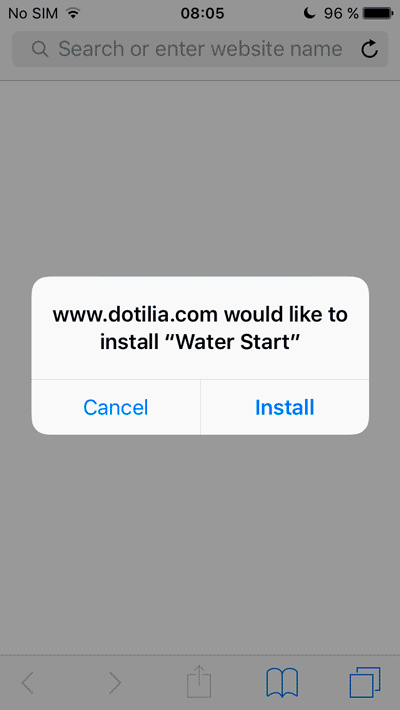
They can then click the link inside to download your application.
The first time users click on this link, a pop-up will be displayed on their screen to confirm that they want to download the application.
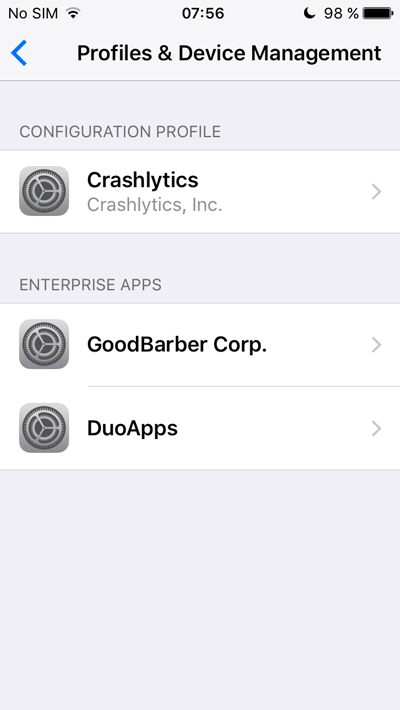
Then, the first time it's launched, a new pop-up will appear.
iOS will ask them if they trust the distributor of the app, which in this case is you.
Your users will then have the pleasure of exploring and using your beautiful app!
Extra info
Once it has expired, it will no longer be possible for your final users to download the application.
You will have to renew it.
You can create up to 3 "In House" distribution certificates per Enterprise Account, and you can use the same certificate for the distribution of multiple applications.


