 eCommerce
 Memberships
 Chatbot
 Online Courses
 Bookings
 Travel guide
 Events
 Content Creators
 Pickup & Delivery
 Newspaper
 Radio
 Schools
 Faith
 Organizations
 Restaurant
 Grocery
 Custom apps
 Employee Communication


 NO CODE APP BUILDER
 TECHNOLOGY
 WHY GOODBARBER?
 Design
 PRODUCT RESOURCES
 TOPICS

 MOBILE APPS RESELLERS
 DISCOVER
Steal this idea: a Christmas gift planner
September is behind us, the back-to-the-gym resolutions held up (or didn't), and now it's time to get ready for the holidays. To help your customers see clearly, here's an app section that takes some of the stress out of filling Santa's sack: one card per person, gift ideas that change state as the budget fills up, and a countdown to Christmas Eve. All of it generated from a single description given to GoodBarber's AI Extension Builder.

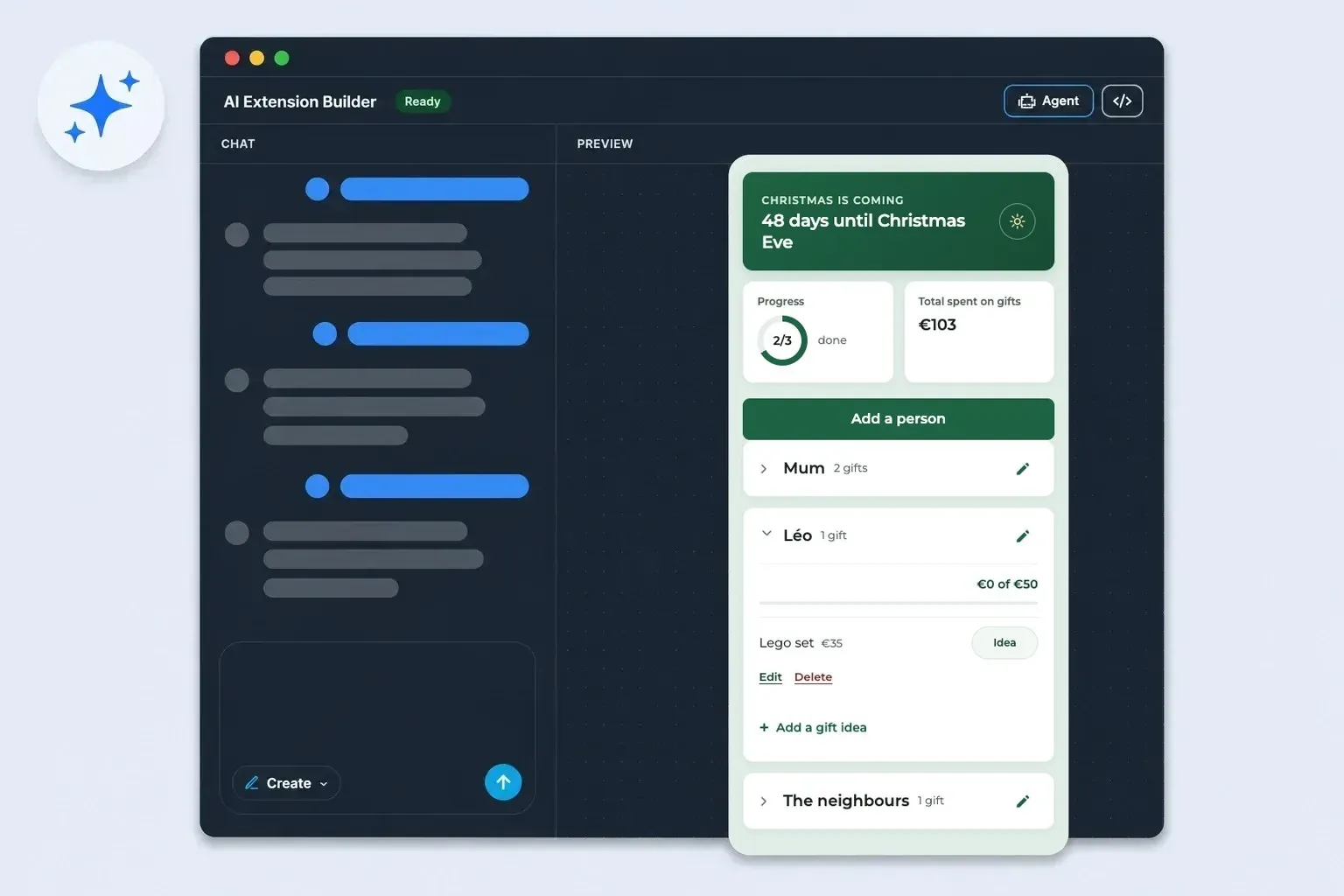
The "Steal this idea" series: an app section we describe to the AI Extension Builder, build for real, and hand over with its full prompt at the end, ready to paste. After the 30-day back-to-shape challenge, on to one of the busiest seasons of the year!
The section, from the customer's side
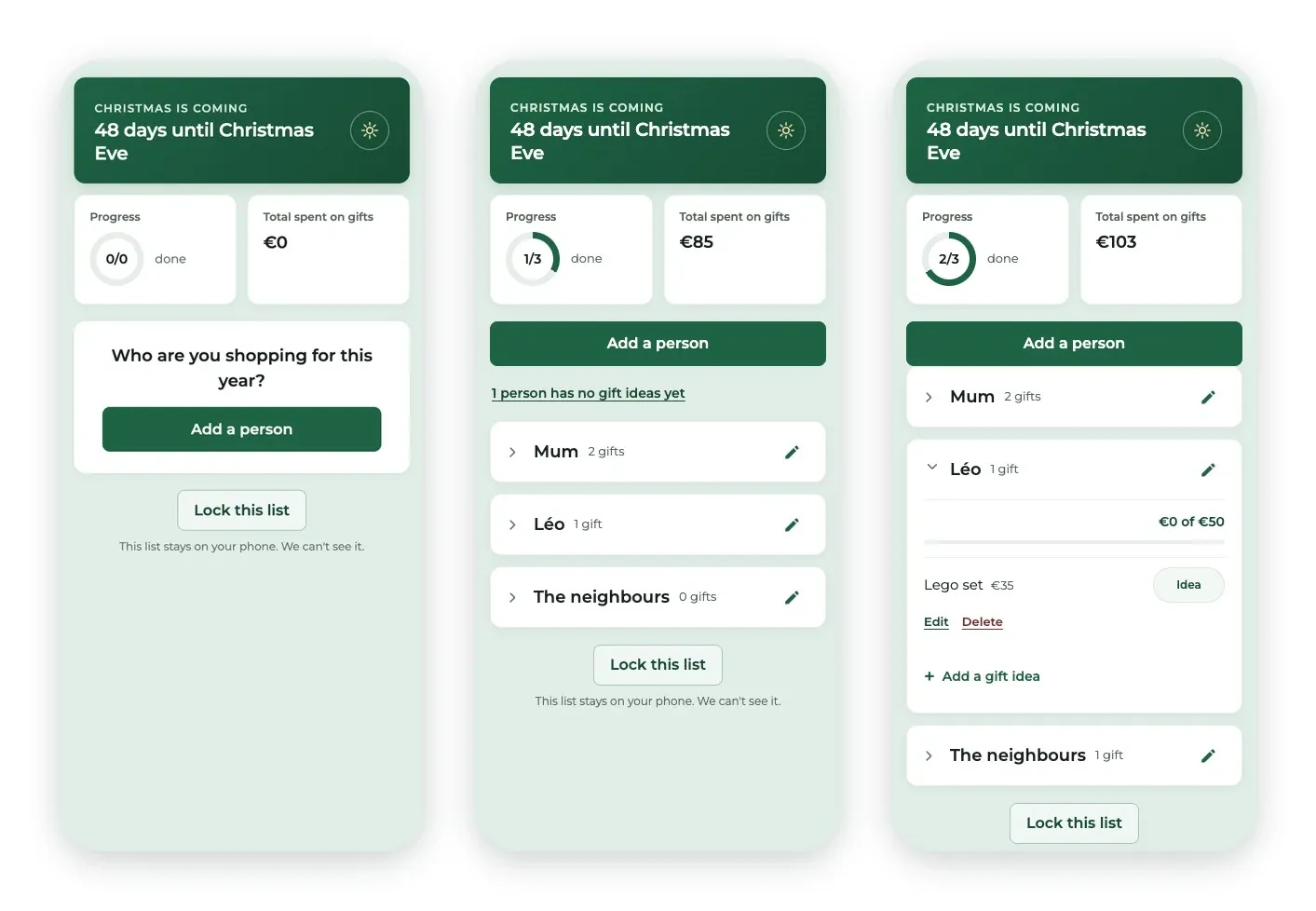
It all starts with a question: Who are you shopping for this year? The customer adds a person — a first name, "Mum", "the neighbours", whatever they like — and can set a budget, or not.
Under each person go the gift ideas. Every idea has a state button you tap to move it along: Idea, then Bought, then Wrapped. Bought and wrapped gifts add up in that person's budget (€0 of €50, with a thin bar) and in the season's total at the top of the screen.
The Progress ring fills as each person gets at least one gift bought. When the list grows, the cards fold down with a tap on their header, leaving just the names. A reminder line shows who still has no ideas (1 person has no gift ideas yet): tap it and the screen scrolls down to that person.
Maison Lumen, the shop in these screenshots, is made up for the example. Everything you see in it is fictional.
Why this format works for a shop
The benefit is the calendar. From early November to 24 December, your customer reopens their list every time a gift comes to mind — and it's your app they open to do it. A shop window gets a passing glance, and a Christmas newsletter gets lost among all the others. A tool that's genuinely useful lands back in their hand at the exact moment they're deciding what to buy.
And it's a service, not one more promotion. The section sells nothing, pushes no product and asks for nothing in return. It saves time and keeps spending within budget. The day your customer is looking for an idea for their mother, your catalog is one tab away.
The budget counts, and doesn't stop at the cap
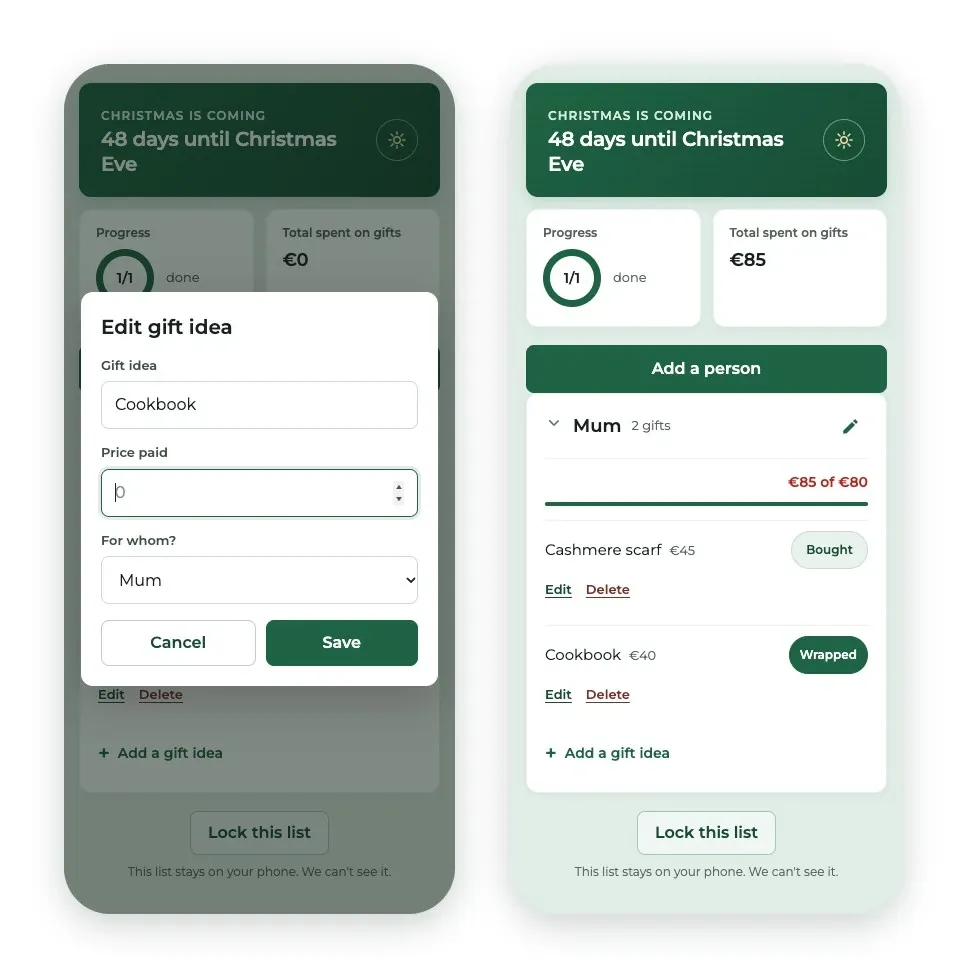
Look at Mum's card: an €80 budget, two gifts bought, €85 spent. The bar is full, the figure turns red (€85 of €80), and the count keeps going. It's written in black and white in the prompt: never stop counting at the budget. A bar stuck at 100% would be lying at the very moment the information matters.
Two details keep that total reliable. A wrapped gift still counts: going from Bought to Wrapped only changes the label. And when an idea with no price is marked as bought, the section immediately opens the gift's card with the cursor in the Price paid field. The customer types what they paid right there, so the total never goes wrong through forgetfulness.
A list that stays on the phone
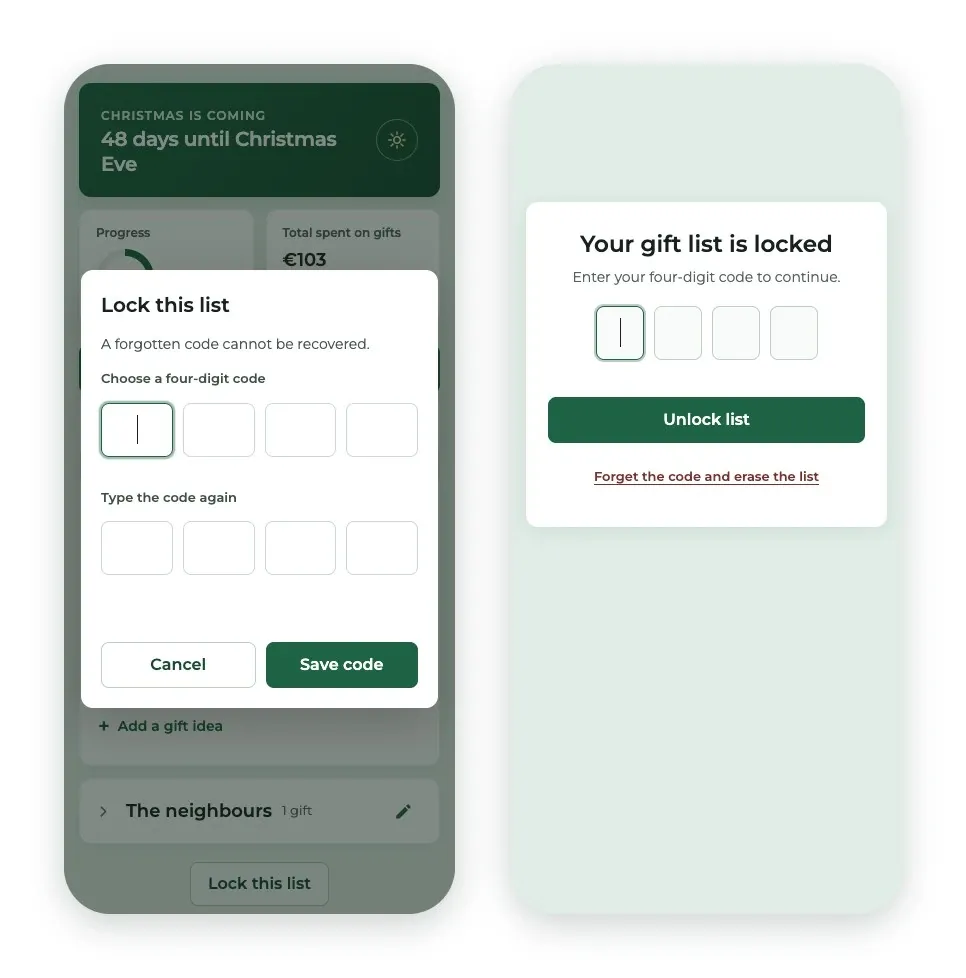
A gift list is a list of secrets, and the section takes that seriously: everything is stored on the device, nothing is sent, nothing is shared. It says so once, in small print at the bottom of the screen: This list stays on your phone. We can't see it.
For phones left lying on the living-room table, the customer can lock the list with a four-digit code. When the section reopens, it asks for the code before showing anything at all.
The prompt sentences that do the work
The full prompt is below. If you adapt it, five sentences carry the essentials: keep them.
- "When the total passes the budget, the bar fills completely and the figure turns to "€72 of €60" in a warning colour — never stop counting at the budget." The worked example does the job: the generator sees exactly what to display when the budget is exceeded.
- "Wrapping a gift never takes it out of any total." In our build, the first version removed wrapped gifts from the total. One sentence is enough to prevent it.
- "When a gift with no price becomes "Bought", its edit window opens with the cursor already in the price field." The moment the customer knows the price is the moment they buy. The section asks for it right then.
- "A person is done as soon as at least one of their gifts is bought or wrapped." "Done" has no obvious meaning. Write the rule down, or the generator will pick one for you.
- "The list is never sent anywhere, never shared with anyone, and never visible to us." The privacy promise is in the prompt, and so is the sentence shown on screen, word for word.
The prompt — steal it
Not a line of code behind this section: just a brief, handed to the AI Extension Builder. Our build took a few rounds of fixes, all folded into this single refined prompt. We checked it: pasted as is into a brand-new section, it delivers everything this article describes on the first try.
Before you announce it: three checks
You check a generated section by going through a customer's moves. Three minutes is enough.
The price at purchase. Add an idea with no price and switch it to Bought: the gift's card should open with the cursor in the price field. Enter an amount: the person's total and the total at the top of the screen should both move.
The wrapping. Switch that gift to Wrapped: no total should change.
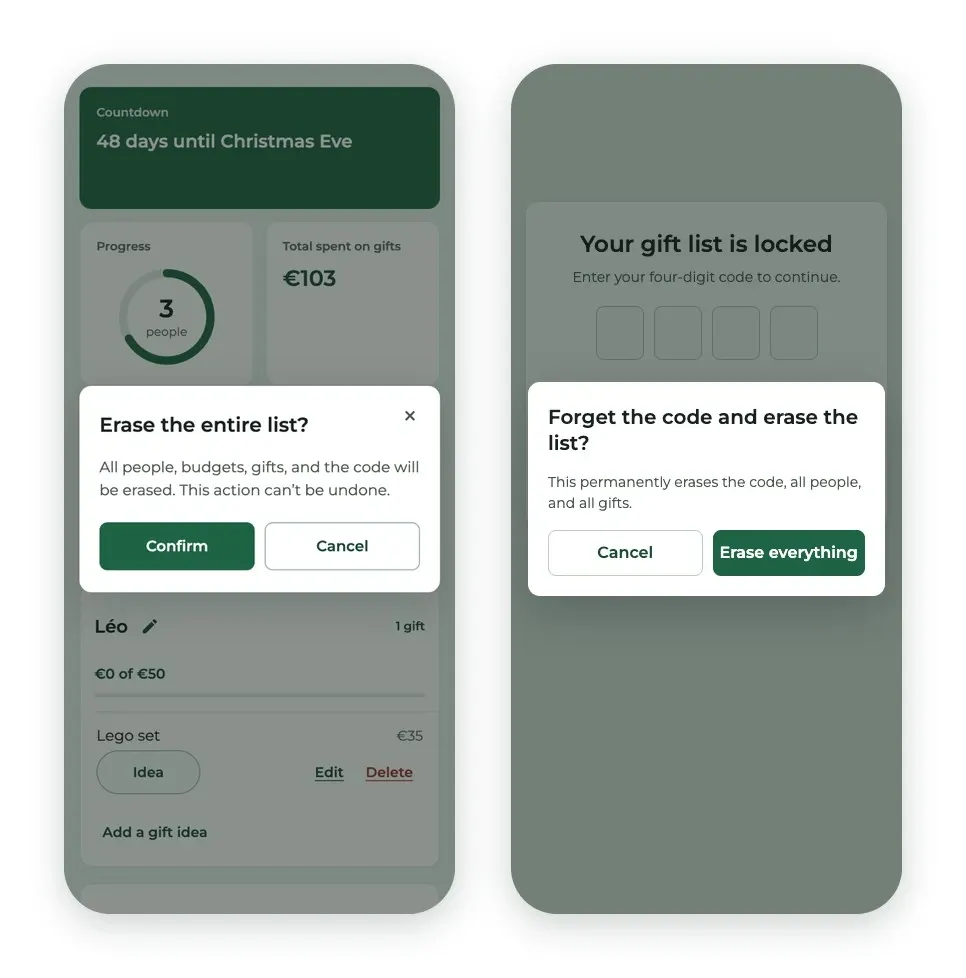
The lock's way out. Set a code, close the section, reopen it. On the lock screen, without typing the code, tap Forget the code and erase the list. The confirmation should appear on top of the lock screen.
In our build, it opened behind the lock screen: you only saw it after unlocking (left-hand screenshot, at the top of this part). With the prompt above, it comes up on top as it should (right-hand screenshot).
That's exactly the kind of detail you only catch by testing. The prompt above now spells it out, but if your generation lets it slip, there's no need to start over: ask for the fix by describing what you see and what you expect. Here it is, ready to paste:
The recipe works for any fix: the symptom you see, the behavior you expect, and the detail that removes the ambiguity. Here, that's "without ever entering the code".
26 December
The countdown has done its job. From 26 December, the top of the screen offers Start next year's list: the people and their budgets stay, the gifts are cleared, after a confirmation. Next year, your customer will find their list right where they left it, in your app — and they can jot down ideas as they come, as soon as the holidays are over.
Your turn to play
People, ideas, three states and a budget: the mechanics go well beyond Christmas. A baby store can turn it into a "baby registry" section to prepare, a stationery shop into a back-to-school list per child. Wherever your customers shop for several people, the section can be rewritten by changing a few words.
Going further
- Prompt teardown: we take a prompt and explain it line by line.
- The AI Extension Builder: describe a section, get it in your app.
- The 30-day back-to-shape challenge: the previous episode of the series.
Over to you
The Christmas list is only a starting point. Describe your section the way you'd explain it to a salesperson starting in December: what the customer sees, what they tap, and what must stay true no matter what. If it can be described, it can be a section of your app: create an app with GoodBarber.
In short
Can I see my customers' lists?
No. Everything stays on their phone: nothing is sent, not to you, not to us. The section says so at the bottom of the screen.
Does the list sync across several devices?
No — that's the flip side of privacy: the list lives on a single phone. If your customer switches devices, they start again from an empty list.
What if my customer forgets their code?
Nobody can recover it. The only way out is to erase the list and start over. The section warns them when they choose their code.
Can I change the currency or the language?
Yes, with one sentence in the prompt: replace "€" and "English" with whatever suits your customers.
What happens after Christmas?
From 26 December, the section offers to prepare next year's list, keeping the people and their budgets.


