 eCommerce
 Memberships
 Chatbot
 Online Courses
 Bookings
 Travel guide
 Events
 Content Creators
 Pickup & Delivery
 Newspaper
 Radio
Radio Schools
 Faith
Faith Organizations
 Restaurant
 Grocery
 Custom apps
 Employee Communication

 NO CODE APP BUILDER
 TECHNOLOGY
 WHY GOODBARBER?
 Design
 PRODUCT RESOURCES
 TOPICS
 MOBILE APPS RESELLERS
 DISCOVER
Steal this idea: a 30-day back-to-shape challenge for your fitness studio
September is the month that makes or breaks a fitness studio: members come back full of good intentions, and good intentions wear off fast. Here's an app section that keeps them going for a whole month: one simple, gentle action to check off every morning, a streak that grows day after day, and a thirtieth day that celebrates. All of it generated by describing it to GoodBarber's AI Extension Builder. This article gives you everything: what the section does, the rule that creates the daily appointment, the full prompt written to be stolen, the ready-to-paste list of thirty actions — and the check to run before you announce the challenge, with the fix that goes with it.

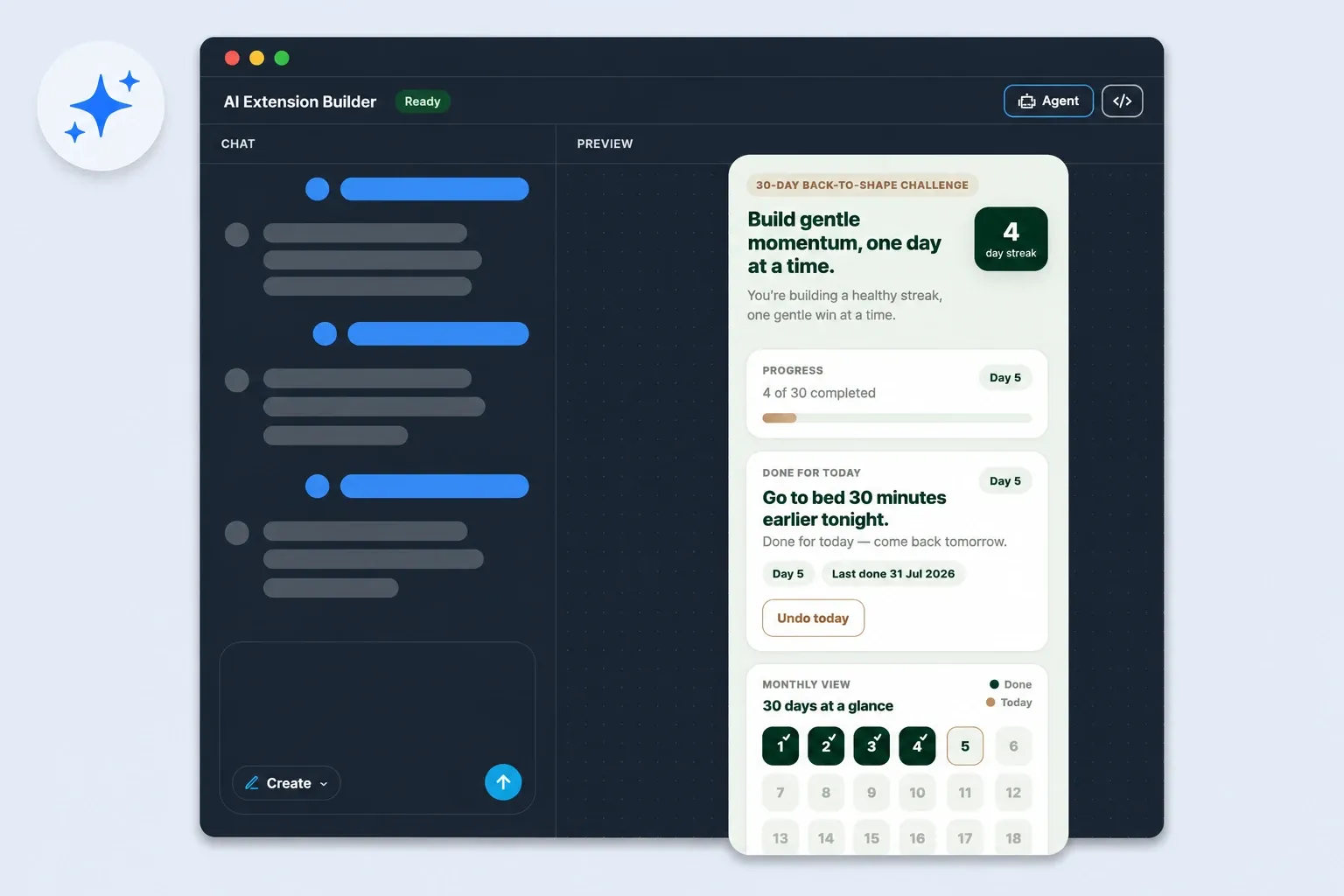
The "Steal this idea" series: an app section we describe to the AI Extension Builder, actually build, and whose full prompt we hand over at the end, ready to paste. After the summer movie quiz and the sports club's season-restart countdown, we're heading to the gym: the back-to-shape challenge.
The section, member side
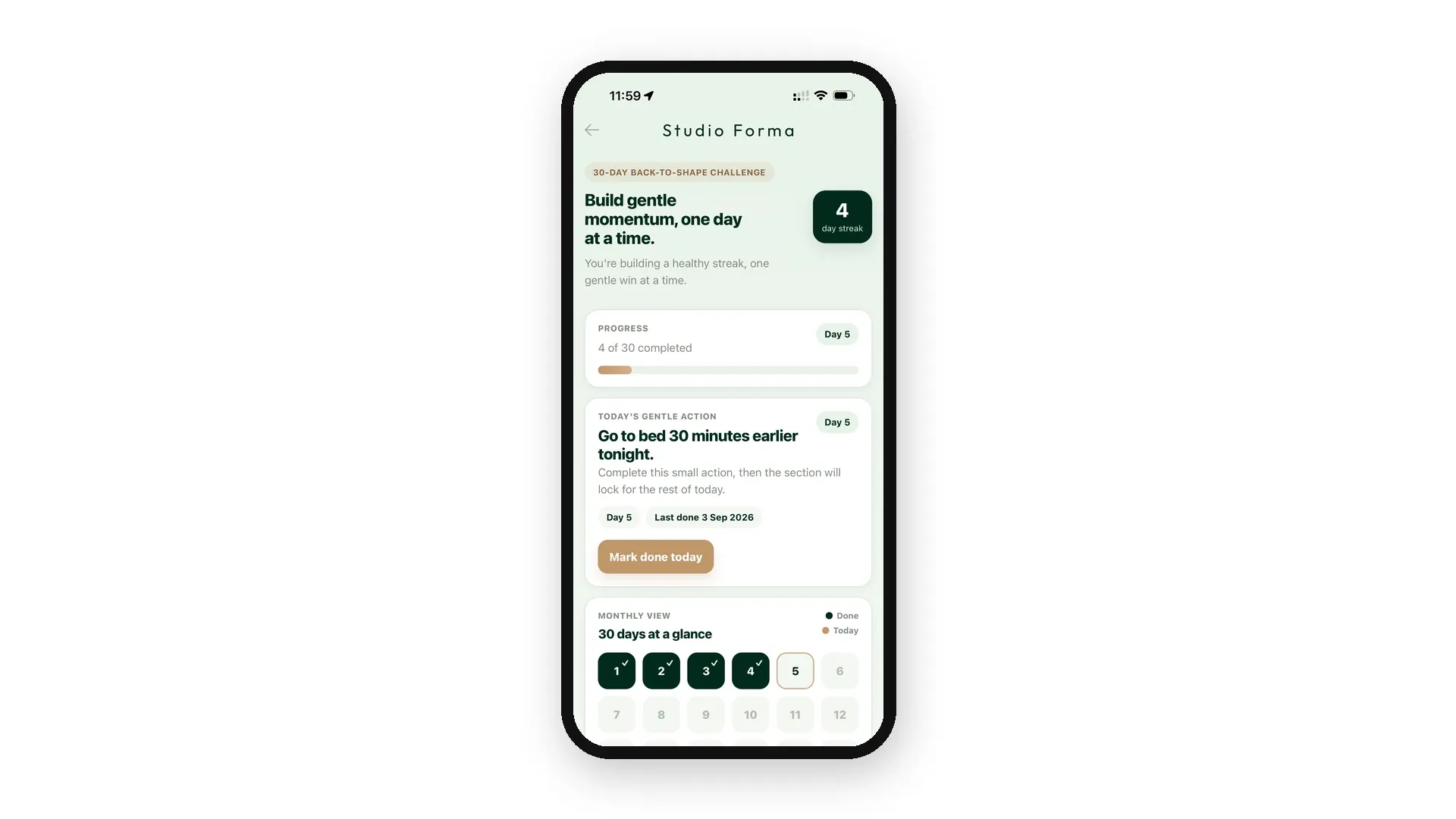
Every morning, one single thing to do. The day's card shows the action — Go to bed 30 minutes earlier tonight., Take a 10-minute walk after lunch. — a gesture that fits in a normal day, no equipment, no stopwatch. Tap Mark done today: the streak ticks up and the card switches state: Done for today — come back tomorrow. The button locks until the next day. That's the whole idea: the challenge can't be binged on a Sunday night — one action per calendar day, and the appointment renews itself every morning.
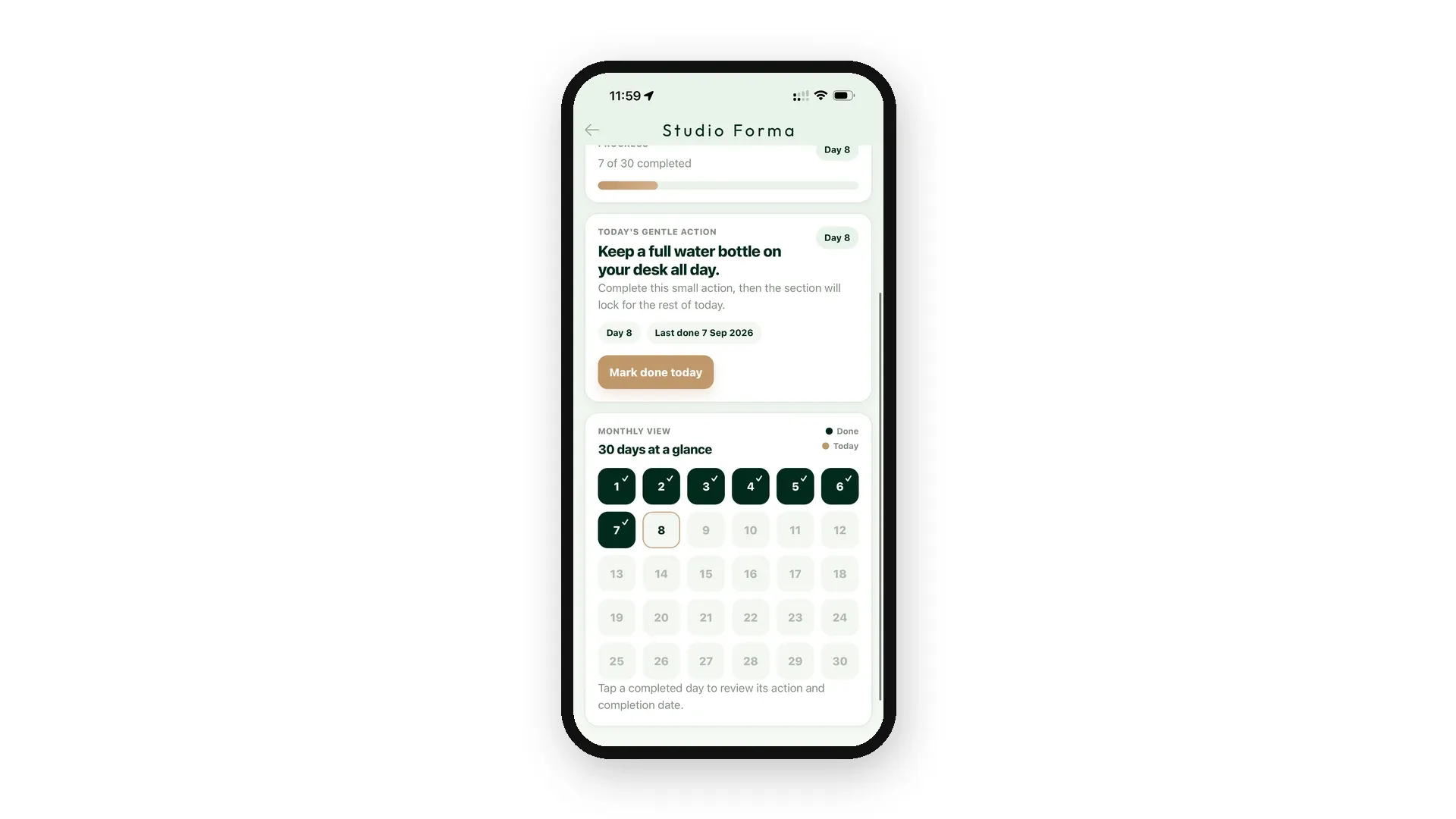
Below, the monthly view lines up the thirty boxes: completed days fill in, today's is circled. Tap a completed day and it shows that day's action and date. And the section remembers: a member closes the app, comes back the next day, and everything is waiting — streak, check-offs, current day — on their phone, with no account to create and nothing to manage at the front desk.
Studio Forma, the studio in these screenshots, is invented for the example — everything you see in it is fictional.
Why this format works for a fitness studio
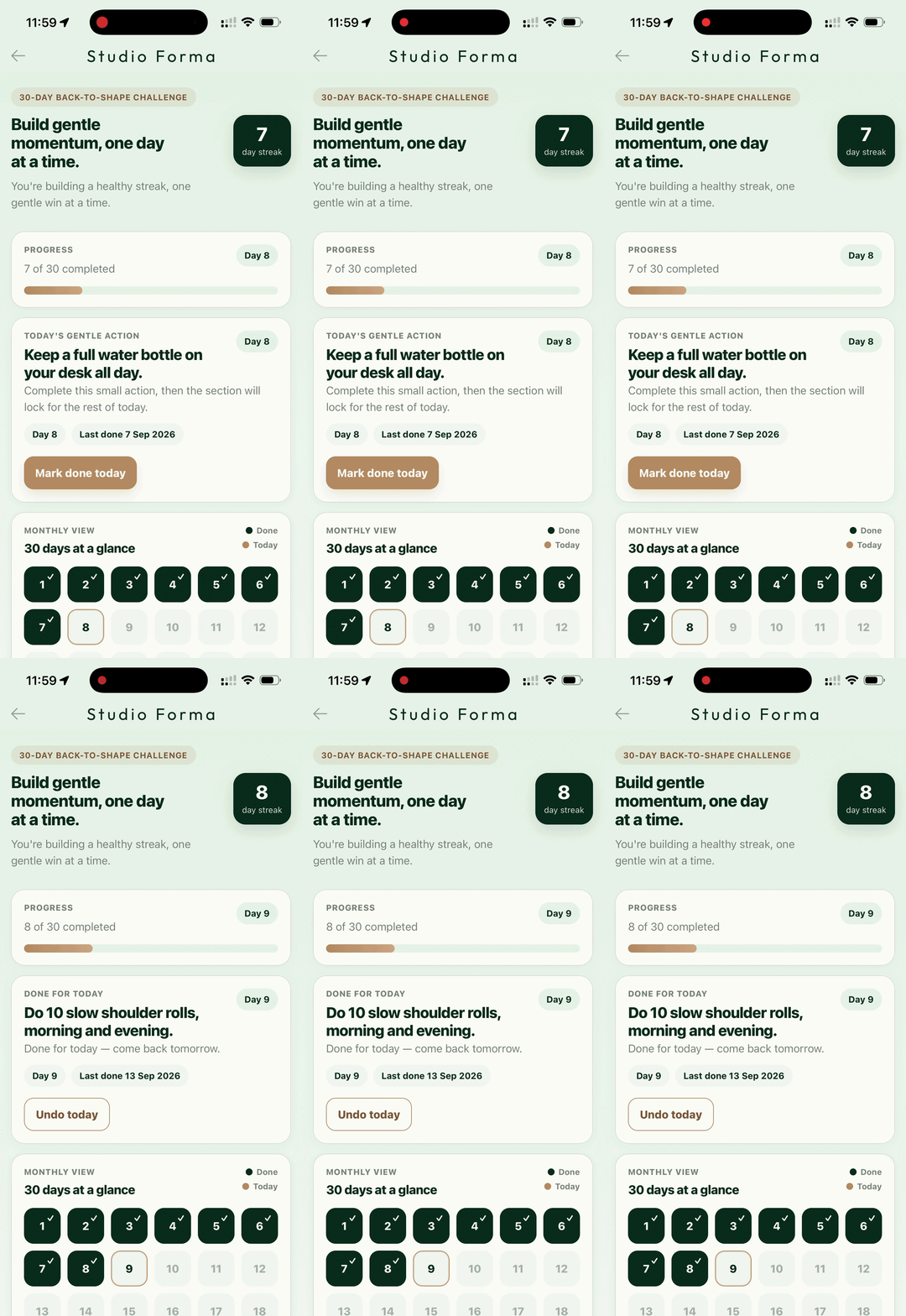
The benefit isn't technical prowess, it's the calendar: a thirty-day challenge means thirty app opens per member. A poster at the front desk gets read once; a message in the group chat drowns the same day. An action that unlocks every morning builds a habit — and habits are precisely what a fitness studio sells in September.
Gentleness isn't a nice-to-have here, it's the mechanism. A twenty-minute walk, five minutes of stretching, a water bottle on the desk: actions so simple people actually do them — and every checked box makes you want the next one. The section's own banner sets the tone: Build gentle momentum, one day at a time. No promised results, no imposed intensity: everyone adapts or skips what doesn't suit them, and the challenge stays a pleasure rather than a reproach.
As for the monthly view, it's the pride board: halfway through, a half-filled grid says "keep going, it's working" better than any reminder.
A missed day breaks nothing
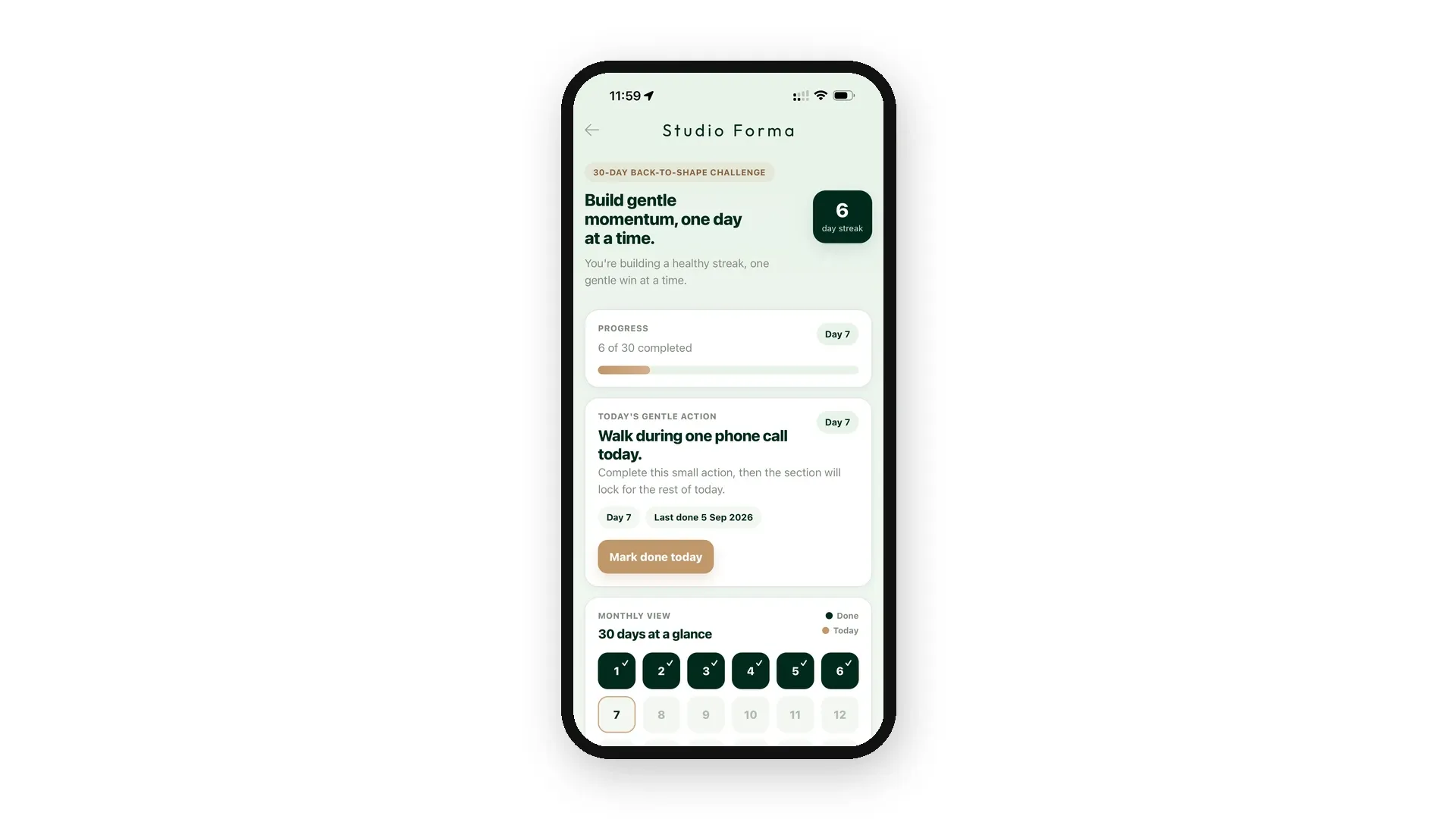
Look at the screenshot: six days done, one Sunday skipped — the streak still shows 6, and the section simply offers the next action. It's a design choice, spelled out in the prompt: missing a day pauses the streak, never erases it. The challenge waits, and picks up where the member left off.
Same logic at the start: day 1 is the first action checked off, whatever the date. Someone who discovers the challenge on September 10 isn't nine days behind — their day 1 is ahead of them. Nobody is disqualified from the start, and that's exactly what you want from a back-to-shape challenge: bring people back, don't sort them.
If you'd rather have the strict version — a streak that drops to zero on the first missed day — that's one sentence to change in the prompt. We stand by the gentle version: it's closer to what a studio wants to tell its members in September.
The prompt sentences that do the work
The full prompt is below. If you adapt it, four sentences carry the essentials — keep them.
1. « Only one action can be completed per calendar day […] the check-off button stays disabled until the calendar date changes at local midnight. » The rule that manufactures the daily appointment. Without it, the challenge gets checked off in one evening and the app never sees anyone again.
2. « Day 1 is the member's first completed action, whatever the date. » The free start. The day number and the calendar date are two different things — this sentence tells the generator, and your members get the benefit: everyone starts when they want.
3. « Missing a day pauses it, but it never resets and past progress is never erased. » Gentleness, coded. The streak waits instead of punishing.
4. « When the 30th action is completed, a congratulations screen takes over from the daily card. » The ending replaces the daily invite — no "come back tomorrow" once the challenge is done.
One last detail: the prompt announces I will provide the list of 30. The generation first fills in sample actions; your list comes right after, as a second message, and it's used word for word — capitals and punctuation included. Write each line exactly as you want to read it on screen.
The prompt — steal it
Not a line of code behind this section: a brief, handed to the AI Extension Builder. Here it is in full.
Then paste your thirty actions
Once the section is generated, send the list as a second message. Here's ours — thirty gentle habits around walking, stretching, water and sleep, written to fit inside a normal day. Steal it as is, or rewrite it with your own classes and studio habits: just keep it gentle.
Day 30 doesn't ask for a feat: it invites members to pick the action they'll keep — and to come say so at the front desk. That's the full loop: the app brings people back to the studio.
Before you announce it: check tomorrow's appointment
A generated section gets checked the way you check a new hire: you have it do the move once. Check off today's action — the card must switch to Done for today and the button must disable. Reopen the section: still locked. Move your phone's date forward one day, just for the test: the next action must be offered, the streak must have grown. Thirty seconds, and you know the daily appointment will hold for a month.
If your generation lets two check-offs through on the same day, no need to start over or rewrite the prompt: ask for the fix by describing what you see and what you expect. Here's ours, ready to paste:
The recipe holds for any adjustment to a generated section: the observed symptom, the expected behavior, and the word that removes the ambiguity — here, "today", which means the calendar date and never the day number. It's a reflex that pays off well beyond this challenge.
And measure what those thirty seconds replace. A daily lock, if you had to maintain the code yourself, is a dated state that survives visits, a midnight rollover to handle, an undo that only undoes the current day — the kind of detail that eats an evening and gets retested at every change. Here, it's described in one sentence of the prompt, checked in thirty seconds, and adjusted in one more sentence.
The thirtieth day
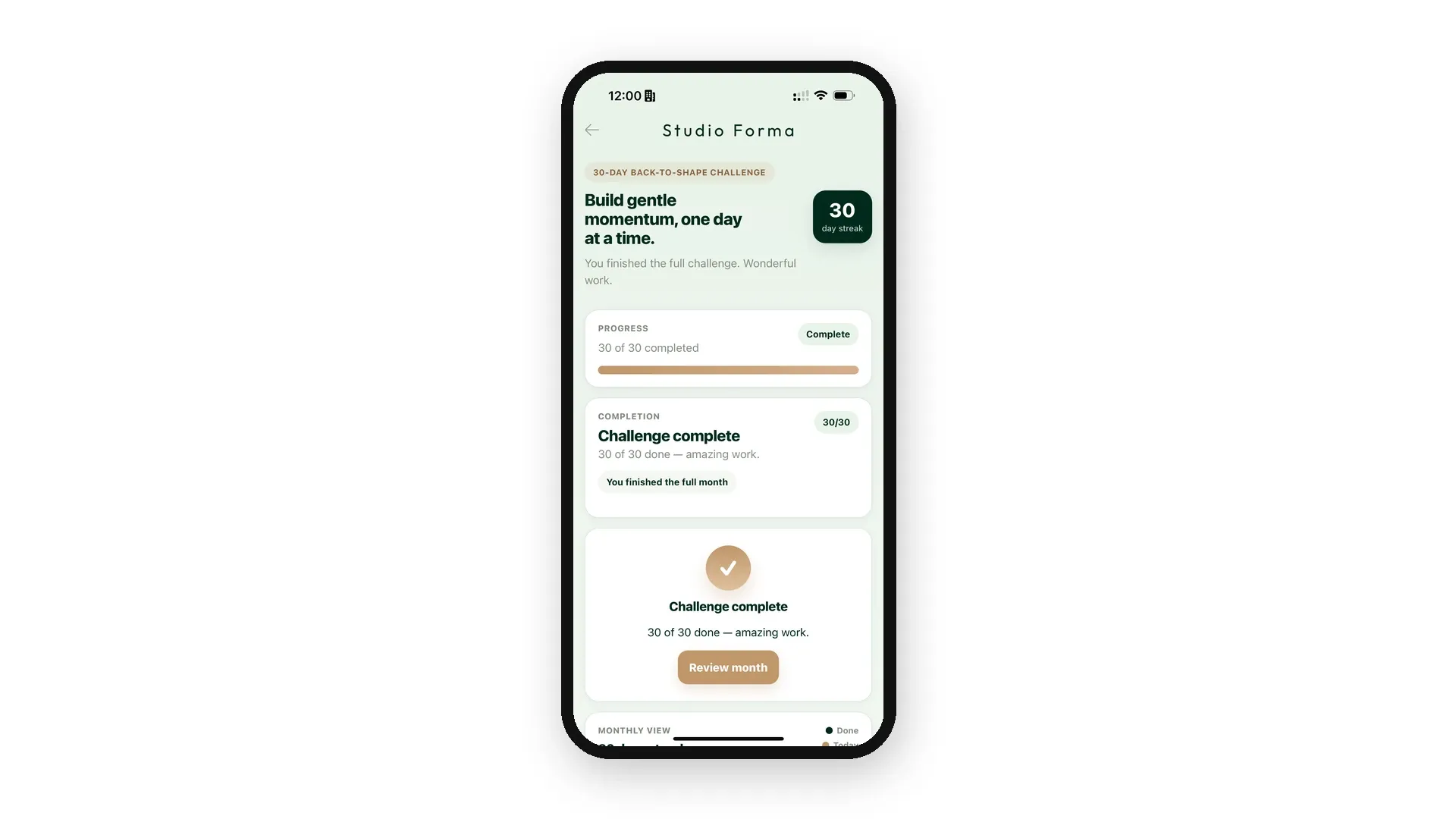
When the thirtieth action is checked off, the daily card steps aside for the congratulations screen: Challenge complete — 30 of 30 done. The streak shows 30, the progress bar is full, and there's no "come back tomorrow" anymore: the challenge ends, cleanly.
It's the right moment to follow up — in the actual studio first (day 30 sends people there by itself), then in the app: in January, the same prompt and thirty new lines are enough to generate the next challenge. The skeleton doesn't move; your thirty lines do.
Make it yours
One action a day, a growing streak, a calendar lock: the mechanic goes far beyond fitness. A yoga studio will make it a month of breathing, a music school thirty days of practice, a library a reading challenge, a shop an advent calendar in December. Anywhere you want to turn a good resolution into a habit — and an app into a daily appointment.
For that yoga studio, here is how to build the app that will carry the month of breathing: how to create a yoga app for your students.
Going further
- Prompt teardown: GPS, memory, and Maps from a single sentence — the sister series: we take a prompt and explain it line by line.
- The AI Extension Builder — describe a section, get it in your app.
- For the engineering-curious: We let an AI write code inside our no-code platform. Generating it was the easy part. — the behind-the-scenes, on dev.to.
Your turn
The back-to-shape challenge is only a starting point. The dietitian's sugar-free month, the writing workshop's thirty days, the photo club's challenge — describe the section the way you'd brief a coach: the pace, the missed-day rule, what must stay true no matter what. If you can describe it, it can be a section of your app: create an app with GoodBarber.
In short
What happens if a member misses a day?
Nothing irreversible: the streak pauses and waits. Their next visit simply offers the next action, and nothing already done is erased. It's the setting we chose for a gentle September — if you'd rather have a strict streak that drops to zero, that's one sentence to change in the prompt.
Can a member catch up several days at once?
No — and it's deliberate: one action per calendar day is the rule that creates the daily appointment. After the day's check-off, the button locks until the next day — it's the first thing to check before you announce the challenge.
Does each member have their own challenge?
Yes. The thirty-action list is shared — you write it. Progress, streak and the final screen are personal: everyone checks off on their own phone, with no account to create.
Can you change an action mid-challenge?
Yes, with a one-sentence adjustment. We did it while building: replacing the list didn't touch the days our testers had already checked off.
Can you run it again in January?
Simplest way: generate the January section with the same prompt and thirty new lines — a few minutes, and the challenge starts from zero. The skeleton will serve as many times as you have good resolutions to offer.


