 eCommerce
 Memberships
 RAG Chatbot
 Online Courses
 Bookings
 Travel guide
 Events
 Content Creators
 Pickup & Delivery
 Newspaper
 Radio
Radio Schools
 Faith
Faith Organizations
 Restaurant
 Grocery
 Custom apps
 Employee Communication

 NO CODE APP BUILDER
 TECHNOLOGY
 WHY GOODBARBER?
 Design
 PRODUCT RESOURCES
 TOPICS
 MOBILE APPS RESELLERS
 DISCOVER
Steal this idea: a season restart countdown for your sports club
Written by Dumè Siacci on
In an amateur sports club, the new season comes down to a date and a to-do list. Here's an app section that shows exactly that: a countdown to the day practice resumes, and each member's personal prep checklist — tappable, remembered between visits, with a progress bar made to be shared. All of it generated by describing it to GoodBarber's AI Extension Builder. This article gives you everything: what the section does, why the format works, the prompt lines that matter — and the full prompt, written to be stolen.
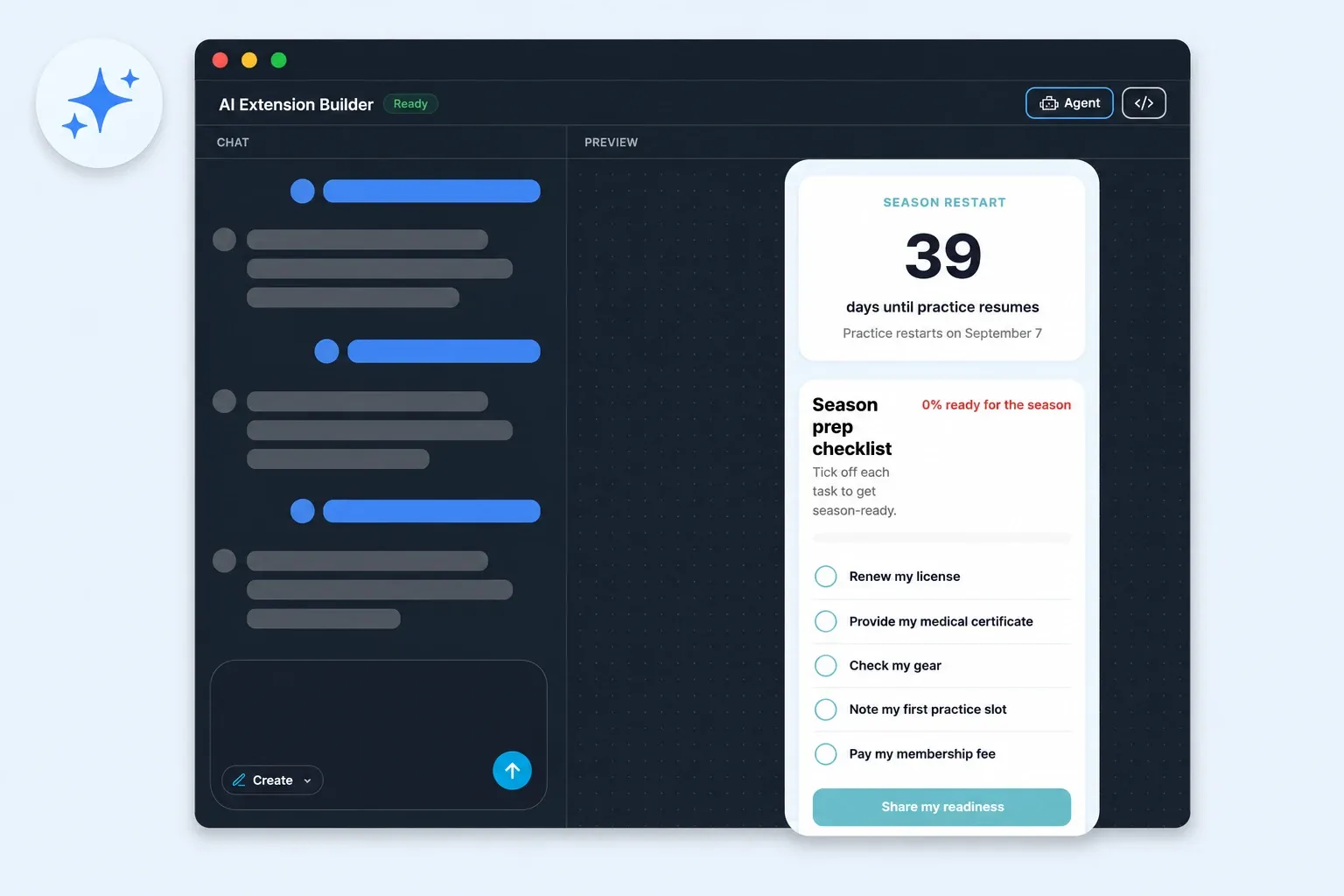
The "Steal this idea" series: an app section we describe to the AI Extension Builder, build for real, and hand over at the end as a complete, ready-to-paste prompt. After the summer movie quiz, we're heading to the gym: back-to-season time for an amateur sports club.
What the member sees
A big number first: 39 today, 38 tomorrow — the countdown runs on its own until practice resumes on September 7. Right under it, one label: days until practice resumes.
Then the checklist — five steps every club member knows: renew the license, provide the medical certificate, check the gear, note the first practice slot, pay the membership fee. One tap checks an item off — with the kind of micro-animation that makes you want to tap the next one — and the progress bar moves: 60% ready for the season. Everything checked? The message turns celebratory. And a button offers to share where you stand — "39 days until practice resumes — I'm 80% ready!" — straight to the team group chat.
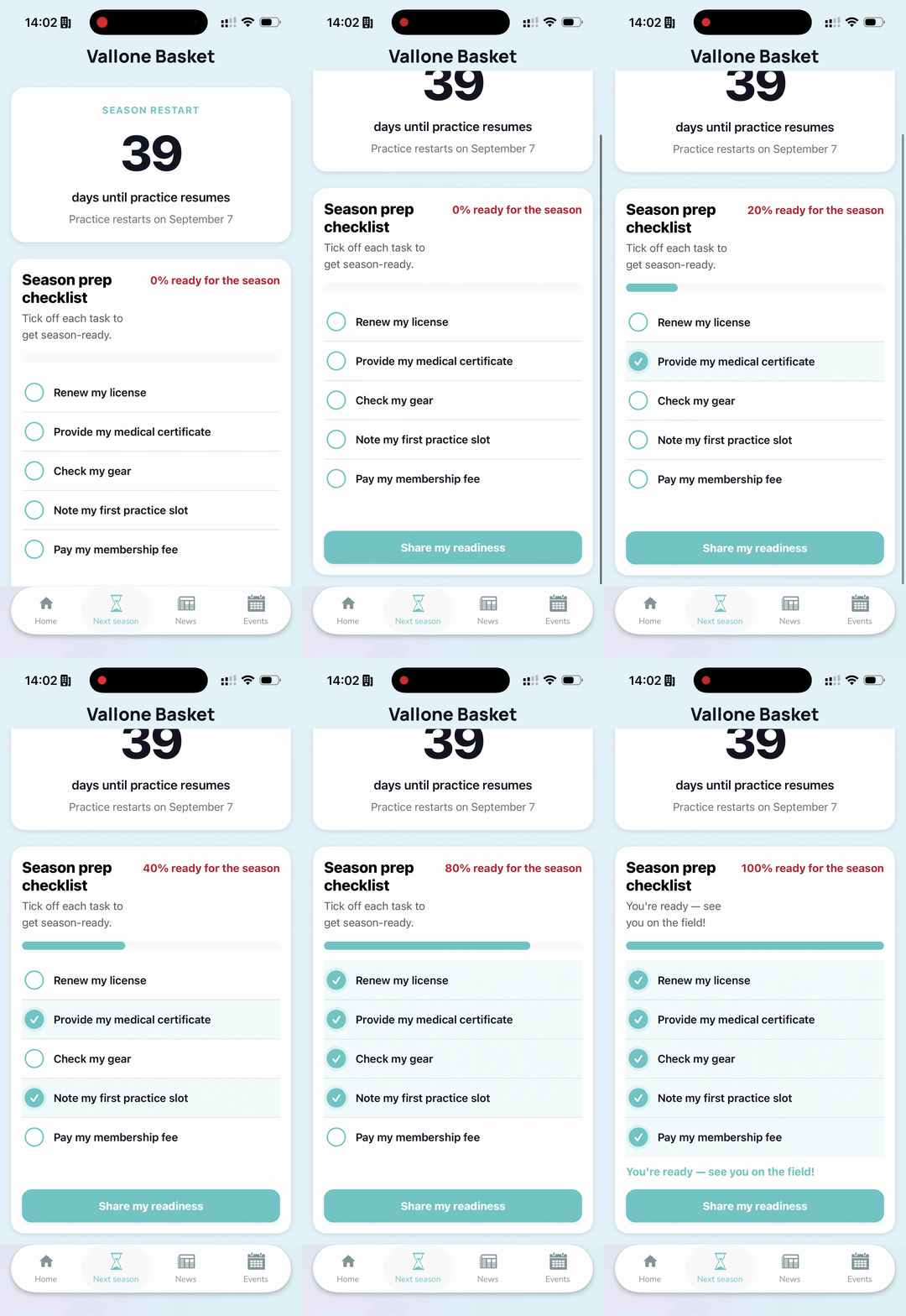
The detail that changes everything is invisible: the section remembers. A member closes the app, comes back three days later, and their checkmarks are waiting. Each member has their own, on their own phone — no account to create, no list for the club office to administer.
Why this format works in a sports club app
Every sports club has the same August: a spreadsheet at the office, reminder messages in the group chat, and a pile of medical certificates that shows up the night before practice resumes. The section doesn't replace the registration file — it moves the tracking to the one place where it stands a chance of being looked at: the member's pocket.
The countdown creates the appointment. It's the visible, slightly theatrical part — and it's exactly what a club screen should do in late August: give people a reason to reopen the app and watch the number drop.
The checklist flips the burden. Instead of the club asking forty people "where do you stand?", everyone can see where they stand — and the percentage turns an administrative chore into a small game. The share button turns it into a team game: an "80% ready" dropped in the group chat works harder than one more reminder.
And the format thinks about next summer. Once September 7 has passed, the countdown re-aims itself at the following season's restart, and every checklist starts fresh. If you had to maintain this code yourself, that yearly re-arm would be next year's classic bug — the one you discover on restart day. Here, it's one sentence in the prompt, and the platform takes care of the rest.
The prompt lines doing the heavy lifting
The full prompt is below. If you adapt it, four lines carry most of the weight — keep them.
1. "…the state is remembered between visits." Describe the outcome, never the mechanism. Not a word about how to store anything: the memory showed up in the very first generation, clean, personal to each member.
2. "Every progress indicator reflects the checklist progress and updates instantly." Consistency is something you ask for. In one of our tries, a decorative ring told a different story than the progress bar; this sentence settled the argument — and simplified the screen along the way: fewer indicators, better aligned.
3. "A share button lets me share how ready I am with my teammates." Sharing never showed up on its own in our generations. If it matters to you, write it down.
4. "After September 7 has passed… the checklist starts fresh for the new season." One sentence about the future, and the section starts thinking in seasons: new year, fresh checkmarks, nothing else touched.
One last detail: write the checklist items exactly as you want to read them on screen — they're reproduced verbatim, capitalization included.
The prompt — steal it
Not a line of code behind this section: a written brief, handed to the AI Extension Builder. Here it is in full.
Make it yours
Change the date and the five steps, and the section fits any sport — and beyond: a dance school, a music academy, a neighborhood association. Anywhere a season starts over and members need to show up ready.
And the skeleton — a date, a list, a memory — works far beyond sports: a shop opening, a trek departure, a training program kickoff. The mechanics don't move; your five lines do.
Go further
- Prompt teardown: GPS, memory, and Maps from a single sentence — the sister series: we take one prompt and unpack it, line by line.
- The AI Extension Builder — describe a section, get it in your app.
- For the engineering-curious: We let an AI write code inside our no-code platform. Generating it was the easy part. — the behind-the-scenes, on dev.to.
Your turn
The season restart is just one example. The September tournament, the raffle, the volunteer schedule: describe the section the way you'd brief a volunteer — the flow, the rules, what must stay true no matter what. If it can be described, it can be a section in your app: create an app with GoodBarber.
In short
Is each member's progress really remembered?
Yes. Each member finds their checkmarks again from one visit to the next, on their own phone, with no account to create. It's one line in the prompt — the state is remembered between visits — and it's the first thing we verified.
Does each member get their own checklist?
The list of steps is club-wide: you define it in the prompt. The checkmarks and the progress bar are personal: everyone ticks their own, on their own phone.
What happens next year?
Once the day has passed, the countdown re-aims itself at the following restart, and every checklist starts fresh for the new season. And if your steps change, ask for the edit in one sentence: members don't lose what they've already checked.
Will it match my app's look?
It's generated inside your app and picks up your colors: it lands in your design, not next to it. The rest adjusts like everything else — by asking.