 eCommerce
 Memberships
 RAG Chatbot
 Online Courses
 Bookings
 Travel guide
 Events
 Content Creators
 Pickup & Delivery
 Newspaper
 Radio
Radio Schools
 Faith
Faith Organizations
 Restaurant
 Grocery
 Custom apps
 Employee Communication

 NO CODE APP BUILDER
 TECHNOLOGY
 WHY GOODBARBER?
 Design
 PRODUCT RESOURCES
 TOPICS
 MOBILE APPS RESELLERS
 DISCOVER
Sign in with Google, Apple or a code sent by email
A forgotten password should never lock you out of your own app. Since late September 2026, you can sign in to GoodBarber with your Google account, your Apple account or a code sent by email. It works everywhere you sign in: app creation, the back office, the reseller dashboard and our mobile apps. Here is what changes for you, what stays the same, and how we keep your account safe along the way.
Three new ways in, on top of your password
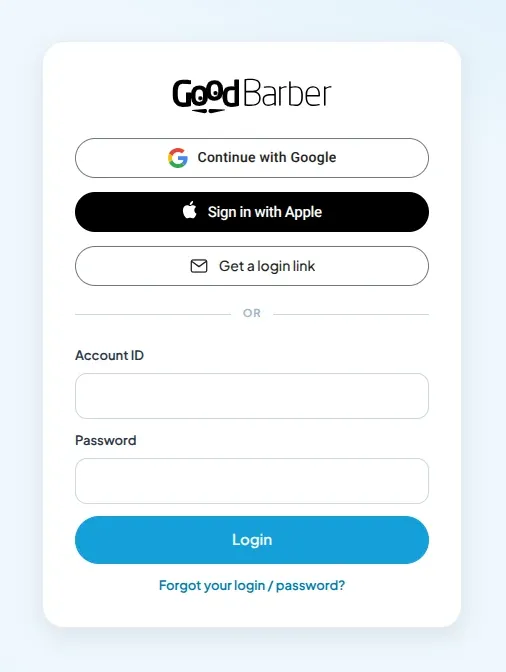
The sign-in screen now has three new buttons alongside the usual form: Google, Apple, and a login link sent by email.
Continue with Google. Pick your Google account and you are in. No new password to come up with, no form to fill in.
Sign in with Apple. The same, with your Apple ID: on an iPhone or a Mac, but also from a Windows computer or an Android phone.
Your password works exactly as before. You don't have to change your habits: the new options are added, nothing is taken away.
A login link, or a six-digit code
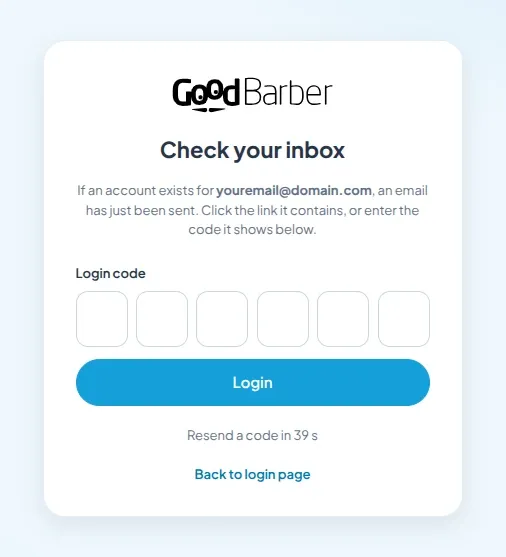
No Google or Apple account at hand? Ask for a login link. Enter your email address and we send you an email containing both a link and a six-digit code.
On the device where you read your email, click the link. On another one, say a computer while the email lands on your phone, just type the code into the six boxes. Either way, you are signed in. The code is valid for 15 minutes and works only once.
Everywhere you sign in to GoodBarber
We didn't want a new feature limited to a single screen. All three options are available in:
- app creation, when you start a new project on goodbarber.com;
- the back office of your app, where you design and run it day to day;
- the reseller dashboard, for agencies managing their clients' apps;
- the My GoodBarber app and its Commerce version, to follow your app from your phone;
- the Shop Companion app, which your staff use to handle orders in store.
One account, one way to sign in, wherever you are. Create your app with Google in the morning, and it's with Google that you open Shop Companion in the evening.
Already have an account? It finds you
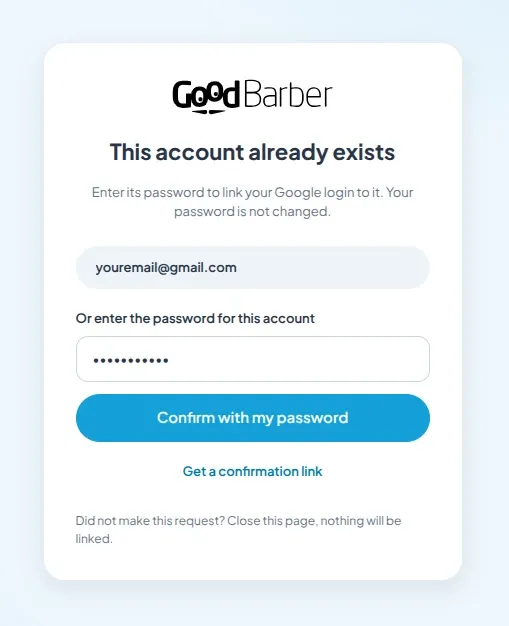
If you already use GoodBarber with a password, and your Google or Apple account uses the same email address, we recognize you by that address and take you to your existing account. Your apps, your settings and your history stay right where they are.
One extra step applies the first time: before linking Google or Apple to a password-protected account, we ask you to prove the account is really yours. Enter your current password, or ask for a confirmation link sent to your address. Your password is not changed. It takes a few seconds, and it only happens once. After that, one click is enough.
Why this step? Because an email address alone doesn't prove who is at the keyboard. Without it, someone creating a Google or Apple account with your address could get into your GoodBarber account. We would rather ask you to confirm than take that risk with your app. And as soon as Google or Apple is linked to your account, we send you an email to let you know: if it wasn't you, you find out right away.
Apple and "Hide My Email"
Apple lets you keep your real address private and share a relay address instead. GoodBarber accepts it: your emails reach you as usual, forwarded by Apple.
One piece of advice if you already have a GoodBarber account: share your real address instead. That is what lets us find you. With a relay address we can't make the connection, and a new, empty account would be created next to yours.
Created with Google or Apple? You can still add a password
An account created with Google, Apple or a login link has no password, and doesn't need one. If you want to add one later, for instance to sign in on a device where you don't use Google, go to your profile page in the back office. We send you an email as soon as the password is saved.
Try it next time you sign in
There is nothing to switch on: the buttons are already on your sign-in screen. Next time you open your back office, choose Google, Apple or the login link, and keep your password for the days you need it.
Don't have an app yet? Start your free trial on goodbarber.com in one click with your Google or Apple account, and build a first version right away.
If anything gets in your way, write to our support team from your back office, mentioning the screen and the method you used. Your feedback is what we use to fine-tune these journeys.
Frequently asked questions
Do I have to give up my password?
No. Your password keeps working everywhere. Google, Apple and the login link are extra options.
Why am I asked for my password when I click Google or Apple?
Because the address on your Google or Apple account already belongs to a password-protected GoodBarber account. We check once that the account is really yours before linking them. If you don't remember the password, ask for a confirmation link by email instead.
I didn't receive the login email. What should I do?
Check your spam folder, then request a new code from the sign-in screen after a few seconds. The code is valid for 15 minutes: after that, you need a new one.
Can I sign in with Apple on an Android phone?
Yes. Sign in with Apple also works on Android and Windows, with your usual Apple ID.
Can my team members use these options too?
Yes. Each person signs in with their own address, using whichever method suits them.


