 eCommerce
 Memberships
 Chatbot
 Online Courses
 Bookings
 Travel guide
 Events
 Content Creators
 Pickup & Delivery
 Newspaper
 Radio
 Schools
 Faith
 Organizations
 Restaurant
 Grocery
 Custom apps
 Employee Communication


 NO CODE APP BUILDER
 TECHNOLOGY
 WHY GOODBARBER?
 Design
 PRODUCT RESOURCES
 TOPICS

 MOBILE APPS RESELLERS
 DISCOVER
The new Reseller interface: all your apps from the home page
In November 2026, the GoodBarber Reseller interface, the dashboard where agencies manage their clients' apps, takes on the design of the new back office and opens on a home page that sums up your agency: active apps, versions ready, builds in progress, invoices coming due. The app list sorts, filters and organizes with tags, you act on several apps at once, and invoices, domain and team each get new tools. Here is what changes, screen by screen.

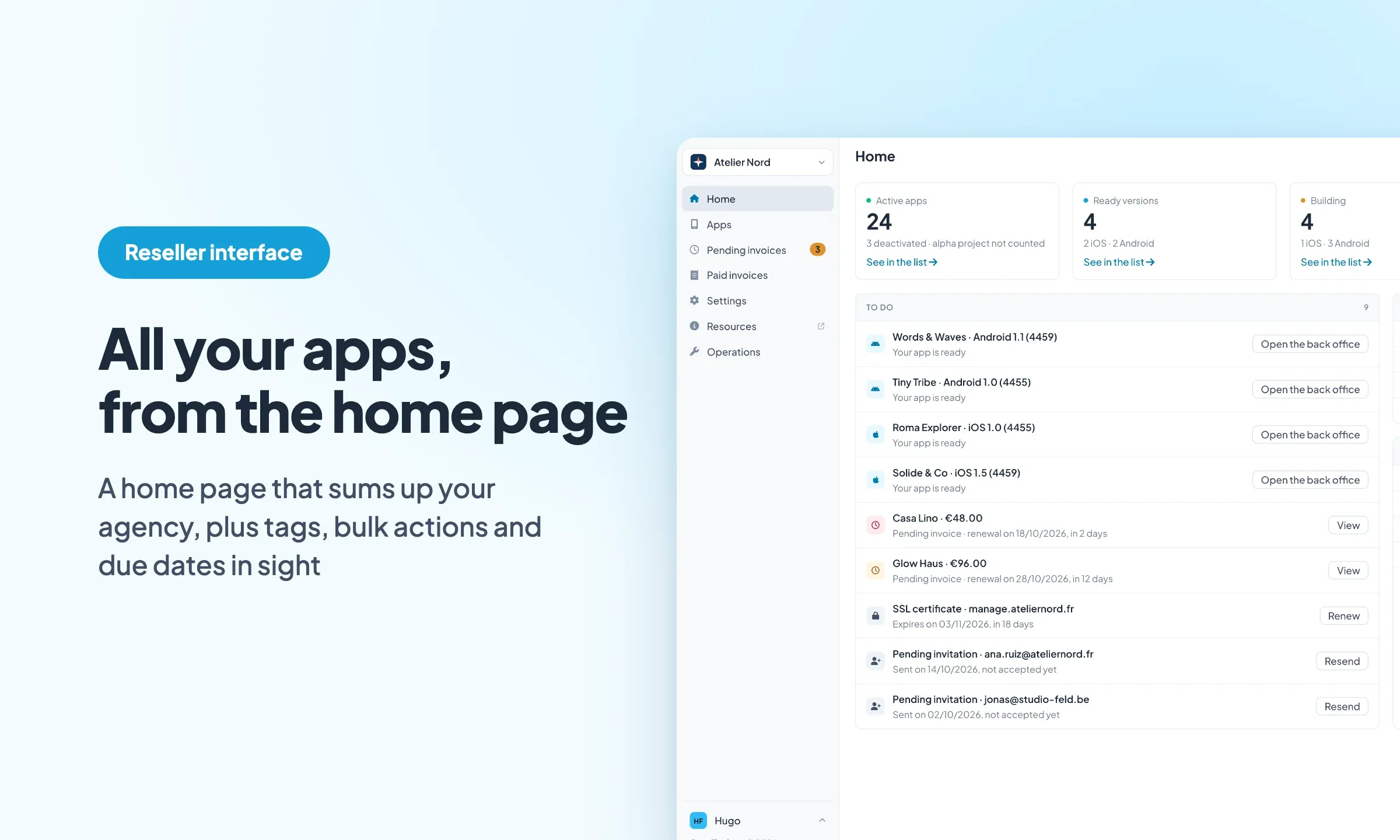
The interface opens at www.goodbarber.app/reseller/manage/, on a login page that has been redesigned too. From there, it all starts on the home page. At the top, four figures: your active apps, the versions ready, the builds in progress and the pending invoices. Each one leads to the list behind it.
What awaits your agency, the moment you open it
Under these figures, the "To do" panel gathers what is waiting for you: an iOS or Android version that is ready, an invoice due within 30 days, a domain waiting for its DNS, an SSL certificate close to expiry, an invitation nobody has accepted yet. Each line has its own button, such as "Open the back office" for a ready version. On the right, "Building" follows the versions started from your apps' back office while they build, and "Latest releases" lists your last five releases on the stores and as a WebApp.
When everything is up to date, each panel says so and tells you what will show up there. You open the interface and see straight away whether one of your clients' apps needs you.
All your clients' apps, in the order that suits you
The Apps page keeps its search and its "Filters" button. The panel filters by app type, status, publication state (version ready or building) and tag. Each active filter shows under the bar and goes away in one click.
The "Columns" button adds the creation date, the last publication and the tags. Every column sorts, dates included, and the table header stays in place while you scroll. The CSV export takes what you see: your search, your filters and your sort order.
Tags to organize your apps
Tags come to the Reseller interface. You add them to one app from its "…" menu, with "Manage tags…", or to several apps at once from the selection. By industry, by project manager, by client when a client has several apps: you choose the system, an app can carry several tags, and the Tag filter finds every app that carries one.
Act on several apps at once
Tick a few apps, or the whole page, and an action bar appears above the table. It deactivates or reactivates the selection, tags it or exports it to CSV. The confirmation window names the action, then gives the result: how many apps changed, how many stayed as they were.
For a single app, the "…" menu at the end of its row holds everything about it: "Open the back office", "Open the webapp", "Duplicate…", "View the pending invoice", "Manage tags…", "Deactivate" and "Remove from the agency…". Each confirmation window says what the action does and how to undo it when that is possible.
Invoices with their due dates
On the pending invoices page, every upcoming due date stands out: orange 15 days ahead, red 3 days ahead. The number of pending invoices also shows in the left menu, next to its entry, and a search runs through the list.
On the paid invoices page, you pick the period, from the current month to any dates you like. Tick invoices to download their PDFs in one go, up to 100 at a time.
Domain, SSL certificate and team
In the domain and SSL settings, the step that waits for your DNS update has a button to check right away whether it is done. Once the certificate is installed, its expiry date shows, with a countdown over its last 30 days. For a custom certificate, turn on the reminder: you get an email 30 days before it expires. A free certificate renews on its own.
In the settings, the team tab lists the invitations you sent next to the members, marked as pending, with the date they were sent. The agency owner can resend or cancel them.
Dark Mode, text size and agency icon
As in the back office, you set up the Reseller interface from your name, at the bottom of the left menu: light, dark or system, four text sizes, increased contrast. These are the same settings as in the back office: set them on one side, find them on the other.
Your agency also has its own icon. The one you upload in the identity settings shows at the top of the left menu, next to the agency name, and that is where you switch from one agency to another if you manage several. On a phone, every table becomes a list, one line per app or per invoice.
One Reseller subscription covers as many apps as you create, each with the features of the Pro plan. The new interface is built to manage them all, whether you have three or thirty. Discover the Reseller program


