 eCommerce
 Memberships
 Chatbot
 Online Courses
 Bookings
 Travel guide
 Events
 Content Creators
 Pickup & Delivery
 Newspaper
 Radio
Radio Schools
 Faith
Faith Organizations
 Restaurant
 Grocery
 Custom apps
 Employee Communication

 NO CODE APP BUILDER
 TECHNOLOGY
 WHY GOODBARBER?
 Design
 PRODUCT RESOURCES
 TOPICS
 MOBILE APPS RESELLERS
 DISCOVER
Turn documents into answers with GoodBarber Chatbot
GoodBarber Chatbot can now use uploaded documents alongside selected app content. Policies, handbooks, course materials, practical guides and other text-based resources can become sources users explore by asking questions. To show what this adds to an app, we will follow one employee looking for a rule in a travel policy.

Start with the question users actually have
In any app, publishing a useful document is only part of the job. People also need to find the right information when they are about to act. A clearly named file helps someone browsing a library, but a reader may arrive with a more immediate question.
Employee communication is only one possible application. The same approach can support learning resources, member guides, technical references or any other useful documents shared through an app. For our example, consider a colleague trying to book a client trip who needs to know:
Which travel expenses need prior approval?
We have added document sources to GoodBarber Chatbot so that the files you already maintain can support these conversations. You select the documents. Users ask in their own words. The assistant looks for relevant passages and uses them to build a response.
The question becomes a way into the policy. Employees can start with the decision in front of them, even when they do not know the title of the document that explains it.
Use the policy you already maintain
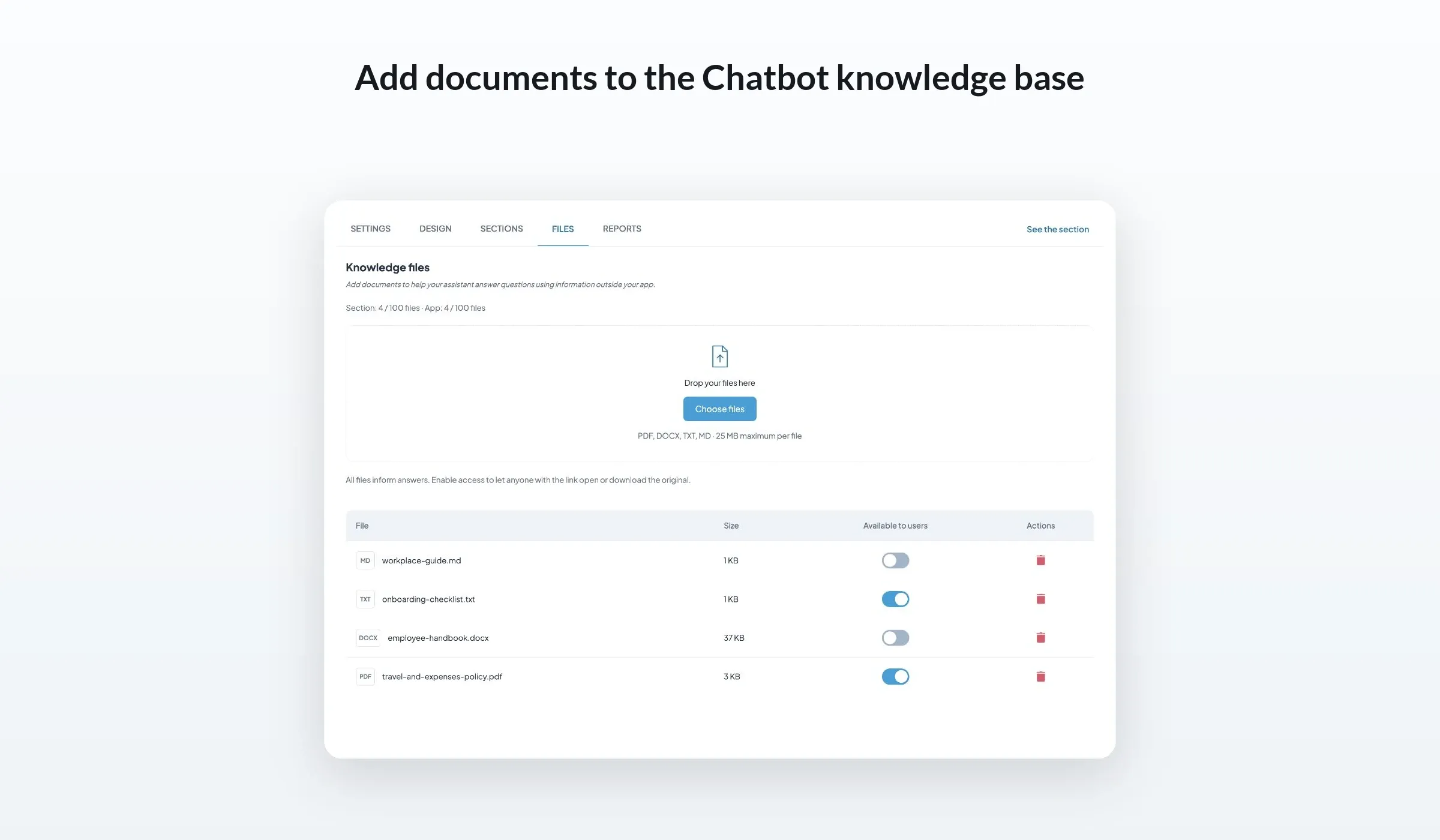
Your operations team may already have an approved travel policy as a PDF. Bringing that knowledge into the assistant no longer requires turning each part of the policy into a separate CMS article. Add the file to the relevant Chatbot section, where it complements the app content you have selected.
You can now add a policy exported as a PDF, a handbook written in Word, a plain text checklist or a guide maintained in Markdown, with more document types expected as the feature evolves.
Bring the relevant passage into the conversation
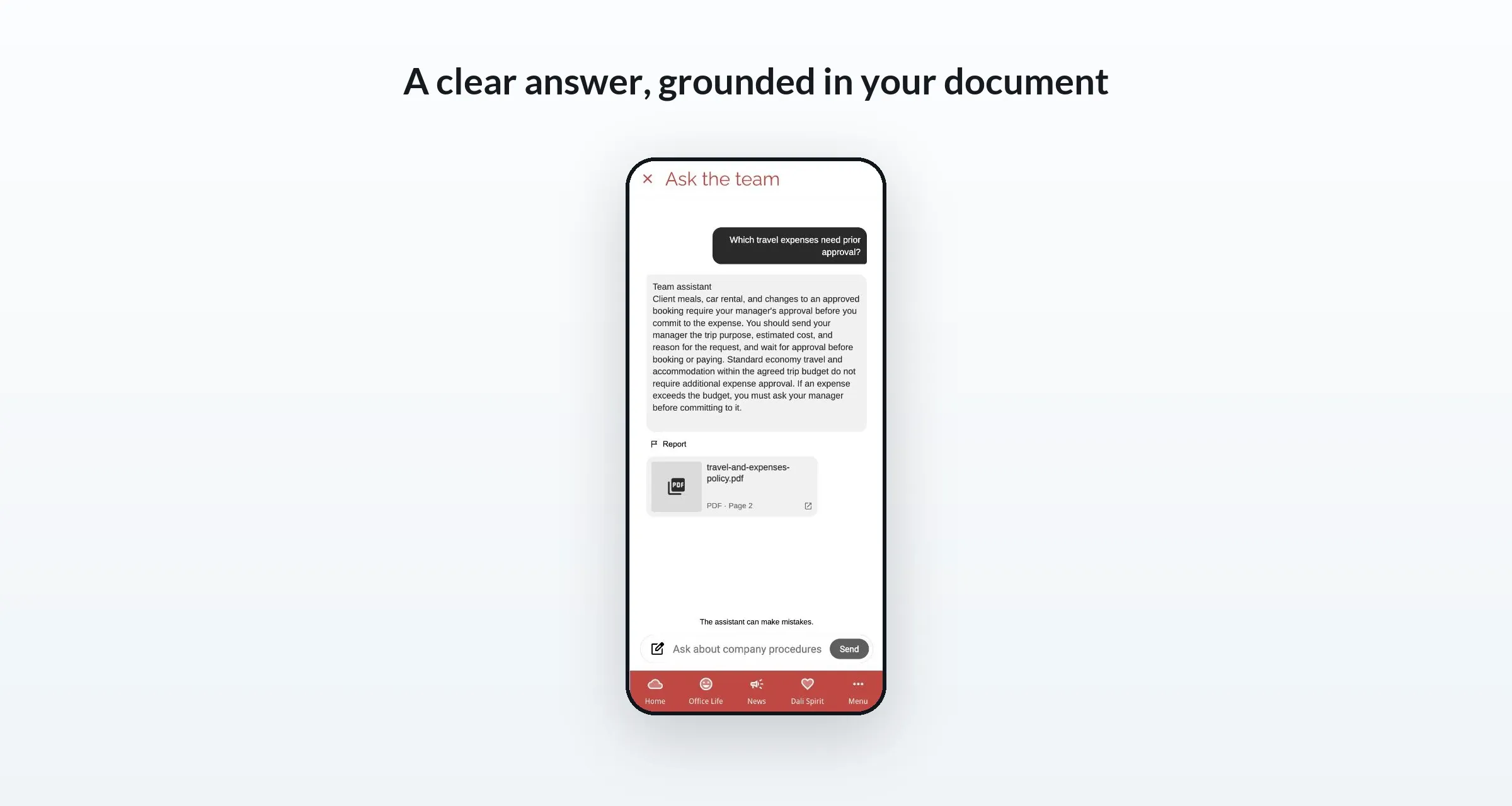
Return to the employee preparing for a client visit. In our demonstration policy, client meals, car rental and changes to an approved booking require the manager's approval before the employee commits to the expense. The policy also explains what to include in that request.
An answer based on this passage can bring those categories together and tell the employee to send the trip purpose, estimated cost and reason for the request to their manager. These are rules from our example document; your assistant's response will depend on the material your team provides.
When access to the original is enabled, a source card can identify the file and give the employee a route back to it. Reading guidance helps them locate the relevant information in the document.
That matters when someone wants to check the wording before submitting a request. The conversation gives them an answer to review, with the original policy available for the surrounding detail.
Decide whether employees can open the original
Each file has an Available to users setting. With it switched off, the document can inform answers, while its filename, download link and source card are withheld. With it switched on, the assistant can share the original so people can open or download it.
For the travel policy in our example, enabling access lets an employee read the full approval procedure. You might keep another reference file unavailable for download while still using its contents to support answers. Make that choice for each document you add.
Whichever option you choose for sharing the original documents, you can still restrict access to the Chatbot to authenticated users or specific groups using User Groups.
Keep documents and app content working together
The travel policy is one part of an employee's preparation. An article may explain how the company organizes client visits. An event can announce a preparation workshop. A map point can identify the office they will visit. A podcast can share practical advice from a colleague. GoodBarber Chatbot can use selected articles, events, map points and podcasts alongside uploaded files in the same knowledge base.
Your team can keep choosing the format that suits the information. Publish an announcement as an article, share an interview as a podcast, keep an appointment in the calendar and maintain a detailed policy as a document. Employees can continue browsing those familiar app sections, with the assistant providing a conversational route when they have a specific question.
Keep an owner behind each answer
When the travel policy changes, your team simply removes the old file and adds the updated version. Your operations team continues to maintain the reference material, while the Chatbot makes it easier for employees to consult that knowledge.
Start with one document your audience consults regularly, such as a policy, handbook or practical guide. Add it in Chatbot > Files, choose whether to make the original available, and ask a question about its contents. The Chatbot documentation covers the configuration steps.


