 eCommerce
 Memberships
 Chatbot
 Online Courses
 Bookings
 Travel guide
 Events
 Content Creators
 Pickup & Delivery
 Newspaper
 Radio
 Schools
 Faith
 Organizations
 Restaurant
 Grocery
 Custom apps
 Employee Communication


 NO CODE APP BUILDER
 TECHNOLOGY
 WHY GOODBARBER?
 Design
 PRODUCT RESOURCES
 TOPICS

 MOBILE APPS RESELLERS
 DISCOVER
Build a real app without writing code
GoodBarber is the no-code app builder for powerful, feature-rich mobile apps. Customize every detail yourself or launch fast with a ready-made design system. Either way, you ship a real native app, no developer required.
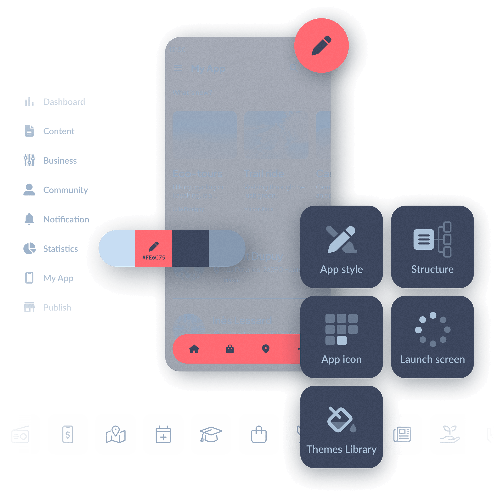
Simplifying app creation with an app builder
An accessible alternative to traditional mobile app development
Opportunities for everyone
 Beginner app creators can now launch their projects with ease.
- Established companies can develop apps more quickly and at a lower cost.
- Developers can speed up their prototyping process.
GoodBarber also empowers entrepreneurs by providing a complete DIY app builder, offering full control of the process from design to launch.

The key benefits of an app builder
A fast, economical, and flexible solution for your applications

Cost reduction
Create and manage your app without outsourcing, at a lower cost.

Time-saving
Launch your application in days, not months.

Total control
Customize every aspect of your app yourself, using our intuitive WYSIWYG editor.

Flexibility and scalability
Easily add new features without starting from scratch.

The best choice for your project
GoodBarber is an incredibly complete and easy-to-use app builder. Here’s why it’s the best choice for app creators and mobile app development professionals.
Maximum simplicity, spectacular results
Create stunning apps with an ultra-intuitive tool
With GoodBarber, simplicity is at the heart of the experience. Our No-Code platform is one of the most intuitive on the market, offering a drag and drop app builder that allows every app creator to design a professional app without technical skills.
The result is impressive: beautiful, high-performance apps rich in features, tailored to your specific needs. Whether you're building an iOS app, an Android app, or a PWA, GoodBarber provides the tools you need.
From design and performance to functionality, you get a complete, professional app with ease, powered by tools trusted by industry experts.

True native apps for optimal performance
The power of native technology in your hands
GoodBarber lets you create native apps for iOS and Android, ensuring maximum performance, speed, and seamless integration with device features like push notifications, GPS, and offline mode.
 Full device functionality → Use advanced features efficiently.
- Top performance → Fast, smooth, and designed for iOS and Android.
- Enhanced user experience → Optimized interfaces for seamless interaction.
In addition, boost your reach with a Progressive Web App (PWA). Accessible on any device via browsers, PWAs expand your visibility while maintaining a high level of performance.
About native appsCreate any app with GoodBarber
For all your projects, from eCommerce to content apps
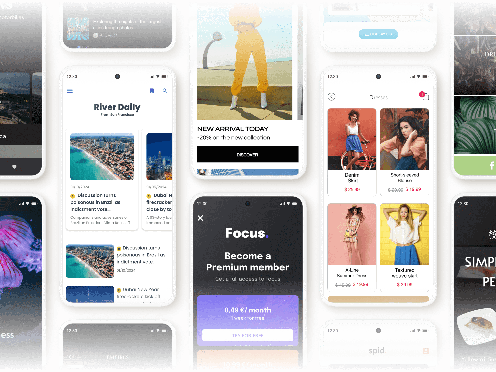
Whether you're looking for an eCommerce app builder to launch your online store, a content app builder for your media project, or a web app builder to boost your visibility, GoodBarber provides all the tools you need.
With business features tailored to each industry, our platform allows you to build high-performing, user-friendly apps, whether for commerce, content publishing, or event management.
Already running a WordPress site? The WordPress app builder brings your posts into a native app for iOS and Android.
Extensions Store
Advanced features at your fingertips
Google Fonts
Diverse font library

Appointment booking
Schedule Management

AI Assistant
Simplify creation
Typeform
Form integration

Content Management System
Streamlined Content

ChatGPT
AI-Powered Apps

Twitch
Video and live integration
Make
Automation connector

Squarespace
Connect Your Content

Meta Pixel & App Events
User behavior analysis

Ticketmaster
Ticketing integration

Memberships
Generate revenues

Slack
Team communication

Mailchimp
Email marketing strategy
Mixcloud
Radio shows and mixes integration

WordPress Plugin
Share your content
Zapier (for eCommerce)

Hubspot
Business growth optimization

Spotify for Podcasters

Stripe
Payment methods

Google Ads
Ad optimization

AzuraCast, podcast
Podcast integration

Paypal
Streamlined payments



Google Analytics
Usage statistics

Gmail
Email integration

Bluesky
Social network integration

Planning Center
Church calendar integration
iBeacons
Proximity notifications

Medium
Publication synchronization

Zeffy Events
Events integration

Authentication
Authorize access

RSS Feed
Content Sync

YouTube
Video Integration

Instagram
Social integration
Microsoft Excel
Data organization
Notion
Database automation

HelloAsso Events
Association events integration

Genius Palette
AI-Crafted Colors

Airtable form
Data submission
Pexels
Photo library access

Vimeo
Real-time synchronization

Google Sheets
Data management

LottieFiles
Fluid animations

Mastodon
Social network integration

Spinitron, schedule
Program schedule integration
Apple Pay
Simplify payments

Google AdMob
Monetize with Ads


Over 190 advanced features can be added to your back office through the Extensions Store. Select the specific business features you need and organize your workspace as you wish.
The best look for your app
A beautiful design thanks to the best no-code app builder
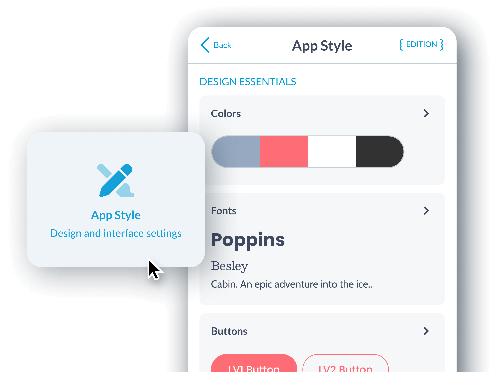
Manage the overall style of your app from a single menu: colors, typography, buttons, hover effects, and more.
Apply your design to all pages with just one click. With a wide variety of pre-built app templates and customization options, you create an app tailored to your needs, with no limits.
A Design System built for excellence
Harmony and consistency at every stage
GoodBarber is the first app builder to respond to a complete Design System, providing a set of harmonious design rules that apply by default to every page of your application.
Thanks to our Design System, you can ensure a smooth and optimal user experience while maintaining visual consistency across all your app's pages. This means every element, every button, and every interaction is carefully designed to offer a seamless and intuitive experience for your users. You no longer need to worry about design details, as our system guides you through the process.
 Excellent management of fonts and colors
 Clear hierarchy
 Optimal spacing management
The best tool on the market
An intuitive interface for professional results
Enjoy the most advanced management interface on the market. GoodBarber’s back office allows you to build apps using the latest technologies without needing to know how to code. It offers a complete tool for creation, management, and performance analysis, all while being accessible to everyone.
What happens in this video
The GoodBarber back office opens on My App, the entry point where we see a live preview of the Words & Waves app. The main menu lists Dashboard, Content, Monetization, Notification, Statistics, My App and Publish. The pointer is moving to Content.
Content opens in the main menu. Add, Content list, Comments and Trash Can are where the articles and the other items of the app are created, reviewed and removed.
Add opens inside Content. For this app, GoodBarber offers two kinds of item: An article and A sound. The pointer is moving to An article.
The article editor, for a new story in Stories. The title is being typed: What the tide leaves behind. The content area is empty. The side panel already shows where the article will appear, who writes it, and the writing date.
On the text block, assisted writing opens from the sparkle button. Inside the CMS it offers Complete, AI Assistant, Sum up, Translate and Change tone. The pointer is heading to AI Assistant.
AI Assistant is open in the article editor. A prompt is being typed for the piece: Write a short piece on what the tide leaves behind. The article already carries its title, a photograph of a surfer, the body text and the author Clara Whitmore. The status is Draft.
The same article in the content editor, now Published. The title is What the tide leaves behind, the author is Clara Whitmore, and the body opens with "When the tide slips away, it leaves a quiet world behind", under a photograph that is also the article thumbnail.
Back on My App. The phone shows that article, written by Clara Whitmore on 10/06/2026. Edit, above the phone, is closed.
Edit opens on the preview. From here GoodBarber offers three ways into the app: General header of the app, Design of the section's articles, and Content of this article. The pointer rests on General header of the app.
The pointer moves to Design of the section's articles. The article highlights in the phone, so we see which part of Words & Waves that action will change.
The design of the Stories articles. ToolBar Up is the selected layout, so the article toolbar, with close, comment, share, text size and bookmark, sits at the top of the phone. ToolBar Slide and ToolBar Down Classic sit beside it. The page background is white, and the title is Playfair Display.
The layout changes from ToolBar Up to ToolBar Slide. The phone preview updates from the same configuration: a Words and waves header appears, the title comes first, and the photograph moves under the text.
Back on My App, with the article still in the phone. The pointer moves down the main menu to the Extensions Store.
The Extensions Store, in the same back office. The page reads "Get the most out of your app with our Extension Store" and "More than 190 extensions for your project." Categories in view: Content, Memberships & Login, Monetization, Notifications, Essentials and Productivity. Popular extensions include Memberships, Chatbot and AI Extension Builder.
The store scrolls to the collection Build audience loyalty. Content creators lists 80 extensions. Newspapers lists 65.
Preview mode. The banner reads "You are now in preview mode." We see the web version of Words & Waves, then the same app inside an iPhone 16 Pro. The tooltip reads "Test your app on iOS." The pointer moves along the device icons.
The preview settles on that web version, at desktop size. Stories shows What the ocean knows about us, Where Sydney begins to whisper, The city after dark and The art of slowing down, by Clara Whitmore. Under Reflections, the audio pieces What remains unsaid and Why we slow down.
Back on My App, with the phone on the Words & Waves home. Publish opens. One configuration, three outputs: the web version, labeled PWA in the menu, plus Android App and iOS App. The pointer moves to iOS App.
Preview and manage your app with ease
Total control from the back office and the My GoodBarber app
Real-time Preview

In the back office, you can instantly see the changes made to your app, ensuring that the design and features meet your expectations.
My GoodBarber app


This combination gives you total, seamless control over the final quality of your project.

A trusted relationship
By choosing GoodBarber for your project, you are investing in building a long-term partnership.
You own your app
- With GoodBarber, you remain the sole owner of your app and its content.
- We don’t display any ads in your apps, and GoodBarber does not take any commission on your sales.
- You have full freedom to switch subscriptions or export your data at any time.
No funny business
GoodBarber never has and never will display its own ads in your app. If ads are displayed, they are the ones you have set up to generate your own revenue.
GoodBarber takes no commission on your sales. All the profits from your store go to you, regardless of the amount. You can easily change your subscription, whether to choose monthly or annual billing, or to upgrade your plan.
Complete support at every stage
Expert customer support to help you succeed

Fast, accurate support

Organized Support Threads

5 languages, 3 timezones

App Store Submission Help

Extensive Online Help

In-Depth Video Tutorials

Trusted by Users on Trustpilot

GoodBarber academy
Frequently asked questions about no-code app builders
Everything you need to know before you build your app with GoodBarber.
A no-code app builder is a platform for creating a mobile app through a visual interface instead of writing code. With GoodBarber, you assemble your app from ready-made features and layouts, customize the design, and publish: the platform generates, hosts and updates the app for you. What used to require a development team now fits in a monthly subscription.
Both. GoodBarber builds true native apps for iOS and Android, distributed on the App Store and Google Play, plus a Progressive Web App that runs in any browser. You manage everything from a single back office, with one content base for all versions.
AI app builders generate code from a prompt, then leave you to host, debug, secure and maintain that code yourself. GoodBarber is a complete platform: design system, native iOS and Android builds, hosting, push notifications, updates and support are all included. You focus on your content and your business, not on maintaining generated code.
No. The whole process is visual: you choose your features, customize your design and organize your content without writing a line of code. And if you get stuck, our support team, help center and video tutorials walk you through every step.
Custom app development is typically billed tens of thousands of dollars, plus ongoing maintenance. With GoodBarber, you build and run your app for a monthly subscription that includes hosting, updates and support. Check our pricing page to find the plan that matches your project.
Yes. GoodBarber generates store-ready builds and guides you through submission to the App Store and Google Play, step by step. Your Progressive Web App, meanwhile, goes live on the web instantly, no store review needed.