GBTC: Publish your app with easeDiscover GoodBarber Takes Care and simplify the app publication process for both the App Store and Google Play. Let us handle the technical details for you.Learn more about GBTC
Apps and digital time spent: smartphone apps dominate the desktop web
Isabella Leland
·Updated · 3 min read
The desktop web is losing momentum, it’s a fact. But, do new user behaviors account for more "digital time" spent on mobile apps? With users transitioning from desktop to mobile, does it play in the favor of smartphones or tablets, websites or apps?
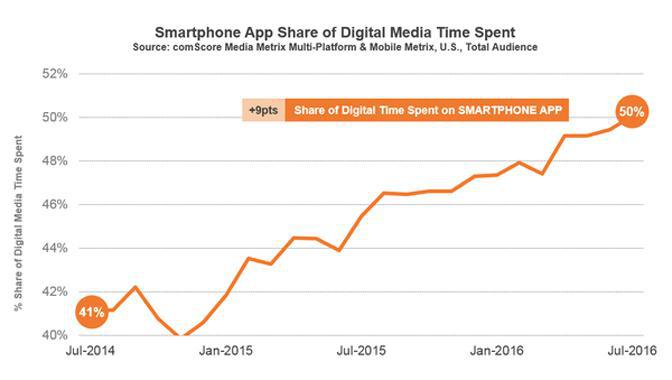
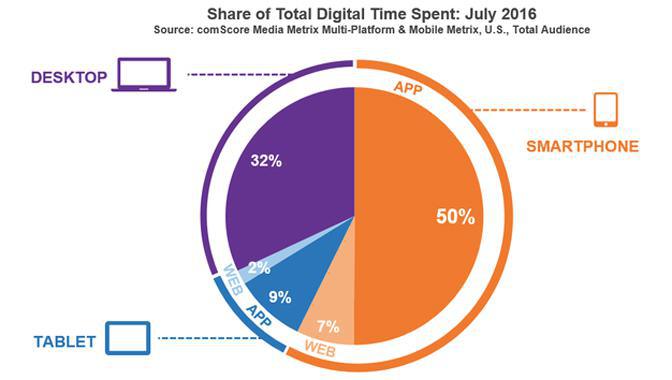
A recent comScore report reveals that, as of July 2016, mobile applications now make up for 50 % of the digital time spent, in the US. An impressive figure, with the mobile web only accounting for 7% of the total share. As for the market of tablets, it is more limited, with an 11% time share only. Nevertheless, even within that portion, mobile apps remain ahead (9% against 2% for the good old web). So, if you are quick at math, you have already calculated that the amount of digital time left for the desktop is of 32% only.
Behind these numbers, what’s showing is our daily routines and continually evolving digital habits. How do we keep in touch with one another? How do we stay on top of news from all around the globe? How do we perform a search when looking to verify something in the middle of a conversation? A few years back, if a movie director had to film any of these actions, the main characters would have probably been seen reaching for their landline phone or typing on a keyboard and waiting for a big window to load on a desktop computer. These days are gone. Today’s director would, instead, zoom in on a smartphone, with a thumb swiping on the device’s screen. You are picturing it too, right? And chances are, you can see yourself as the leading character in that movie.
If we add up the fact that the screen size of smartphones has considerably increased and that 4G is more and more available, it comes to no surprise that many of us turn away from computers, even laptops. Desktops and even tablets now tend to serve specific purposes. However, the idea isn’t to set one side against the other, and the comScore report is careful not to jump to that conclusion either, reminding us that the desktop web is still an essential part of consumers habits, for E-commerce for example. One must therefore think in terms of synergy, while yet admitting that a mobile app has become a necessity, if not a priority, with a website being more often than not its desktop sidekick. With different purposes, websites are far from obsolete, but they need to adapt, with a reconsidered user experience to meet new user expectations.
In a nutshell, the key takeaway of this report is that it is getting difficult to picture a business without an app these days. Whether you are a digital sector start-up or a local business, the average client is the same, a smartphone always at hand, a connected user by nature, and it is on that precious acquisition channel that a business should engage with him, with an app and unique native features: push notifications, geoalerts, coupons, loyalty card.
The short version. Zeffy Events and Zeffy Campaigns are two extensions of GoodBarber, the no-code app builder, that read a nonprofit's campaigns on Zeffy. Zeffy Events fills a Calendar section with upcoming events, one entry per date when an event runs on several dates, each with a button that opens its Zeffy ticketing page in the app. Zeffy Campaigns fills an Article section with donation forms, peer-to-peer fundraisers and memberships: memberships open in the app, donations open in the phone's browser. You connect them with your Zeffy API key. Both are free for Content apps: each section counts as one of the extensions included in your plan.Zeffy says more than 100,000 nonprofits have raised over $2 billion through its platform, in an article published on June 16, 2026. Here is how the two extensions play out for a youth theater company that sells its show and raises funds on Zeffy.
In GoodBarber, each color of your theme plays a role. On one of our apps, changing a single color repainted 95 settings at once, without opening a screen.
The short version. Planning Center is an extension of GoodBarber, the no-code app builder, that fills a Calendar section with the events a church publishes on Church Center over the next six months. Recurring events appear once per date, at their public times, in the church's time zone, with their image, location and description. When an event has a sign-up, a button opens the form in the app. You connect it by signing in with a Planning Center Calendar administrator account: there is no key to copy. It is free for Content apps: each section counts as one of the extensions included in your plan.Many churches already run their calendar in Planning Center: it counts 78,000 active churches and 4 million active users, according to its About page, consulted in October 2026. Here is how the extension plays out for a church with a weekly service and a youth retreat.
 eCommerce
 Memberships
 Chatbot
 Online Courses
 Bookings
 Travel guide
 Events
 Content Creators
 Pickup & Delivery
 Newspaper
 Radio
Radio Schools
 Faith
Faith Organizations
 Restaurant
 Grocery
 Custom apps
 Employee Communication

 NO CODE APP BUILDER
 TECHNOLOGY
 WHY GOODBARBER?
 Design
 PRODUCT RESOURCES
 TOPICS
 MOBILE APPS RESELLERS
 DISCOVER