GBTC: Publish your app with easeDiscover GoodBarber Takes Care and simplify the app publication process for both the App Store and Google Play. Let us handle the technical details for you.Learn more about GBTC
GoodBarber is constantly evolving to offer its users powerful and intuitive tools. Today, we're pleased to present a new template that will transform the way you integrate and display audio content in your applications: the Immersive Card Banner template for the Sound Widget.
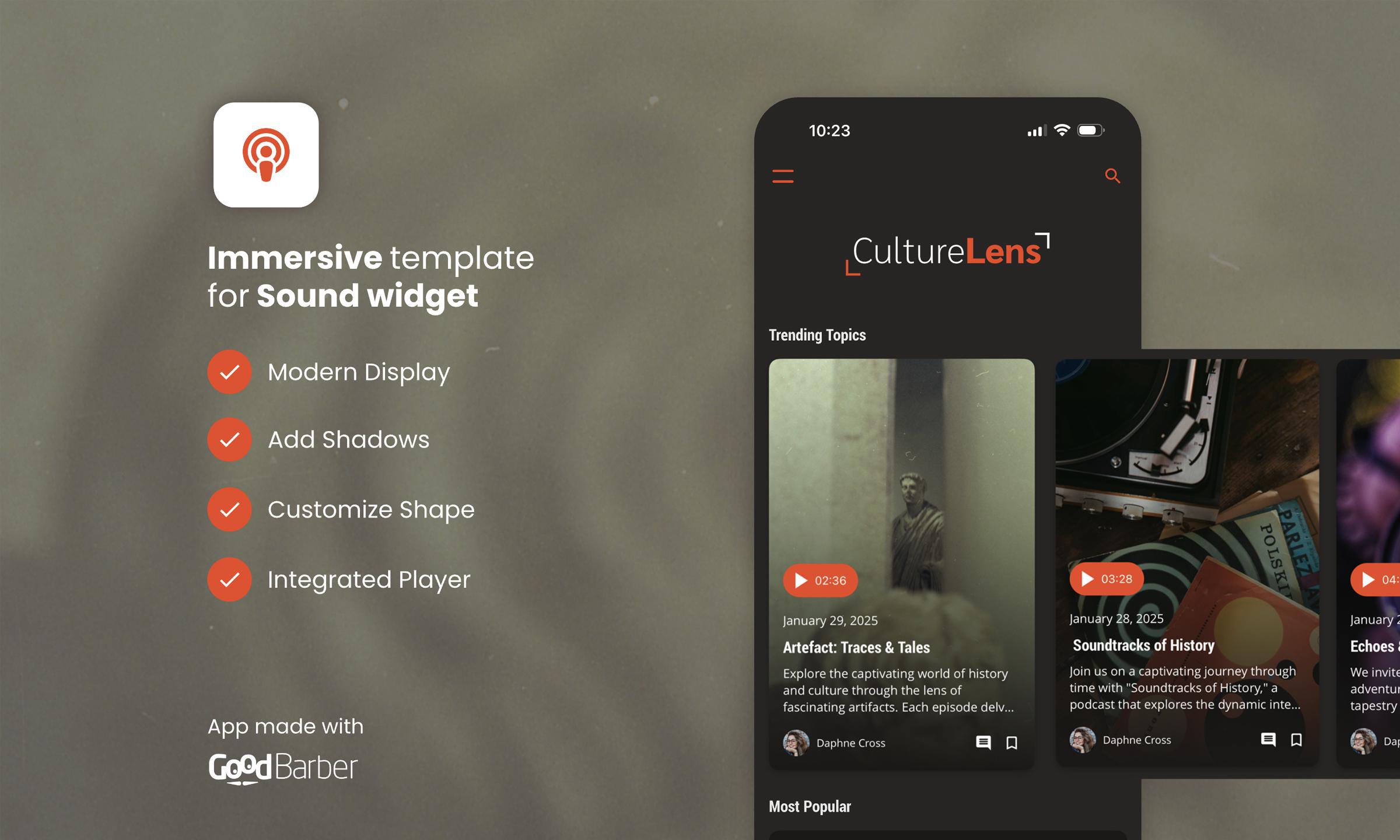
The Immersive Card Banner is a new template specifically designed to enrich the visual and interactive experience of audio widgets in your applications. Already available for other template types, it adds a new dimension to the way audio content is presented, while optimizing the management of user interactions.
The Immersive Card Banner features a clean, dynamic design that presents audio elements in a clear and engaging way. The template incorporates both a simple, modern interface and smooth interaction with the audio. Using this template, your users will be able to interact with audio content in a natural way, while enjoying high-quality visual rendering.
Why adopt this template?
The Immersive Card Banner is ideal for applications that want to offer a modern, interactive interface for audio. Whether you're a podcasting platform, a music streaming service or just want to add some audio content to your app, this template is designed to make the experience more enjoyable and engaging. Its clean design, ease of use and customization options make it a must-have choice for anyone wishing to integrate audio content into a GoodBarber application. It transforms the listening experience into an interactive and visually pleasing moment, while offering simple and effective management of audio content.
How to integrate the Immersive Card Banner template into your Sound widgets?
You can add it directly from the back office of your GoodBarber app by following these steps:
Go to the My app > Structure menu in your back office.
Then select the Home section and the Sound widget you wish to customize.
Choose the Immersive Card Banner template from the available layout options.
Customize the visuals and descriptions of the various points of interest to suit your needs.
Save, publish and enjoy!
Immersive Card Banner transforms your sound widgets and enhances the interactivity and presentation of your audio files!
Take a local radio station with live programmes, a schedule and interviews available on demand in its app. Every recording has a title and a description. Those help listeners browse, but an interview often contains useful details that never make it into the summary.In our example, the episode is called “The city we share”. Its description introduces a conversation about everyday life in the city. During the recording, an urban planner explains the city's approach to summer heat: planting trees along school routes, adding shade to playgrounds and replacing some paved surfaces with planted areas.None of those measures appears in the title or description. A listener remembers the subject and asks:Which episode explained how the city plans to reduce summer heat?We have added audio podcasts as knowledge sources for GoodBarber Chatbot so questions like this can lead back to your programmes. There are two levels: the written information you publish about each episode, and the spoken content you choose to have transcribed.
The short version. Twitch is an extension of GoodBarber, the no-code app builder, that adds a Twitch channel as the source of a Video section. When the channel is live, the stream sits at the top of the section; the rest of the time, the section lists the channel's videos. You connect it once, with a Client ID and a Client Secret from Twitch's developer console. It is free for Content apps: each section counts as one of the extensions included in your plan.The audience is on Twitch. In September 2026, viewers watched 1.51 billion hours of live streams there, with 2.1 million people watching at any given moment on average, according to TwitchTracker. Here is how the extension plays out for a creator who goes live every Tuesday at 8 pm.
In any app, publishing a useful document is only part of the job. People also need to find the right information when they are about to act. A clearly named file helps someone browsing a library, but a reader may arrive with a more immediate question.Employee communication is only one possible application. The same approach can support learning resources, member guides, technical references or any other useful documents shared through an app. For our example, consider a colleague trying to book a client trip who needs to know:Which travel expenses need prior approval?We have added document sources to GoodBarber Chatbot so that the files you already maintain can support these conversations. You select the documents. Users ask in their own words. The assistant looks for relevant passages and uses them to build a response.The question becomes a way into the policy. Employees can start with the decision in front of them, even when they do not know the title of the document that explains it.
 eCommerce
 Memberships
 Chatbot
 Online Courses
 Bookings
 Travel guide
 Events
 Content Creators
 Pickup & Delivery
 Newspaper
 Radio
Radio Schools
 Faith
Faith Organizations
 Restaurant
 Grocery
 Custom apps
 Employee Communication

 NO CODE APP BUILDER
 TECHNOLOGY
 WHY GOODBARBER?
 Design
 PRODUCT RESOURCES
 TOPICS
 MOBILE APPS RESELLERS
 DISCOVER