 eCommerce
 Memberships
 Chatbot
 Online Courses
 Bookings
 Travel guide
 Events
 Content Creators
 Pickup & Delivery
 Newspaper
 Radio
Radio Schools
 Faith
Faith Organizations
 Restaurant
 Grocery
 Custom apps
 Employee Communication

 NO CODE APP BUILDER
 TECHNOLOGY
 WHY GOODBARBER?
 Design
 PRODUCT RESOURCES
 TOPICS
 MOBILE APPS RESELLERS
 DISCOVER
IndexNow on GoodBarber: get your PWA indexed faster
You publish a new article, you fix a price, you pull a listing: your app's content changes all the time. But between the moment you update a page and the moment a search engine notices, days can go by. Until the crawler comes back around, your update stays invisible in search results. IndexNow flips the logic: instead of waiting for a crawler to show up, your app tells search engines what changed. Here's how to switch it on for your GoodBarber PWA.

The real SEO drag on an app that moves: indexing lag
The SEO of a PWA rests on a simple principle: for a page to show up in search results, an engine first has to visit it, read it, and index it. That visit — the crawl — isn't something you trigger. The engine decides when it comes back, at its own pace.
For a static site, that wait barely matters. For an app whose content is alive — a media outlet publishing several times a day, a store whose prices and stock keep shifting, a schedule where events appear and expire — it's a genuine drag. You've already done the work: the content is live, up to date, ready to be found. But it sits there waiting on a crawler that hasn't come back yet. In the meantime, it's sometimes an old version of the page — or nothing at all — that surfaces in results.
IndexNow: notify search engines instead of waiting for them
IndexNow is an open protocol that turns the process around. Rather than waiting for an engine to come and discover your changes, your site notifies the engines the moment a URL is created, updated, or removed. The engine then knows exactly what to fetch, and when.
The mechanism is shared: a single notification goes to the IndexNow endpoint, which propagates it to every participating engine — Bing, Yandex, and the other protocol members. You notify once, and every engine that supports it is served. It's a direct signal, sent at the moment the change happens, in place of the implicit "come back whenever you like" of a classic crawl.
Turn IndexNow on in your back office, with one toggle and one key
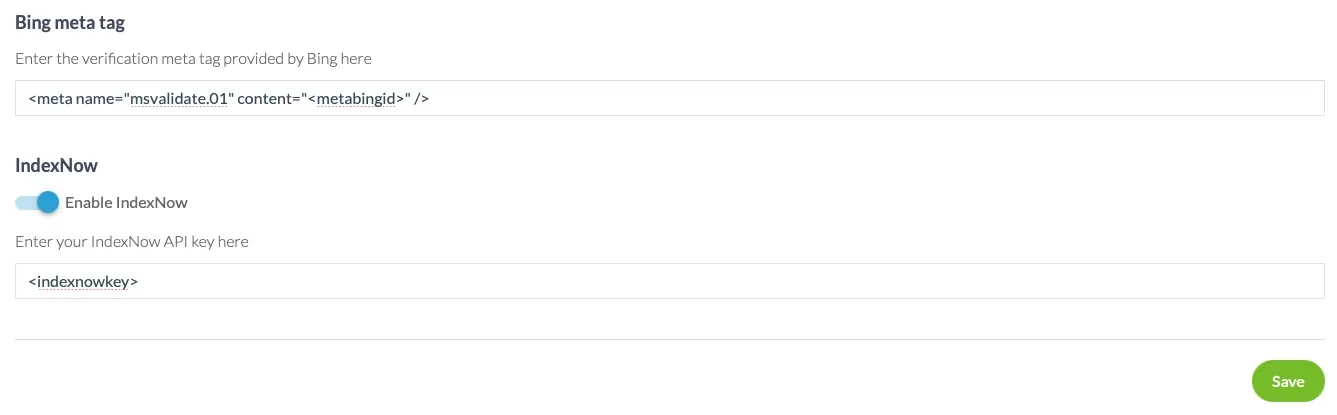
On GoodBarber, IndexNow switches on without writing a line of code. Go to your back office, open the SEO page, Sitemap tab: you'll find an IndexNow section with a simple toggle. Turn it on, enter your IndexNow key — and save.
Where do you get that key? Head to the official bing.com/indexnow/getstarted page and generate one: on the GoodBarber side, only the first step concerns you. You grab the key, you paste it into the back office, and you stop there. Hosting the key file and submitting the URLs — the later steps in the guide — that's on us.
Comfortable with the technical side? Bing isn't a mandatory stop: the protocol's official FAQ explains how to generate the key yourself. A GUID/UUID generator or a single command-line call does the job, as long as you follow the same rule — 8 to 128 characters, using only letters (lower or upper case), digits, and hyphens.
That's all you have to do. GoodBarber handles the rest: the key file the protocol expects is published automatically at the root of your site, and every notification is sent for you. No API to wire up, no file to host, no script to maintain. One condition to keep in mind: your PWA has to be published for notifications to go out — which makes sense, since IndexNow signals URLs that are actually live.
Track your indexing requests with Bing Webmaster Tools
Turning notifications on is good. Checking that they do their job is better. That's where the second addition to this page comes in.
Next to the Google Search Console verification field, which was already there, you now have a dedicated field for the Bing meta tag. Fill it in to verify ownership of your site with Bing Webmaster Tools. Once that's done, you can follow the status of your content's indexing requests on Bing's side: which URLs were submitted, which were crawled, which are indexed. IndexNow sends the signal; Bing Webmaster Tools shows you what becomes of it.
Bing hands you that tag when you add your site. Here's how:
- Create an account — or sign in — at Bing Webmaster Tools, then add your site, either by entering its URL or by importing it from your Google Search Console account.
- At the ownership verification step, choose the Meta tag authentication method among the options offered.
- Copy the
<meta>tag on screen: it holds your personal verification code. - Paste it into the Bing meta tag field in your GoodBarber back office, Sitemap tab. No need to touch your site's code — we insert the tag into your pages'
<head>for you. - Go back to Bing Webmaster Tools and run verification. Your site is validated, and tracking is live.
What happens automatically, on every change
Once the toggle is on, the mechanism is completely silent. Every time you publish, update, or unpublish a piece of content in your CMS, GoodBarber picks up the change and sends the relevant URL to IndexNow. Notifications are deduplicated and batched, so only what needs to be signaled gets signaled — cleanly.
There's nothing else for you to do. You keep working on your content the way you always have, and each meaningful change becomes, right away, a signal sent to the engines. It's the GoodBarber principle all the way through: the feature is built in, included in your subscription, and it works in the background without you having to think about it.
IndexNow is already in your back office: open Publish → SEO → Sitemap tab, turn on the IndexNow toggle, paste your key — and let your content get noticed the moment it changes.


