GBTC: Publish your app with easeDiscover GoodBarber Takes Care and simplify the app publication process for both the App Store and Google Play. Let us handle the technical details for you.Learn more about GBTC
If you've subscribed to a native GoodBarber offer and you've activated the PWA version of your app, you have the option to send push notifications to your native iOS, Android, and PWA users.
Being able to directly contact all of your users regardless of the device they're using is a significant advantage.
On the other hand, in some cases it can be a good idea to adapt your communication based on the type of user.
Certain messages may only apply to web users (to get them to install the application for example), or only native iOS users (maybe to inform them of an update that only concerns iPhones).
Basically, it's good to have the option to target users based on their platform, and now this is possible.
How does it work?
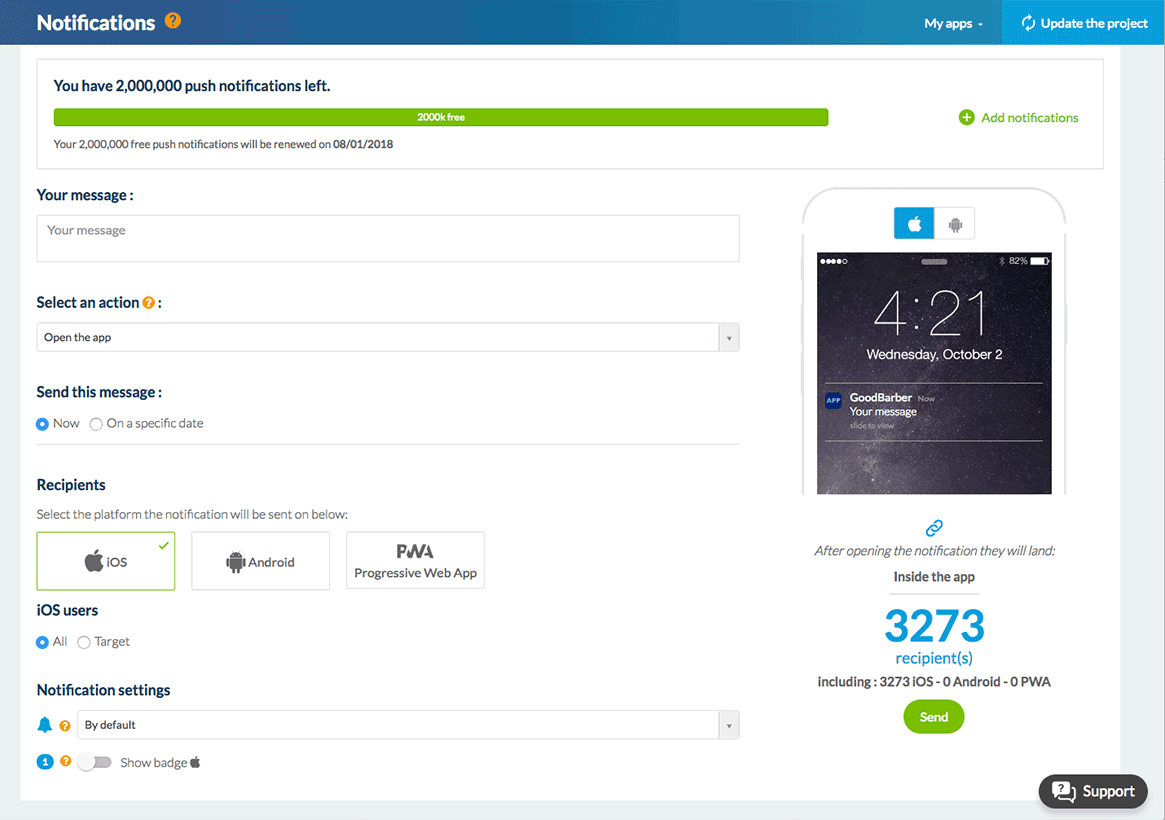
Push notifications panel on GoodBarber
In the menu Users > Push > Send, you'll find the page to create push notifications.
As usual, you can write your message, select an action, schedule the sending, etc.
The update can be found in the Recipients sub-menu. Here, in just one click you can choose the platforms that will receive this notification.
On the side in the notification preview, you'll see the total number of recipients as well as the platform repartition (PWA, native Android, and native iOS if you're subscribed to the iOS Premium offer).
All that's left is to finish setting up your notification and to send it to the users you chose !
On a closed iPhone Duo, Apple lines up an app's controls in a column along the camera, with a rule that fits in one line: a control that has a symbol goes into the column, a control that only has text stays horizontal. A GoodBarber app draws its own bars and follows the same rule. In its rail, each capsule is 48 points wide: room for one icon.A word, though, has a width of its own. To fit it into the rail, we could have turned it, cut it or swapped it for an icon. Turned, it makes you tilt your head; cut, it makes you guess; and an icon picked for you would make it say something else. A word is read, and it's read along a line. Writing out your tabs is a design choice: the app keeps it, and puts it where it reads best.
 eCommerce
 Memberships
 Chatbot
 Online Courses
 Bookings
 Travel guide
 Events
 Content Creators
 Pickup & Delivery
 Newspaper
 Radio
 Schools
 Faith
 Organizations
 Restaurant
 Grocery
 Custom apps
 Employee Communication

 NO CODE APP BUILDER
 TECHNOLOGY
 WHY GOODBARBER?
 Design
 PRODUCT RESOURCES
 TOPICS
 MOBILE APPS RESELLERS
 DISCOVER