 eCommerce
 Memberships
 Chatbot
 Online Courses
 Bookings
 Travel guide
 Events
 Content Creators
 Pickup & Delivery
 Newspaper
 Radio
Radio Schools
 Faith
Faith Organizations
 Restaurant
 Grocery
 Custom apps
 Employee Communication

 NO CODE APP BUILDER
 TECHNOLOGY
 WHY GOODBARBER?
 Design
 PRODUCT RESOURCES
 TOPICS
 MOBILE APPS RESELLERS
 DISCOVER
Your GoodBarber app is now in the Claude connectors directory
Until now, connecting Claude to your app meant knowing a URL and finding where to paste it. Not that simple when Claude's interface keeps evolving with each new release. Now you type GoodBarber in the directory, and one click does the rest.

Picture a Sunday evening. Your shop's app has been live for a year, orders come in every day, and for weeks you have been telling yourself you should try the thing everyone is talking about: running the app by chatting with Claude. You open claude.ai, and you stop. Where do you start? How do you add a custom connector? You see a field waiting for a URL you do not have and... you close the tab. On Monday, you go back to managing your shop from the back office and the Shop Companion app, as usual.
Good news: connecting Claude to your GoodBarber app just got a lot simpler.
GoodBarber in the Claude connectors directory
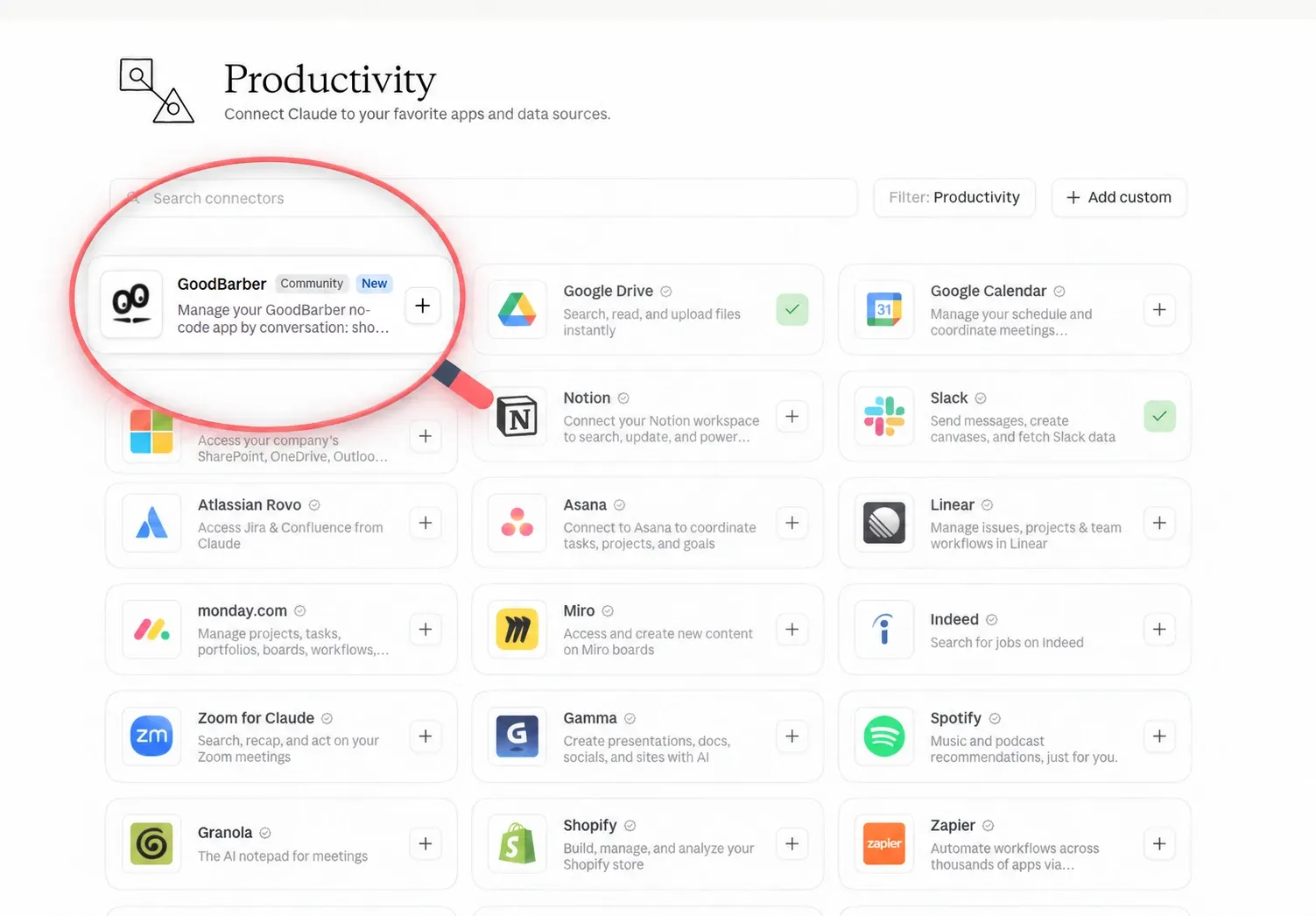
GoodBarber is listed in the Claude connectors directory. Search for "GoodBarber", click "Connect to Claude", sign in. The GoodBarber authorization page opens, you paste the Public API token created in your back office (Settings > Other settings > MCP Server & Public APIs), and Claude is connected to your app. That connection works on the web, in the desktop app and on your phone.
An address is something you copy. A name is something you remember. And GoodBarber is an easy one to remember :)
It is not even a first. Since August, the official GoodBarber plugin has been in the ChatGPT plugin directory: you find it by name, no Developer mode needed, and a free ChatGPT account is enough. Codex, OpenAI's coding app, connects to the same server with a single command, as the ChatGPT and Codex guide explains.
Back to Sunday evening. As I write this, your MCP server offers 150 tools you can use on your app. Once connected, you ask Claude: "Which products did I sell the most last week?" Claude reads the stats and answers. Read tools are picked and run without asking anything more. The answer shows that your "Slim fit viscose shirt" sells well in red, but not in blue. You decide to lower its price to boost sales. You tell Claude: "Set the blue one to 29." This time Claude stops, restates your instruction and asks you to confirm. Why? Simply because every tool that creates, changes or deletes something in your back office is flagged as such, so the question comes before the action, not after. You confirm. The price changes in the live app, and Claude reads it back to you. Three sentences, no settings menu, and your evening is still yours.
What doesn't change
If you are already connected from Codex, Claude Code, Cursor, n8n or Zapier, there is nothing to redo. The endpoint is the same, https://mcp.goodbarber.dev/mcp/sse, the tools are the same, and the manual route described in the MCP guide still works for every client without a directory. Your token still comes from your back office; revoke it and the connection stops, whichever client is using it. And the 44 open-source skills (as of this writing) keep assembling those same tools into complete workflows.
FAQ
What is the Claude connectors directory?
A catalogue of MCP servers Claude can connect to, shared by claude.ai, the desktop app and the mobile app. Being listed means a user finds GoodBarber by name and adds it from the page, without the URL and without the custom connector form.
What can Claude do once connected?
Shop: products, variants, collections, promo codes, orders. Content: articles, events, places, media. Push notifications, customers and members, analytics. Read tools answer directly; tools that write ask first. Not all MCP servers expose the same thing: this one exposes your app's operations, never its database.
Do I still need the Public API token?
Yes. It is generated in the back office (Settings > Other settings > MCP Server & Public APIs), and it is what ties the connection to your app and to the rights you chose. The directory removes the URL step, not the key.
Next Sunday
Connection hassle is no longer the reason to hold off on running your app with Claude. The listing is here: connect, and start with the question you would have asked a colleague on Monday morning.


