GBTC: Publish your app with easeDiscover GoodBarber Takes Care and simplify the app publication process for both the App Store and Google Play. Let us handle the technical details for you.Learn more about GBTC
Update, July 2026: this article has a successor. The up-to-date picture of what quietly breaks when an app is not updated, and what GoodBarber absorbs for you, is here: What quietly breaks when you don't update your app.
You took the leap, and created and launched a beautiful mobile app. Well done! Now all your work is done and you can sit back, relax, and let the app do its work to gain you, customers, build loyalty, and increase sales. Right? Well..... No. The work has just begun, actually. Your mobile app is only as good as its latest version, which means you need regular updates to keep your app “fresh” and relevant.
Let's see the three main reasons to update your app:
Reason #1: Apple Store and Google Play love it
Apple and Google definitely prefer to see apps get updated, even more so if those updates coincide with their major OS releases. To keep up with their standards and maintain their ecosystem safe for their users and always offer high-quality apps, both Stores have taken measures to remind app owners of the importance to update their apps.
Apple removes from the App Store any apps that haven't been updated often enough. They started doing this in 2016 when warned developers that they would have 30 days to update their app before it got taken down. Recently, it appears that they have been widely removing outdated apps.
Google Play is also cracking down on outdated apps by not only removing old apps from the Store but also in certain cases closing the developer account.
Also, keep in mind that apps with rare updates are considered bad quality and therefore have lower rankings.
Reason #2: Keep your users happy
There are always ways to improve your app. Your users will for sure give you feedback and tell you what they're looking for. By implementing the changes your users ask for, you will show that you care about quality. This will not only increase engagement but also make your users happy and consequently more loyal.
Here are a few examples of updates that can benefit your app:
Add new features:People love new things, and for mobile apps, this means new features. Adding new features is an important part of the evolution of your app. Your users may grow bored of your app if it remains the same for a while. We regularly add new features to our tool to enhance your app. Our Extensions Store offers more than 90+ extensions and our Service+ team is also here to create custom features based on your needs. Always pay attention to your users' feedback to find out which features they might be looking for.
Remove old features:An update is also the opportunity to remove old features that may not perform well or until you find a way to optimize their use.
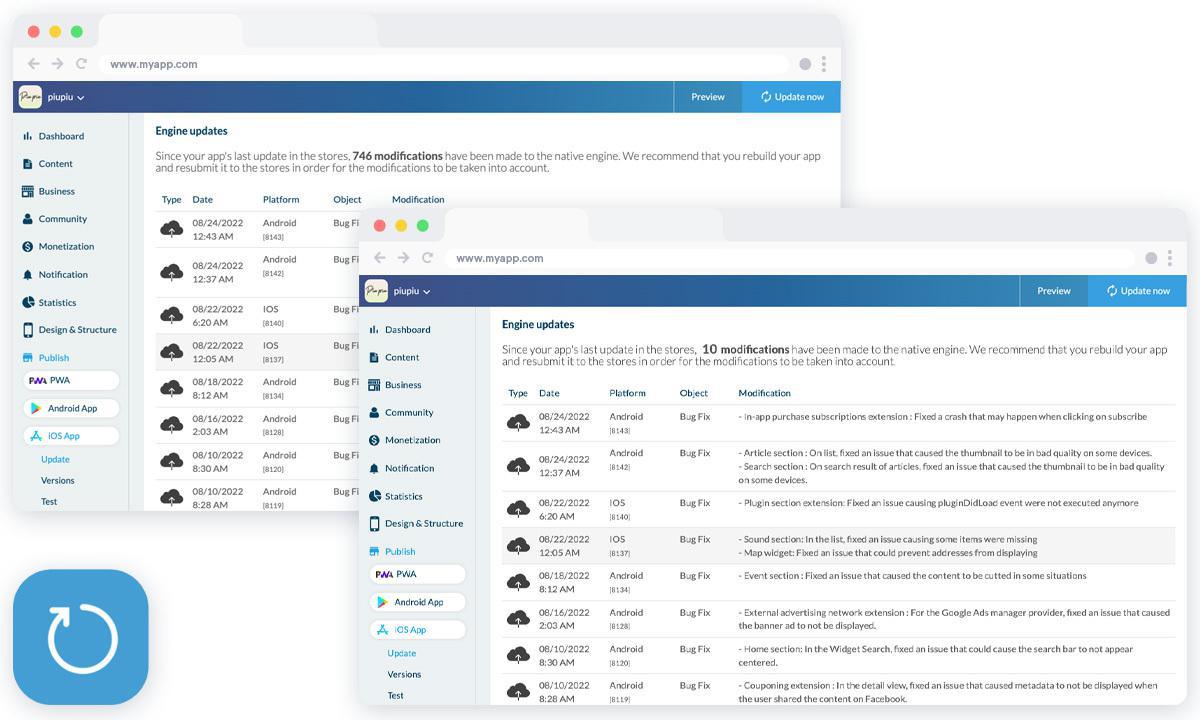
Fix bugs: our teams are regularly fixing issues on the platform. You can find every month the lists of all fixes and improvements made on our changelog on the blog, but also in your app back office > dashboard > what's new.
Improve users' experience:We're not talking here of major changes to your app design unless you're doing a total rebranding. But small tweaks here and there can bring a lot to your users' experience. For example, changing the style of your thumbnails to a more modern and trendy round shape will give your app a more modern and sleek look. As for new features, our designers and developers often add new style elements to our platform such as new header heights or new button styles
Follow the latest OS updates:A good reason to regularly update your app is to keep up with software and hardware advances. Every time a device’s operating system is updated, chances are that you’ll need to update your mobile app. Our developers are on top of these updates and our continuous maintenance endure that our platform is in line with the latest OS updates.
In your back office, you can see what has been updated by our developers, and which new features or modifications you've made to your app require sending a new version to the Stores.
Reason #3: Increase your visibility on the Stores
An update is a great opportunity to increase your visibility on the App Store and Google Play. Indeed, the metadata in your stores' listings can only be modified when you submit a new version of your app to Stores. In this metadata, the main visibility factors are the title, description, and keywords. Both Stores give you access to statistics where you can see if your texts, keywords, and screenshots also are effective. You will be able to see for example the impact of changing, for example, the subtitle on your downloads.
So take this opportunity to update your keywords. As we said previously, searching for keywords is an ongoing process: Research your competition, and analyze their reviews. You may find new keywords you didn’t think of during the first submission or last update.
Another good practice is to update the screenshots to showcase new features to your users. Make the best of the “ What’s new “ field by not only listing bug fixes but also by highlighting new features and encouraging positive reviews.
Once your update is done, don't forget to let your users know about it! App updates can be one of the best marketing tools at your disposal. Users give up on apps every single day. Remember, your app is competing with thousands of others and with shorter attention spans, it can be very easy to forget about even the most popular of apps over time. Regular updates can help an app get more attention. Updating your app is a great opportunity for sending a new push notification. You can remind users that your app is still on their smartphone, and nudge them back to check out its new features.
There are no magic numbers to how often you should update your app. However, our developers recommend doing it 3 to 4 times per year. Frequent updates show that you are committed to the app, which can help you maintain a loyal following and stay in good standing with the app stores.
It all starts with the design. A new typeface, Plus Jakarta Sans, a blue for the interface, a green kept for publishing and confirming, softer corners, gentle shadows and redrawn icons. The whole thing reads calmly, and every color has a job: blue guides, green confirms.In My App, your app's preview takes the center of the screen and the settings sit together in a panel on the right. You edit on one side, you see the result on the other, and your app stays in front of you the whole time.
The short version. Ticketmaster is an extension of GoodBarber, the no-code app builder, that fills a Calendar section with the upcoming events a venue sells on Ticketmaster. Each event arrives with its image, its description, its date and time, and a button to buy tickets on Ticketmaster; canceled events are not shown. You connect it with a free key from Ticketmaster's developer portal and your venue's ID. It is free for Content apps: each section counts as one of the extensions included in your plan.Plenty of venues already sell there. Ticketmaster sold 346 million fee-bearing tickets in 2025, according to Live Nation's full-year results, published on February 19, 2026. Here is how the extension plays out for a concert hall that sells all its shows on Ticketmaster.
Take a local radio station with live programmes, a schedule and interviews available on demand in its app. Every recording has a title and a description. Those help listeners browse, but an interview often contains useful details that never make it into the summary.In our example, the episode is called “The city we share”. Its description introduces a conversation about everyday life in the city. During the recording, an urban planner explains the city's approach to summer heat: planting trees along school routes, adding shade to playgrounds and replacing some paved surfaces with planted areas.None of those measures appears in the title or description. A listener remembers the subject and asks:Which episode explained how the city plans to reduce summer heat?We have added audio podcasts as knowledge sources for GoodBarber Chatbot so questions like this can lead back to your programmes. There are two levels: the written information you publish about each episode, and the spoken content you choose to have transcribed.
 eCommerce
 Memberships
 Chatbot
 Online Courses
 Bookings
 Travel guide
 Events
 Content Creators
 Pickup & Delivery
 Newspaper
 Radio
Radio Schools
 Faith
Faith Organizations
 Restaurant
 Grocery
 Custom apps
 Employee Communication

 NO CODE APP BUILDER
 TECHNOLOGY
 WHY GOODBARBER?
 Design
 PRODUCT RESOURCES
 TOPICS
 MOBILE APPS RESELLERS
 DISCOVER