GBTC: Publish your app with easeDiscover GoodBarber Takes Care and simplify the app publication process for both the App Store and Google Play. Let us handle the technical details for you.Learn more about GBTC
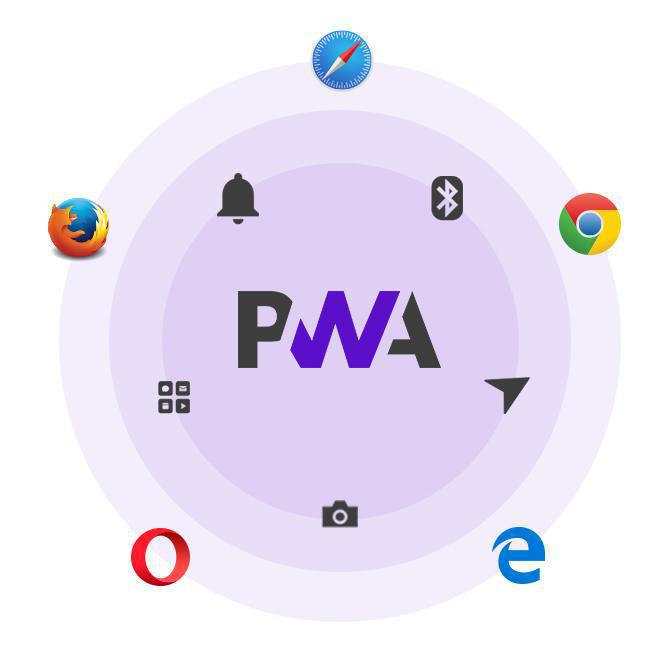
One of Progressive Web Apps strongest points is that they are adaptive, meaning that they always provide the best experience possible based on the screen they're being viewed on, as well as the capabilities of the browser they're being run on.
Therefore, it's useful to be aware of each browser's capabilities and its compatibility with Progressive Web App features.
Here is the list of the main browsers on the market, and their compatibility with the key PWA features. The interactive table below sums it up. Select the browser that interests you and check out its compatibility with the different features, also taking into account the screen type and operating system being used.
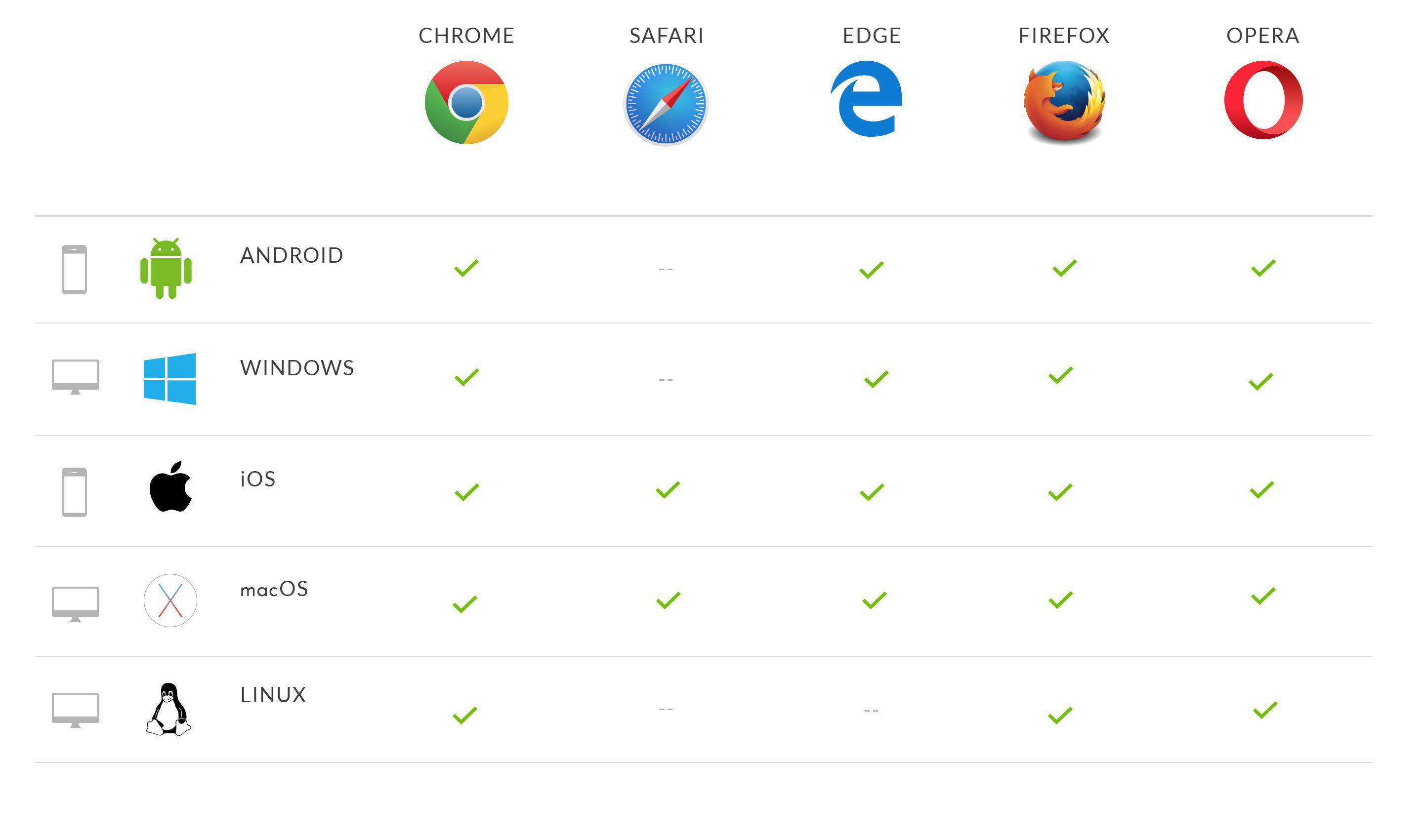
1) Advanced user experience & offline functionality
Progressive Web Apps browser support & compatibility
The first advantage Progressive Web Apps have over classic Web Apps is undeniably the exceptional user experience they offer.
We recently spoke about the use of Service Workers, which allow PWA developers to integrate a number of advanced features.
The Service Worker is installed in the browser the first time the PWA is used and then performs tasks it is assigned in an independent manner.
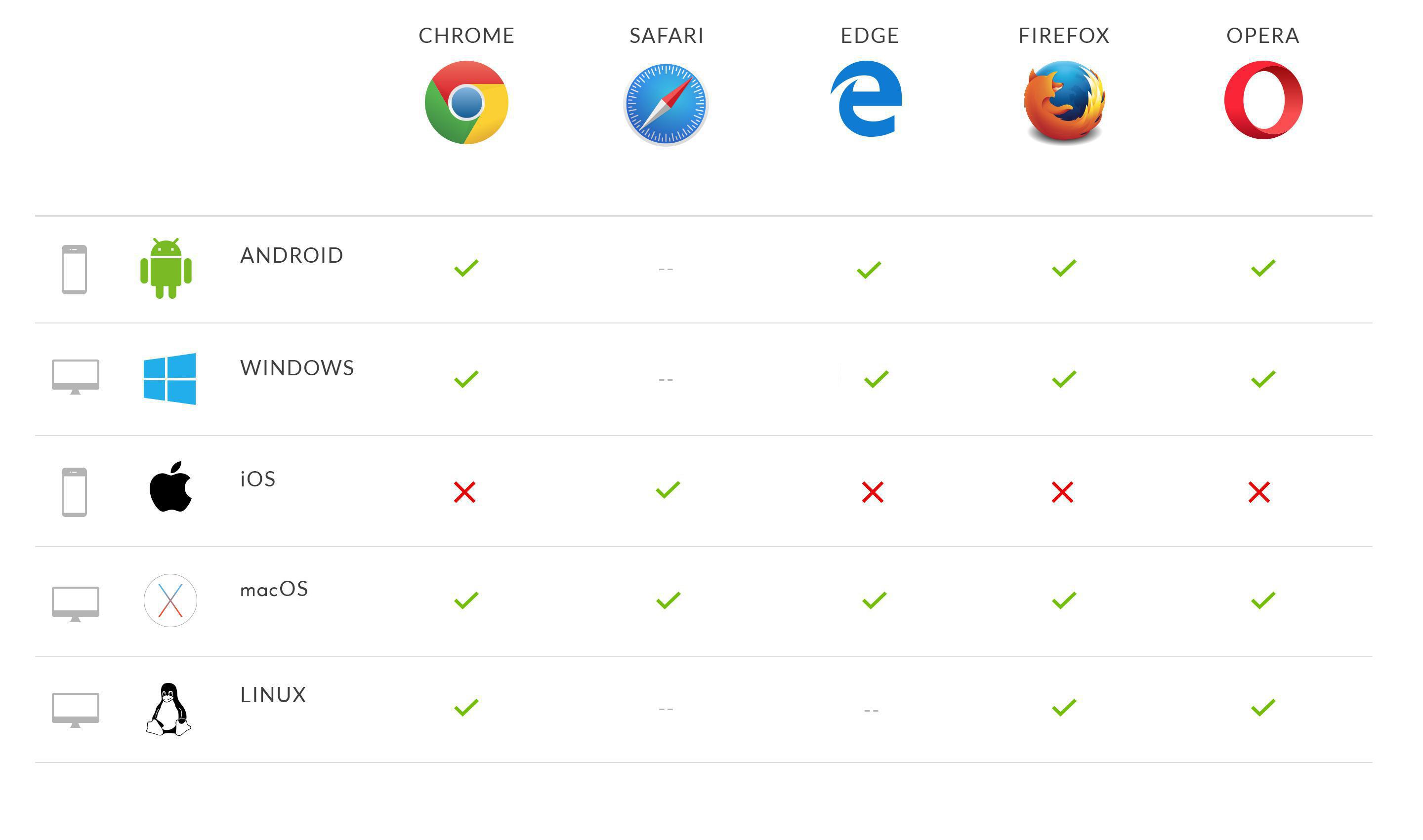
Here is the list of browsers that support the installation of the service worker :
Like we said, the Service Worker allows for advanced functionalities to be built, such as background synchronisation, allowing up to date data to be directly displayed to the user when he arrives (thanks to the regular data updating done in the background).
The synchronisation allows for an extremely smooth user experience by significantly speeding up the app's performance.
Progressive Web Apps browser support & compatibility
Offline accessibility also relies on the Service Worker, which once installed in the browser, manages the caching of the app files, intercepts network requests, and then performs the appropriate actions depending on the whether or not the network is available.
This functionality allows for the app to be visited without a connection, as well as for improved user experience to be enjoyed, since even when an internet connection is available, certain files won't need to be loaded from the web server since they'll already have been locally stored.
2) Web push notifications
Progressive Web Apps browser support & compatibility
This feature is possible thanks to service workers' capacity to work in the background.
To enable this, two complementary elements work together : the Push API and the Notification API.
The Push API is used to notify a service worker of a notification's presence.
The Notification API is used to trigger the display of a notification in a browser.
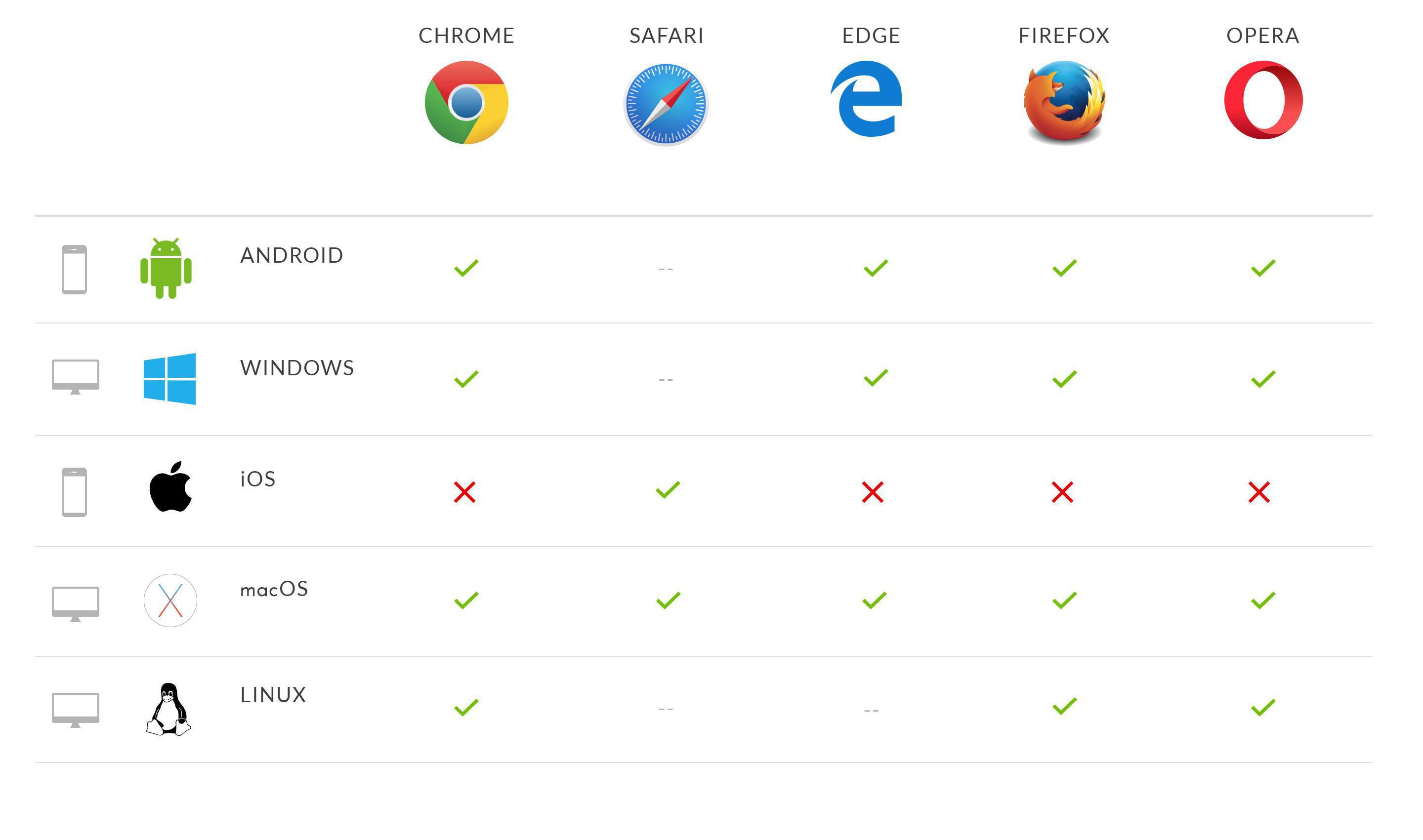
All, except for Safari, rely on Service Workers to achieve these results. Safari uses an Apple-specific system called APNs that allows notifications to be received on OS X, but not on iOS.
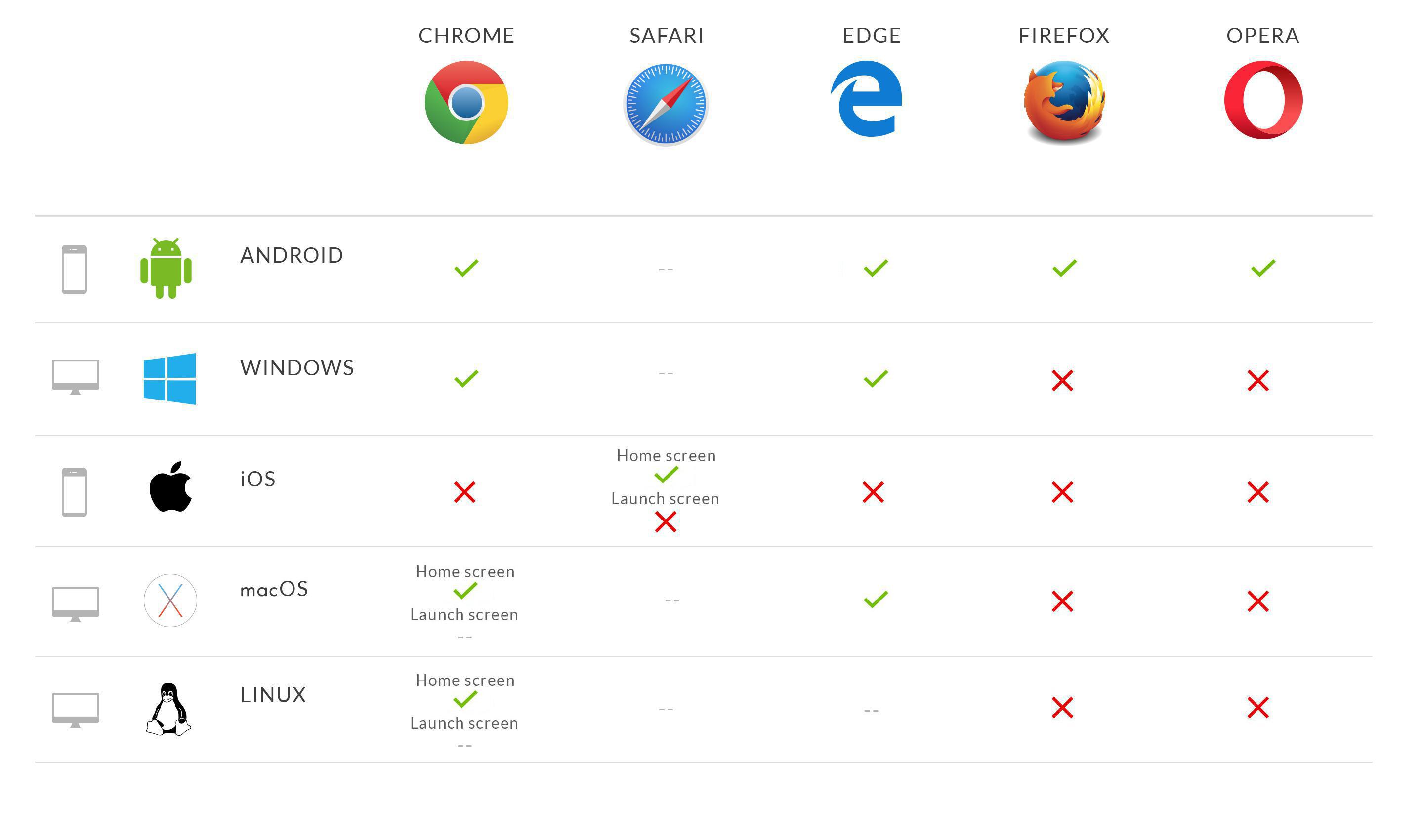
3) Home screen & Splashscreen
Progressive Web Apps browser support & compatibility
Another particular thing about PWA's is that even though they run via a browser, they can be installed directly onto the user's home screen and they offer an experience on an immersive, full screen.
This behavior is possible thanks to a JSON Manifest that is actually a descriptive file allowing developers to control the way the Progressive Web App behaves.
The JSON Manifest will allow the application to be saved onto the home screen of the device from the browser.
The app will then have its own icon and name, previously defined in the Manifest.
The Manifest also allows for a splashscreen to be displayed that the user will see upon opening the application, or while data is being downloaded or retrieved from the cache.
4) Geolocation
Progressive Web Apps browser support & compatibility
Information concerning the app user's geolocation can be retrieved by using the Geolocation API, which allows (with the user's permission) his location to be found.
It also allows you to keep an eye on the user and to be notified if a position change occurs.
The Geolocation API only works in apps under HTTPS, and allows for this precious information to be obtained in a secure way.
Through this API, you can build engagement and loyalty strategies that were unheard of in the web world up until now.
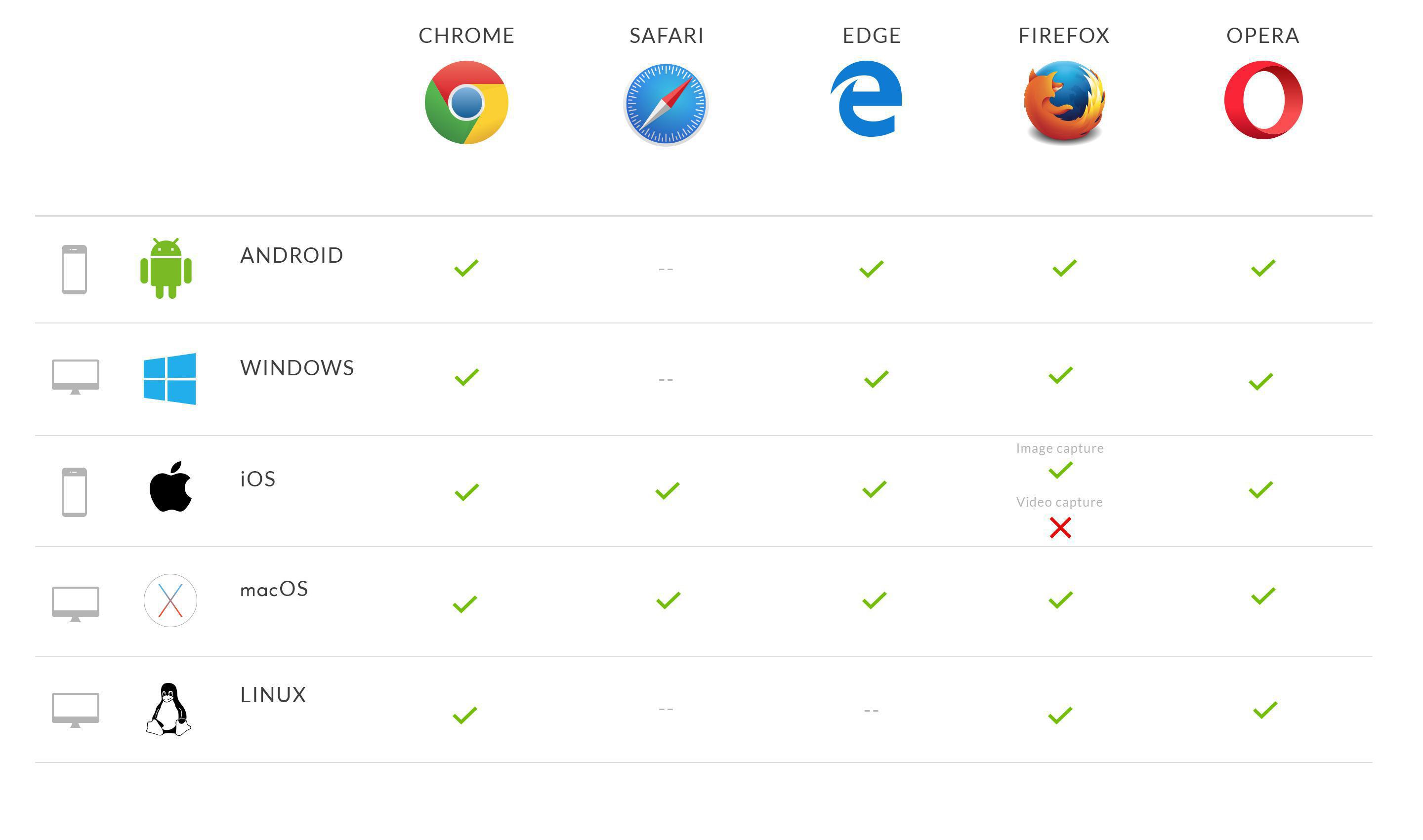
5) Video & Image capturing
Progressive Web Apps browser support & compatibility
Up until not long ago, the only way to get photos and videos on mobile devices was to use a standard HTML element that allowed for apps providing images to be launched, such as the camera. You had no choice but to leave the Web App.
Today, the "Media Capture API" allows Web Apps to have direct access to devices' audio and video feeds (the camera and microphone). These feeds can be read and handled from the Web App.
It is therefore possible to take a picture or record a video without leaving the browser, for example.
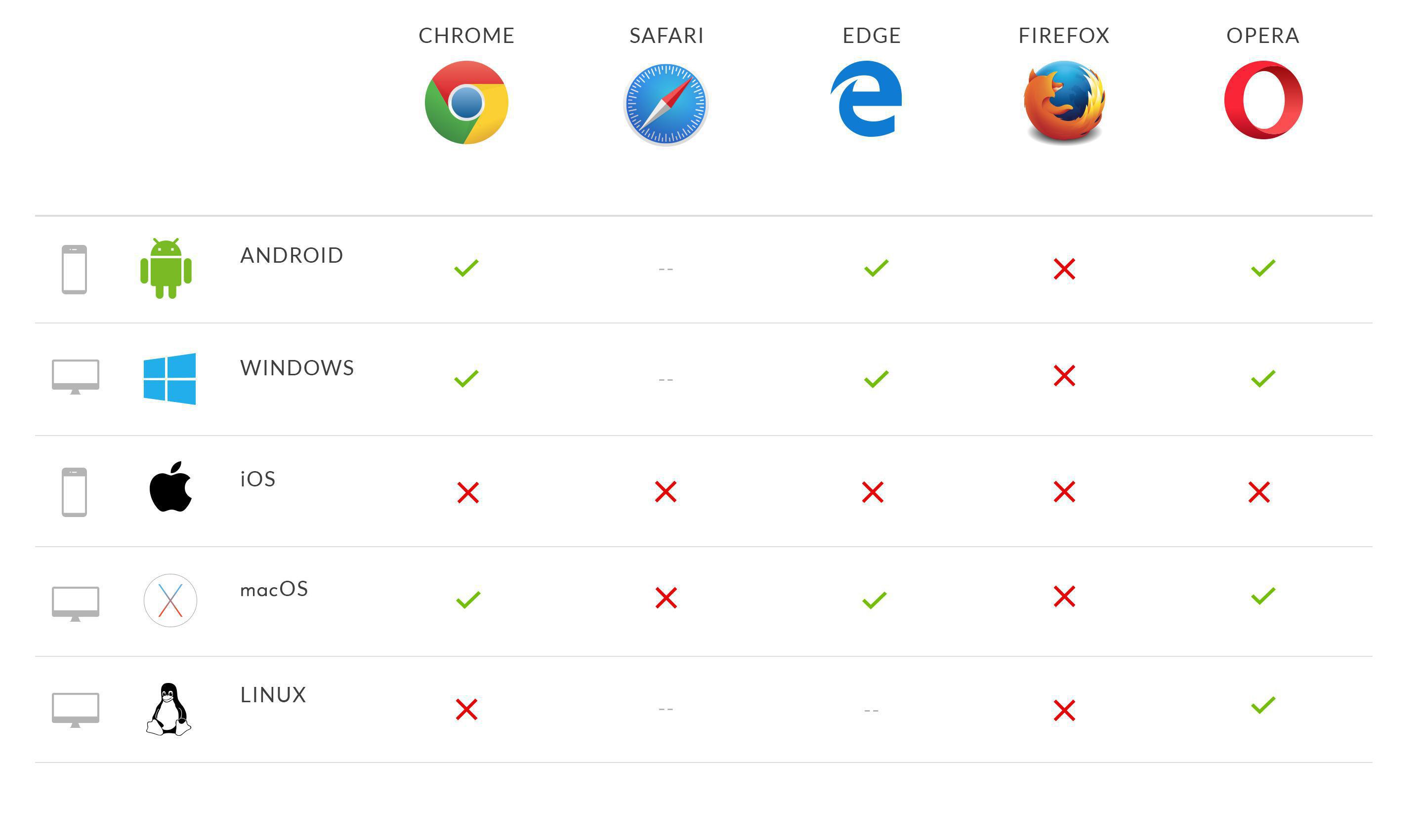
6) Bluetooth
Progressive Web Apps browser support & compatibility
Progressive Web Apps can also securely communicate with Bluetooth devices.
Reserved for native apps only up until now, Bluetooth usage on the web has been made possible thanks to the Web Bluetooth API.
This API makes communication between a Web App and a device possible : the application prompts the browser to display a list of surrounding Bluetooths in proximity, and the user chooses a device or closes the dialog box.
In order to avoid any security risks, the application must absolutely be running under HTTPS in order to use the Web Bluetooth API.
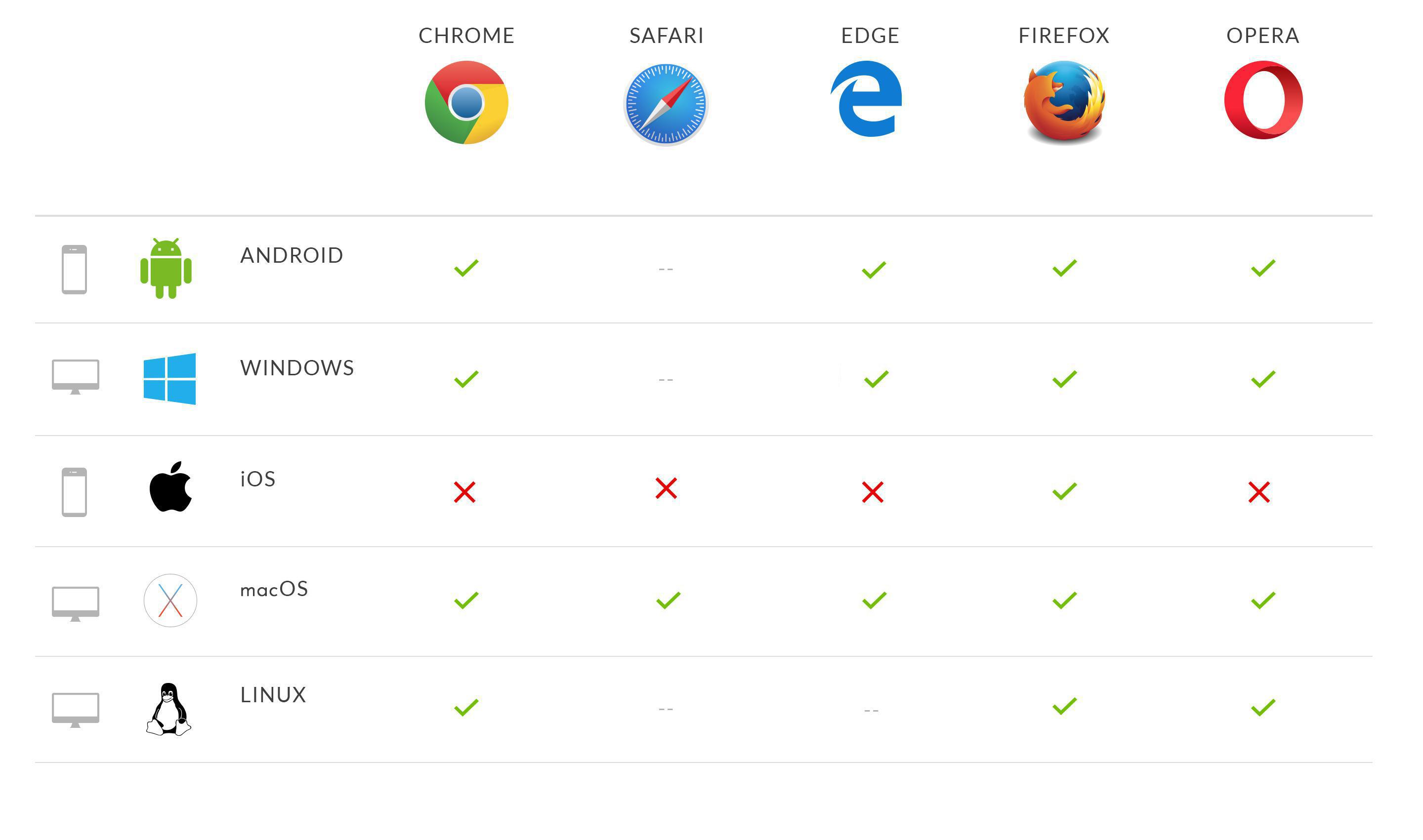
Here is the list of browsers compatible with this API :
The short version. Ticketmaster is an extension of GoodBarber, the no-code app builder, that fills a Calendar section with the upcoming events a venue sells on Ticketmaster. Each event arrives with its image, its description, its date and time, and a button to buy tickets on Ticketmaster; canceled events are not shown. You connect it with a free key from Ticketmaster's developer portal and your venue's ID. It is free for Content apps: each section counts as one of the extensions included in your plan.Plenty of venues already sell there. Ticketmaster sold 346 million fee-bearing tickets in 2025, according to Live Nation's full-year results, published on February 19, 2026. Here is how the extension plays out for a concert hall that sells all its shows on Ticketmaster.
Take a local radio station with live programmes, a schedule and interviews available on demand in its app. Every recording has a title and a description. Those help listeners browse, but an interview often contains useful details that never make it into the summary.In our example, the episode is called “The city we share”. Its description introduces a conversation about everyday life in the city. During the recording, an urban planner explains the city's approach to summer heat: planting trees along school routes, adding shade to playgrounds and replacing some paved surfaces with planted areas.None of those measures appears in the title or description. A listener remembers the subject and asks:Which episode explained how the city plans to reduce summer heat?We have added audio podcasts as knowledge sources for GoodBarber Chatbot so questions like this can lead back to your programmes. There are two levels: the written information you publish about each episode, and the spoken content you choose to have transcribed.
The short version. Twitch is an extension of GoodBarber, the no-code app builder, that adds a Twitch channel as the source of a Video section. When the channel is live, the stream sits at the top of the section; the rest of the time, the section lists the channel's videos. You connect it once, with a Client ID and a Client Secret from Twitch's developer console. It is free for Content apps: each section counts as one of the extensions included in your plan.The audience is on Twitch. In September 2026, viewers watched 1.51 billion hours of live streams there, with 2.1 million people watching at any given moment on average, according to TwitchTracker. Here is how the extension plays out for a creator who goes live every Tuesday at 8 pm.
 eCommerce
 Memberships
 Chatbot
 Online Courses
 Bookings
 Travel guide
 Events
 Content Creators
 Pickup & Delivery
 Newspaper
 Radio
Radio Schools
 Faith
Faith Organizations
 Restaurant
 Grocery
 Custom apps
 Employee Communication

 NO CODE APP BUILDER
 TECHNOLOGY
 WHY GOODBARBER?
 Design
 PRODUCT RESOURCES
 TOPICS
 MOBILE APPS RESELLERS
 DISCOVER