 eCommerce
 Memberships
 Chatbot
 Online Courses
 Bookings
 Travel guide
 Events
 Content Creators
 Pickup & Delivery
 Newspaper
 Radio
Radio Schools
 Faith
Faith Organizations
 Restaurant
 Grocery
 Custom apps
 Employee Communication

 NO CODE APP BUILDER
 TECHNOLOGY
 WHY GOODBARBER?
 Design
 PRODUCT RESOURCES
 TOPICS
 MOBILE APPS RESELLERS
 DISCOVER

Ticketmaster
 Built by GoodBarber
Your Ticketmaster line-up in direct access on your app
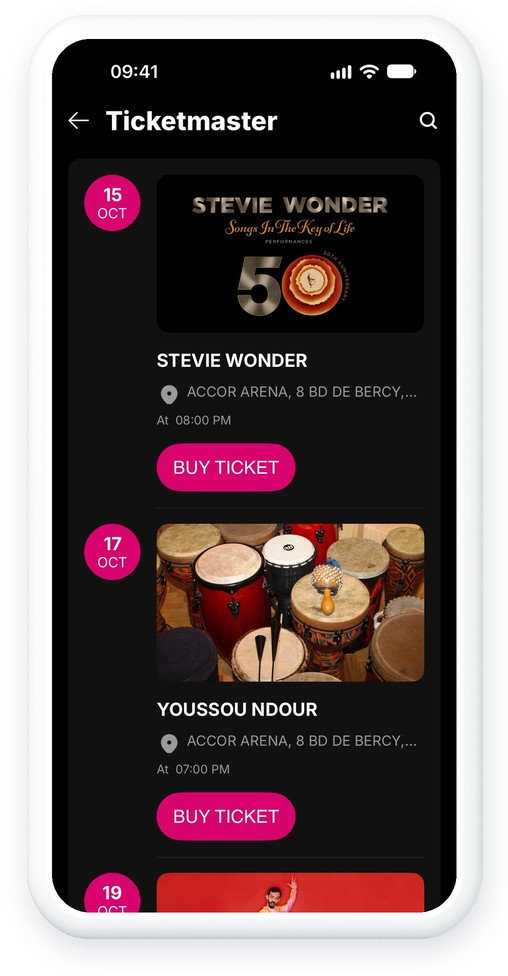
No need to copy your line-up by hand. With the Ticketmaster integration, the upcoming events of your venue are synchronized with your GoodBarber app and sorted by date: each new date published on Ticketmaster joins your calendar, and canceled events are removed from it.
Each event comes with its image, date and time, the venue's address and its description. A button sends your audience to the event page on Ticketmaster, where they buy their tickets.
 Upcoming events, sorted by date
- Images, descriptions and categories
- Local date and time of the venue
- Venue address and location
- Price range, when Ticketmaster publishes it
- Buy button to the event's Ticketmaster page
How to integrate Ticketmaster?
- 1Activate the Ticketmaster extension in your app
- 2Create an account on the Ticketmaster developer portal
- 3In My Apps, copy the Consumer Key of your application
- 4In the Ticketmaster API Explorer, paste your key, choose Venue Search, search for your venue's name and copy its id
- 5Enter the key in the API Key field and the venue's id in the Venue ID field of your GoodBarber back office
And that's it!
For a detailed step-by-step guide, please refer to our online help
Ticketmaster is available in your app!
Once the integration is complete, a new Ticketmaster section will appear in the menu of your app. Like all other sections, you can customize it as you wish.
All you have to do is put your events on sale on Ticketmaster: they will be available directly in your app.


