 eCommerce
 Memberships
 Chatbot
 Online Courses
 Bookings
 Travel guide
 Events
 Content Creators
 Pickup & Delivery
 Newspaper
 Radio
Radio Schools
 Faith
Faith Organizations
 Restaurant
 Grocery
 Custom apps
 Employee Communication

 NO CODE APP BUILDER
 TECHNOLOGY
 WHY GOODBARBER?
 Design
 PRODUCT RESOURCES
 TOPICS
 MOBILE APPS RESELLERS
 DISCOVER
AI Extension Builder: custom article templates for your app
Name any content section of your app in your prompt, and the AI Extension Builder builds a section that displays that content — in the exact layout you described. Your articles, your template, always up to date.

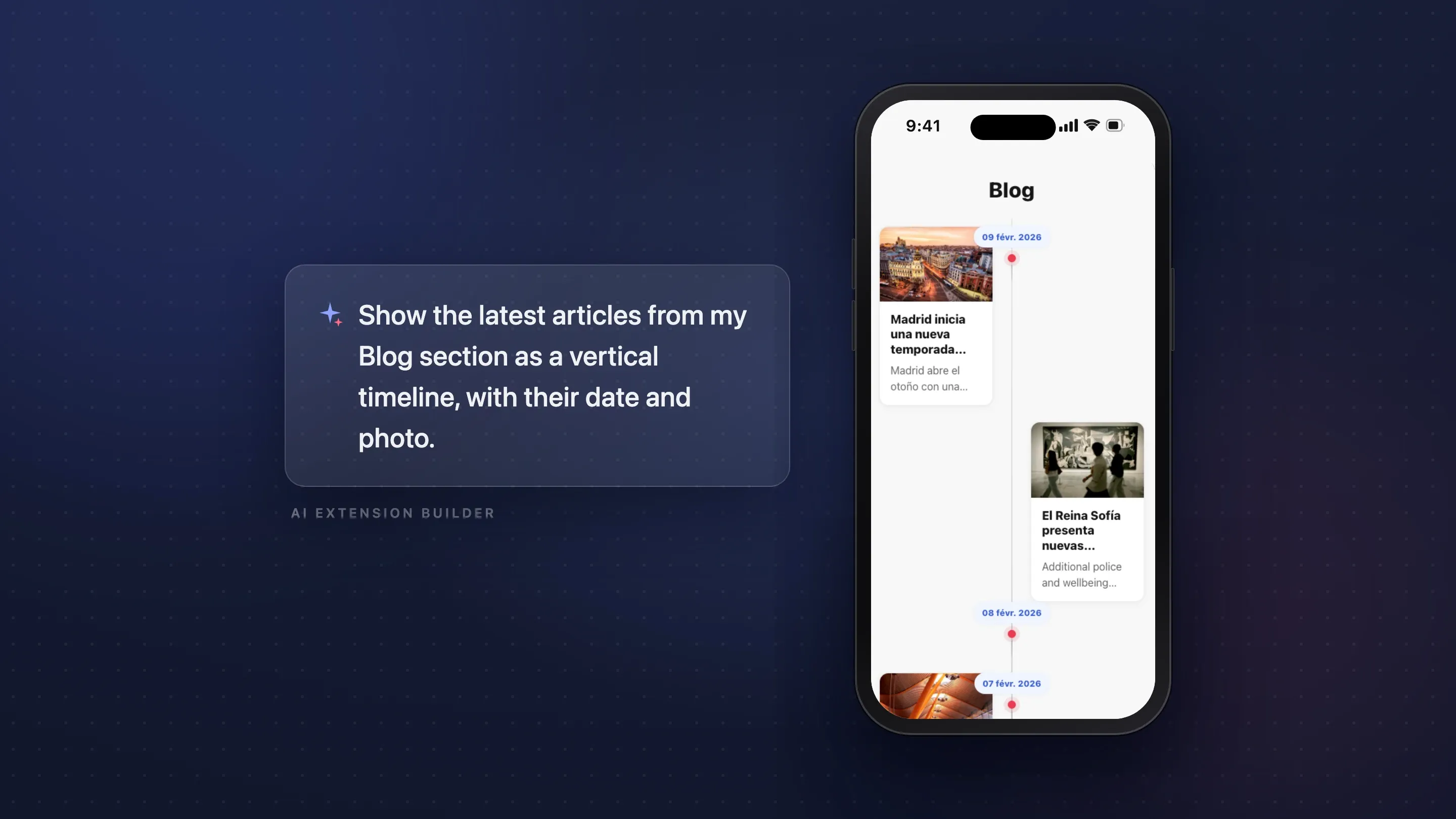
Your content, someone else's template — until now
Every content section in a GoodBarber app comes with a set of carefully designed templates. You pick one, and it works — that's the point of an integrated platform. But the layout you have in mind isn't always in the list. Maybe you picture your latest articles magazine-style: one big cover photo with the title overlaid, smaller cards underneath. Or your events as a compact agenda with just the date and the venue. Until now, you picked the template that came closest.
What many AI Extension Builder users haven't discovered is that this limit is gone. The builder doesn't just create standalone widgets — it can read the content of your app's existing sections. Which turns it into something more interesting than a widget generator: a tool for designing your own display templates.
Describe the template, name the section
In the AI Extension Builder, you can mention any content section of your app by name in your prompt, and the section it generates displays that section's real content. There is no syntax to learn, no code to write, and no configuration screen. You write what you want, and you call your section by its name. Here is a prompt we ran, word for word, in July 2026 while preparing this article:
"Show the 3 latest articles from my Sport section, magazine-style: the first as a large card with a full-width photo and the title overlaid, the next two as side-by-side thumbnails below."
The builder recognized "Sport" as a section of the app, connected the new section to its content, and designed the layout as described — a full-bleed cover photo, the title in bold over the image, the author and publication date in a badge, a category chip. The article displayed was the real, most recent article of that section, pulled live from the app. Not sample data: the actual content.
The result renders in the live preview, and it stays a conversation. Too tight? Wrong proportions? Want a "Read more" button? Say so, and the builder refines the template — the connection to your content carries over.
It shows your real content — and stays up to date
This is the part that changes how you think about it. The generated section doesn't copy your articles at creation time; it reads the section's content when it's displayed. Publish a new article tomorrow, and your custom template shows it — nothing to regenerate, nothing to sync. You designed the display once; the content keeps flowing through it.
Not just articles
As of July 2026, the builder can read six types of content sections: articles, videos, podcasts, photos, places, and events. A prompt for each, all taken from our test runs:
- Videos — "Show the 5 latest videos from WMaker TV in a grid."
- Podcasts — "List the latest episodes from the Podcasts section with an audio player."
- Events — "Show the upcoming events from the Events section with their venue and date."
- Photos — "Display the photos from the Photo gallery section as a square mosaic."
- Places — "List the places from the Places section with their address and coordinates."
Each type brings its own fields — a video URL, an audio player, a date and a venue, map coordinates — and the builder knows which ones make sense for the layout you're asking for.
Compose your own front page
Since a single generated section can read from several sections at once, you can go one step further and design a layout that no built-in template offers — a front page of your own:
"Build a section with the latest article from Politics & Society at the top, and the latest video from WMaker TV below."
One section, two content sources, one layout you decided. For a publisher, that's an editorial homepage assembled by prompt; for anyone else, it's a way to give the most important content of the app a stage that fits it.
The details that make it work
Section names are matched the way a person would match them. Case, accents, and the connectors "&", "+", "and" are interchangeable — asking for "bars and pubs" finds your "Bars & Pubs" section. You write naturally; the builder figures out which section you mean.
An empty section doesn't break anything. If the section exists but has no content yet, the generated template displays sample content with a visible note inviting you to fill the section. As soon as you publish, the real content takes over.
The design fits your app. The builder designs the template within your app's look — its colors and its visual hierarchy — so a custom layout doesn't feel like a foreign object in your navigation.
Further reading
- AI Extension Builder: build sections with AI — how the builder works, if you're starting from scratch.
- The AI Extension Builder now handles file uploads — bring your own files into a generated section.
- AI Extension Builder: add a Supabase database to your app — give a section a real data layer.
- Everything you asked at our Reddit AMA — the questions builders actually ask.
FAQ
Can the AI Extension Builder display my app's existing content?
Yes. Mention any content section of your app by name in your generation prompt — "the 3 latest articles from my Blog section" — and the AI Extension Builder connects the generated section to that content. It reads the section live at display time and presents it in the custom layout you described.
Do I need to learn a special syntax to reference my sections?
No. You name the section in plain language, inside your normal prompt: "the 3 latest articles from my Blog section." Case, accents, and connectors like "&" versus "and" don't matter — the builder matches the name the way a person would.
Which types of content can a generated section display?
Articles, videos, podcasts, photos, places, and events. Each type exposes its natural fields — an audio player for podcasts, a date and venue for events, coordinates for places — and the builder uses the ones your layout calls for.
Does the section update when I publish new content?
Yes, automatically. The generated section reads your section's content at display time, so a new article, video, or event shows up in your custom template without touching the builder again.
What happens if the section I mention is empty?
The template displays sample content with a clear note that the section is waiting for its first items. Publish something, and the real content replaces the sample.
Can one generated section display content from several sections?
Yes. You can combine sources in a single layout — the latest article from one section at the top, the latest video from another below — and each source stays live and up to date.
Can I change the template after it's generated?
Yes. Refining is part of the same conversation: ask for a different grid, another card style, an extra button. The connection to your content carries over from version to version.
Try it on a section you already have
Open the AI Extension Builder in your GoodBarber back office and pick the section you publish to most — your blog, your videos, your events. Describe the template you always wished it had: the big cover photo, the compact agenda, the mosaic. Name the section in the prompt, and watch your own content arrive in it, laid out your way. Then keep the conversation going until it's exactly right — that's what the builder is for.


