 eCommerce
 Memberships
 Chatbot
 Online Courses
 Bookings
 Travel guide
 Events
 Content Creators
 Pickup & Delivery
 Newspaper
 Radio
Radio Schools
 Faith
Faith Organizations
 Restaurant
 Grocery
 Custom apps
 Employee Communication

 NO CODE APP BUILDER
 TECHNOLOGY
 WHY GOODBARBER?
 Design
 PRODUCT RESOURCES
 TOPICS
 MOBILE APPS RESELLERS
 DISCOVER

Palette generator
 Built by GoodBarber
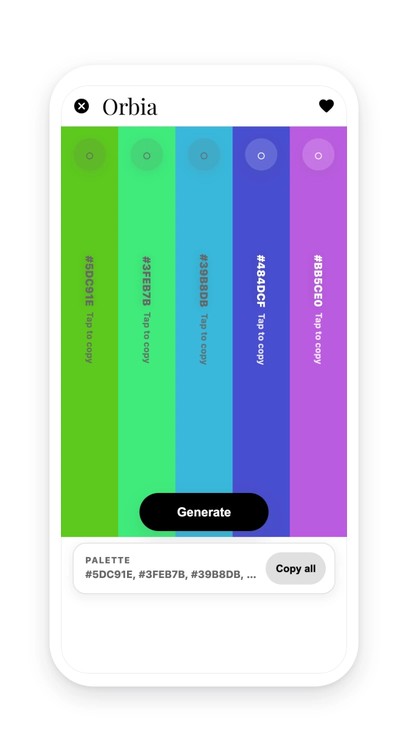
A fresh palette on every tap
Five full-height columns fill the screen, each carrying its hex code. The “Generate” button draws a new set, and so does the space bar. The five colors aren't each drawn in their own corner: the section starts from one hue and moves about 47 degrees around the color wheel at each column, keeping saturation and lightness within a narrow range. That is what makes a palette hold together instead of clashing.
Each column carries a padlock. A locked color survives the next generation: you keep the two that work, you draw the rest again. And if all five are locked, the button doesn't stay silent: it shows “All colors are locked” and makes the five padlocks pulse.
A tap on a column copies its code, a bar at the bottom copies all five at once. The palette and the locks stay on the device: when the section is opened again, the same five colors are there. An interior design app, a design school, a community of creators: wherever colors get picked, this is a tool that gets opened often and no longer has to be looked for somewhere else.
 Nothing to supply, not even a starting color
- A copy that fails says so and offers selection instead
- No more hex codes retyped by hand from a palette site
Your section lives in your app
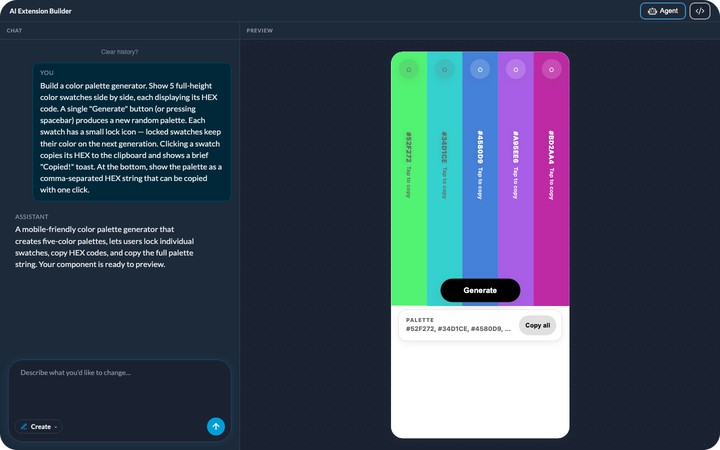
You describe it, the agent builds it, and it shows up in your app's menu. It picks up your app's colors with nothing to set, like any other section. You can rename it, move it in the menu, change its design.
And it keeps evolving with you: ask for a change in plain language, or edit the generated code directly.


