 eCommerce
 Memberships
 Chatbot
 Online Courses
 Bookings
 Travel guide
 Events
 Content Creators
 Pickup & Delivery
 Newspaper
 Radio
Radio Schools
 Faith
Faith Organizations
 Restaurant
 Grocery
 Custom apps
 Employee Communication

 NO CODE APP BUILDER
 TECHNOLOGY
 WHY GOODBARBER?
 Design
 PRODUCT RESOURCES
 TOPICS
 MOBILE APPS RESELLERS
 DISCOVER

Mood tracker
 Built by GoodBarber
Your users open your app to say how they are doing
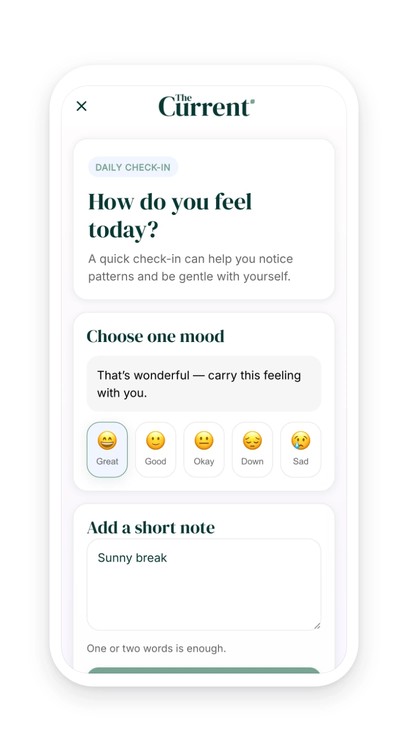
The section asks a question, “How do you feel today?”, and offers five moods: “Great”, “Good”, “Okay”, “Down”, “Sad”. A tap on one of them immediately shows a line written for it. “Great” gets “That's wonderful — carry this feeling with you.”, “Down” gets “That sounds heavy — rest if you can, and move slowly today.” Below, a free field collects the context, a word or two is enough, and a button saves the day's entry.
Under the form, the last seven days line up as dots, the most recent on the right, each in the color of the mood it carries: green for a good day, lilac for a hard one, gray-blue for a neutral one. One entry per day, today's replaces the previous one. The week reads at a glance, with no chart to decipher.
A magazine running a wellness column, a school supporting a class, a gym, a follow-up program: as soon as your app comes back into your users' day, a daily appointment gives them one more reason to open it. And this time, the content is theirs.
 Five moods, their messages and their colors provided
- The day's entry stays on their device
- No custom development, no third-party form
Your section lives in your app
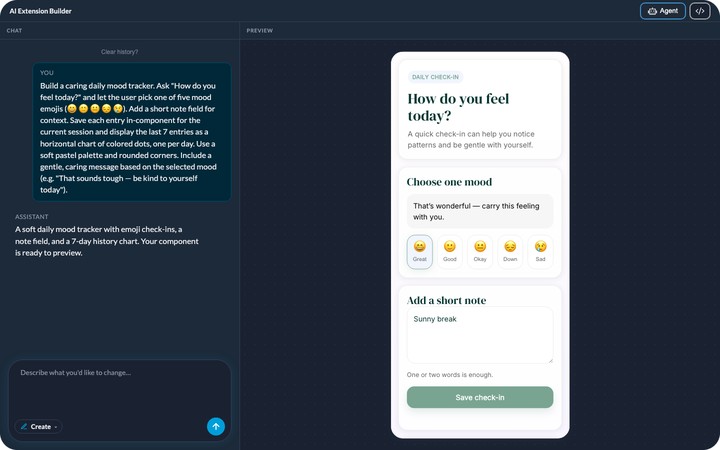
You describe it, the agent builds it, and it shows up in your app's menu. It picks up your app's colors with nothing to set, like any other section. You can rename it, move it in the menu, change its design.
And it keeps evolving with you: ask for a change in plain language, or edit the generated code directly.


