 eCommerce
 Memberships
 Chatbot
 Online Courses
 Bookings
 Travel guide
 Events
 Content Creators
 Pickup & Delivery
 Newspaper
 Radio
Radio Schools
 Faith
Faith Organizations
 Restaurant
 Grocery
 Custom apps
 Employee Communication

 NO CODE APP BUILDER
 TECHNOLOGY
 WHY GOODBARBER?
 Design
 PRODUCT RESOURCES
 TOPICS
 MOBILE APPS RESELLERS
 DISCOVER

To-do list
 Built by GoodBarber
Your users see where they stand
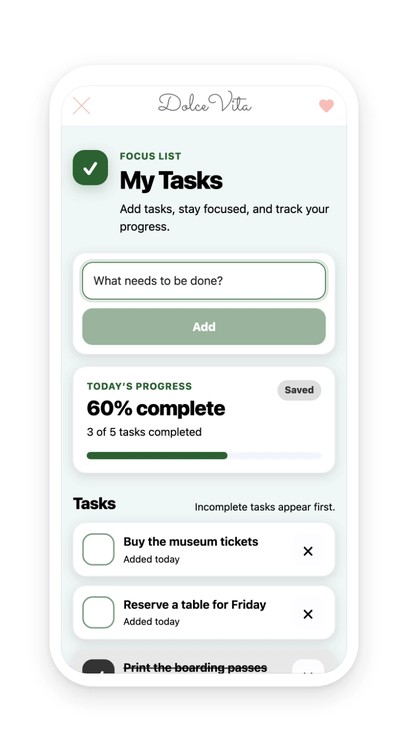
One field, one button, and the task joins the list. A tap on the box checks it: the text is struck through and the row turns gray. A tap on the cross removes it. The tasks still to do move up to the top by themselves, the done ones move down, so the top of the list is always what is waiting. Above it, a progress card counts the tasks done, shows the percentage and displays it with a bar that fills up.
The list is kept on the device, and the section says so: a “Saved” note appears next to the progress. Your user closes the app, opens it again the next day, and finds their tasks and their progress where they left them. Nothing goes off to a server, nothing asks them to create an account.
A school supporting a new term, an event getting its exhibitors ready, a department working through a file in several pieces: as soon as your app follows a process in several steps, your users are already keeping a list somewhere. It may as well be in the place they come to for everything else.
 No content to produce, the section arrives ready and it is the user who fills it in
- Their tasks stay on their device, with no account to create and no server to query
- One notes app fewer to open next to yours
Your section lives in your app
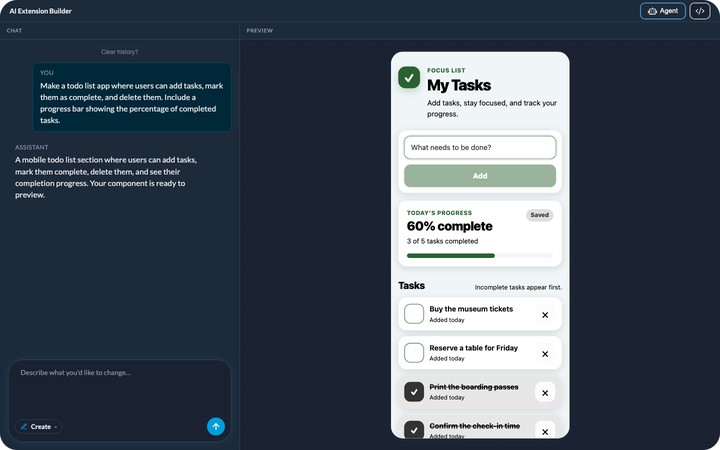
You describe it, the agent builds it, and it shows up in your app's menu. It picks up your app's colors with nothing to set, like any other section. You can rename it, move it in the menu, change its design.
And it keeps evolving with you: ask for a change in plain language, or edit the generated code directly.


